
The Problem With "Low Open Rates"
When a cold email campaign is underperforming, low open rates are usually the first thing people notice. The temptation is to immediately start iterating on subject lines — A/B testing new hooks, trying different lengths, switching from questions to statements.
Sometimes that's the right fix. Often it isn't.
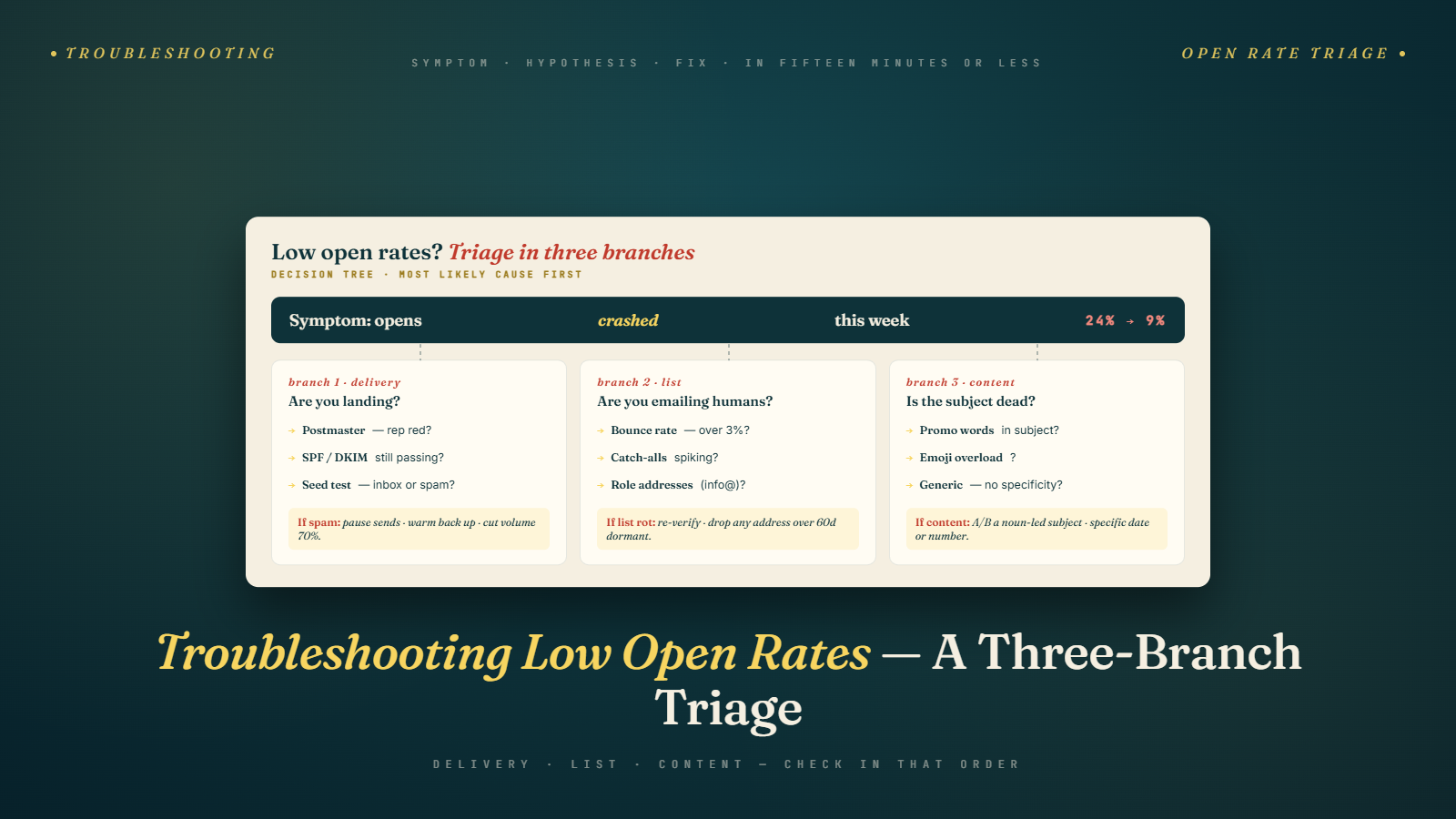
Low open rates are a symptom, not a diagnosis. Three completely different problems can all produce low open rates:
- A deliverability problem — emails are going to spam or not reaching the inbox
- A targeting problem — emails are reaching people who don't recognize the sender or aren't interested enough to open
- A subject line problem — emails are reaching the right inbox but the subject line isn't compelling enough to earn the open
Each of these requires a completely different intervention. Iterating on subject lines when the real problem is spam filter placement will have no effect. Investigating deliverability when the real problem is that you're targeting the wrong people wastes time.
This article gives you a systematic diagnostic framework for identifying which problem you actually have — and then the right fix for each one.
This is the final article of Phase 4, and it draws on everything covered across the phase: the deliverability fundamentals, domain and authentication setup, spam filter avoidance, and the infrastructure and account management that underpins it all.
The Diagnostic Framework: Three Questions First
Before you investigate anything specific, answer these three questions. They'll immediately narrow the problem space.
Question 1: Did this campaign ever perform better?
If yes — open rates have declined from a previous baseline — this is most likely a deliverability problem. Something changed in your sending infrastructure or reputation that's now filtering your emails differently. Targeting and subject lines don't suddenly get worse; deliverability can.
If no — this is the first campaign or this campaign has never performed well — the problem could be any of the three root causes. Run through the full diagnostic below.
Question 2: Do your test emails land in the primary inbox?
Send your campaign email (exactly as it would go to prospects — same platform, same account, same content) to Gmail and Outlook addresses you control. Check where they land.
If spam: Deliverability problem. The issue is at the infrastructure or content layer. If Promotions tab (Gmail): Near-deliverability problem. Your email is getting through but routing to a lower-visibility inbox area. If primary inbox: Deliverability is probably fine. The problem is targeting or subject line.
This single test eliminates or confirms deliverability as the root cause in under 5 minutes.
Question 3: What are your bounce rate and complaint rate?
Pull these metrics from your sending platform for the past 2–4 weeks.
Bounce rate above 2%: List quality problem contributing to reputation damage — which causes spam filtering. Complaint rate above 0.08–0.1%: Targeting or content generating spam reports — which directly damages reputation and inbox placement. Both within normal range: Deliverability may still be the issue, but not from these specific causes. Use inbox placement testing to confirm.
Diagnosis Path 1: It's a Deliverability Problem
You've confirmed emails are landing in spam or Promotions, or metrics suggest reputation damage. Here's the investigative checklist:
Check Authentication Records
Go to MXToolbox and check SPF, DKIM, and DMARC for your sending domain.
- SPF fail or neutral: Your SPF record is missing or doesn't include your current sending server. Update it.
- DKIM fail: The DKIM record is misconfigured, or DKIM isn't enabled in your email hosting admin panel. Verify and re-enable.
- DMARC fail or missing: Add or correct the DMARC record. At minimum
p=nonewith a monitoring email address.
Authentication failures are a hard filter trigger. Fix these before anything else.
Check Domain and IP Blacklist Status
Run your sending domain through MXToolbox's blacklist checker and check Spamhaus (spamhaus.org/lookup/) directly.
If blacklisted: This is serious but recoverable. Each blacklist has a removal request process. For Spamhaus, the removal form requires you to identify and fix the root cause of the listing before submitting. Typical root causes: past spam behavior, high bounce rates, or a compromised account.
Submit the removal request, fix the root cause, and allow 48–72 hours for delisting to propagate. While a primary blacklist removal is pending, pause campaigns from that domain.
If not blacklisted: The deliverability problem is subtler — reputation-based filtering rather than hard blacklisting.
Check Google Postmaster Tools
If you're sending a meaningful volume to Gmail addresses, set up Google Postmaster Tools (postmaster.google.com) for your sending domains. It provides:
- Domain reputation score: Green/Yellow/Orange/Red. Orange or Red means active reputation problems.
- Spam rate: The percentage of emails your domain sends that Gmail users are marking as spam
- Delivery errors: Technical delivery failures
A red domain reputation score or a spam rate above 0.1% in Postmaster Tools confirms a reputation-based filtering problem. The fix is: stop sending until you identify why the reputation is damaged, clean up the root cause (typically list quality or complaint-generating targeting), then restart at much lower volume with clean sending behavior.
Check Warm-Up Status
Is warm-up still running on the affected inbox(es)? Has it been configured correctly?
Run an inbox placement test through your warm-up tool. If inbox placement has dropped below 80–85%, the domain's reputation is eroding. Check:
- Was volume scaled too fast recently?
- Did a recent campaign generate elevated bounces or complaints?
- Has the domain been sending consistently or were there gaps that broke the pattern?
Check Sending Volume vs. Limits
Are you within the per-inbox daily limits covered in Sending Limits & Scaling Safely? Running at 90+ emails/day per inbox on a domain that's less than 3 months old is a high-risk pattern.
If you've been pushing limits, reduce volume immediately. Give the domain 1–2 weeks of conservative, clean sending before reassessing inbox placement.
Diagnosis Path 2: It's a Targeting Problem
Your test emails land in the primary inbox. Authentication is clean. Bounce and complaint rates are normal. But open rates are still low.
Now look at who you're sending to.
Are You Reaching the Right People?
Pull a sample of 20–30 prospects from the campaign and audit them manually:
- Do they genuinely match your ICP?
- Are their titles accurate to the buyer persona you're targeting?
- Are they still at the same company?
- Would this email be genuinely relevant to them?
If you're finding that a significant portion of your list is off-target — wrong seniority, wrong industry, job changes, or marginal ICP fits — the targeting is the problem. No subject line improvement will fix an email going to the wrong person.
The fix: tighten your ICP definition and rebuild the list with stricter filters. Re-verify the list with BulkMailVerifier to confirm email accuracy.
Is the From Name Recognizable?
If your from name is generic (Sales Team@company.com) or associated with a domain the recipient has never heard of, recognition can be a barrier to opening.
Sending from a real person's name (Mike Reynolds) consistently outperforms role-based or company-name from addresses for cold email. If you're using anything other than a first name / full name format, test the change.
Is the Market Saturated for Your Message?
In highly saturated categories — where every prospect is getting 20 cold emails a week from similar vendors — open rates are lower simply because the inbox is crowded. This isn't a fixable problem per se, but it changes the bar for subject line quality. In a saturated market, your subject line needs to be notably more specific and relevant than average.
Diagnosis Path 3: It's a Subject Line Problem
Deliverability is clean. Targeting is right. Open rates are still low — meaning emails are reaching the right inbox, in front of the right person, and they're still not opening.
Now it's a subject line and preview text problem.
Run a Subject Line Audit
Review the last 5–10 subject lines you've used. Ask honestly:
- Could this subject line have gone to anyone in your industry, or is it specific to this prospect?
- Does it look like a personal email or a marketing campaign?
- Is it over 8 words? (Mobile truncation risk)
- Does it contain any of the patterns that signal mass email — all caps, exclamation points, promotional phrasing?
- How does it compare to the subject lines that get you to open cold emails from strangers?
For detailed frameworks on what works, go back to How to Write Subject Lines That Get Opened. The six frameworks there — personalized reference, direct question, competitor name drop, etc. — give you structured approaches to test.
A/B Test Systematically
Test one variable at a time. Don't change the subject line and the from name and the preview text simultaneously — you won't know what drove the change.
A/B test structure:
- Split your next campaign list 50/50 randomly
- Send Group A with Subject Line 1, Group B with Subject Line 2
- Keep everything else identical (from name, preview text, email body, CTA)
- After 3–5 business days, compare open rates
- The winner becomes your new control; iterate from there
Run at least 100 recipients per variant before drawing conclusions. Smaller samples produce noisy results.
Check Your Preview Text
The subject line and preview text work together. If your subject line is strong but your preview text defaults to "Hi {first_name}, I wanted to reach out because..." you're wasting half of the inbox real estate.
Set your preview text explicitly in your sending platform, or ensure your email's first line is strong enough to serve as the preview. See the full treatment of subject line + preview text interaction in the subject lines guide.
Diagnosing Segment-Level vs. Campaign-Level Problems
One nuance that gets overlooked in low open rate troubleshooting: the problem might not be campaign-wide. It might be isolated to a specific segment, a specific inbox, or a specific batch of prospects.
Before you conclude a whole campaign is broken, segment your data:
By sending inbox/domain: If you're running across 5 inboxes, pull open rates per inbox. Is one inbox dramatically underperforming? That may indicate an inbox-level deliverability problem while the others are fine.
By prospect source: If you built your list from multiple data sources, segment by source. Are contacts from Apollo performing differently than contacts from ZoomInfo? A data quality problem in one source can drag down overall metrics while another source performs well.
By company size or segment: Are certain ICP sub-segments opening at lower rates? Maybe your targeting is right for one company size tier but wrong for another.
By send date: Did performance change at a specific point in time? A sudden drop on a specific date points to an event — a domain issue, a list quality batch, a platform change — not a systemic problem with the campaign's design.
These breakdowns often reveal that the "campaign isn't working" is actually "one inbox is having a deliverability issue" or "the list batch we added on Tuesday has data quality problems." That specificity changes the remediation from "rebuild the whole campaign" to "investigate inbox 3 and re-verify the Tuesday batch."
The Reply Rate Diagnostic (When Opens Are Fine But Replies Aren't)
Low reply rates despite decent open rates are a different problem entirely — and one that's frequently confused with a deliverability issue.
If your open rates are 25–35% but reply rates are under 1%, the emails are reaching the inbox and getting opened. The problem is that what's inside the email isn't compelling enough to generate a reply.
This is a copywriting and targeting problem, not a deliverability problem.
The reply rate diagnostic checklist:
- Is the opening line specific and personalized? Generic openers that don't reference anything specific to the recipient kill reply rates even when opens are decent. See Writing the Perfect Opening Line.
- Is the value proposition clear and outcome-focused? Feature lists don't generate replies. Specific, relevant outcomes do. See Crafting Value Propositions That Resonate.
- Is the CTA low-friction? Asking for a 45-minute demo in email 1 dramatically reduces reply rates compared to a soft yes/no question. See CTA Strategies That Increase Replies.
- Is the email too long? Walls of text have lower reply rates than tight, punchy emails. See Short vs. Long Cold Emails.
- Is the list well-segmented? Generic messaging to a mixed list produces lower reply rates than segment-specific copy to a tightly defined audience. See Segmenting Your Email List.
Address these in order. The Phase 3 copywriting series is your reference for all of these improvements.
The Compound Case: Multiple Problems Simultaneously
In practice, underperforming campaigns often have problems at multiple layers simultaneously. Deliverability is slightly off, targeting is a bit loose, and the subject lines are generic. None of these individually would be catastrophic, but together they compound into a campaign that generates 3% open rates when it should be generating 25%.
When this is the case, the order of operations matters:
- Fix deliverability first. Nothing else matters if emails aren't reaching the inbox.
- Fix list quality and targeting second. Sending clean emails to the wrong people is wasted effort and generates complaint risk.
- Fix subject lines and copy last. Optimization belongs after the foundation is solid.
Trying to fix a deliverability problem with better copy is like trying to paint a house whose structure is collapsing. Fix the foundation first.
When to Pause a Campaign vs. Keep Testing
Pause immediately when:
- Test emails land in spam on Gmail or Outlook
- Bounce rate exceeds 3% in a single week
- Spam complaint rate exceeds 0.1%
- Authentication checks show failures
- Your domain appears on a major blacklist
Keep testing (but thoughtfully) when:
- Open rates are low but deliverability checks out
- Reply rates are low but open rates are reasonable (this is a copy/CTA problem, not deliverability)
- Results are inconsistent week over week without a clear pattern
Consider retiring the campaign when:
- You've run 3+ subject line variations with no improvement despite clean deliverability and good targeting
- The ICP has fundamentally shifted and the list is no longer the right audience
- The offer has changed enough that the campaign's premise is no longer accurate
The Post-Diagnosis Checklist
After you've identified the root cause and implemented a fix, use this checklist before re-launching:
- Authentication confirmed working (MXToolbox — SPF, DKIM, DMARC all green)
- Domain not on any major blacklists
- Test emails land in primary inbox on Gmail and Outlook
- List re-verified with BulkMailVerifier if list was rebuilt or updated
- Bounce rate from previous campaign under 1.5%
- Send volume reset to conservative limits if reputation was damaged
- Subject lines updated with specific, tested variants
- Warm-up confirmed running on all sending inboxes
When all items are confirmed, re-launch at a conservative volume and monitor closely for the first week. Don't assume the fix worked until you see the metrics improve.
Phase 4 Complete
You now have the full technical infrastructure framework:
- What Is Email Deliverability — the foundational mental model
- Setting Up Domains — domain structure and configuration
- Email Warm-Up — building reputation before you send
- SPF, DKIM, DMARC — authentication that makes your email legitimate
- Avoiding Spam Filters in 2026 — how modern filters work and what to do about them
- Sending Limits & Scaling Safely — growing volume without destroying reputation
- Managing Multiple Accounts — the operational layer at scale
This infrastructure, built correctly, is the engine that makes everything from Phase 2 and Phase 3 actually work. Good copy sent from a broken infrastructure gets nothing. Average copy sent from a clean, well-managed infrastructure will outperform it every time.
Phase 4 complete. Coming up in Phase 5: Sequences, Automation & Follow-Up — how to structure multi-touch campaigns, write follow-up emails that don't feel annoying, and use automation without losing the human element.