
What Separates a Cold Email That Gets Replies from One That Gets Deleted
Most cold emails get deleted in under 3 seconds. The recipient opens it, reads half a sentence, and it's gone. Not because the sender did something egregiously wrong — but because the email gave them no reason to keep reading.
On the other end of the spectrum, some cold emails get printed out. They get forwarded to colleagues with notes like "this is exactly what we were talking about." They generate replies that turn into calls that turn into six-figure deals. The difference isn't luck. It isn't charisma. It's structure.
High-converting cold emails share a consistent underlying anatomy. Every component has a job to do. When each component does its job, the email works. When one breaks down, the whole thing breaks down — even if everything else is perfect.
This article is the pillar for Phase 3 of this cold email series. We're going to break down every component of a cold email from top to bottom, explain the role each one plays, and point you toward the deeper dives elsewhere in this series. Think of this as the blueprint — everything else is the detailed instruction manual for each part.
If you haven't gone through Phase 2 yet, start there. You need a well-defined ICP, a verified prospect list, and segmented, researched contacts before you write a single word. The best-written email in the world sent to the wrong person achieves nothing.
The Seven Components of a Cold Email
A cold email isn't just text. It's a series of individual decisions, each of which affects whether the email gets opened, read, and acted on. Here are the seven components:
- The From Name and Email Address
- The Subject Line
- The Preview Text
- The Opening Line
- The Body (Value Proposition)
- The Call to Action
- The Signature
Let's go through each one.
Component 1: The From Name and Email Address
This is what the recipient sees before they open the email. Before the subject line, before anything. It's the first filter: do I know this person? Is this spam?
From name options:
- First name only: "Mike" — casual and personal, works in some contexts
- Full name: "Mike Reynolds" — the standard for professional cold outreach
- Name + company: "Mike from Acme" — slightly more context, can feel warmer or slightly promotional depending on the recipient
- Company name only: "Acme Sales" — almost always feels like a mass email. Avoid for cold outreach.
First name or full name is almost always the right call for cold email. You want to look like a real person reaching out, not a brand newsletter.
The sending email address matters more than most people think. Several things to get right:
- Use a real first name address (mike@company.com or mike.reynolds@company.com), not a role-based address like outreach@, info@, or sales@
- Use a legitimate company domain — not Gmail or Yahoo. A custom domain signals legitimacy.
- If you're sending at volume to protect your primary domain's reputation, use a subdomain or secondary domain (e.g., mike@mail.company.com or mike@getcompany.com) that you've properly warmed up
The health of your sending domain is foundational. All the copywriting in the world can't fix emails that land in spam because your domain has a poor reputation. Make sure your list is verified (we covered this in How to Verify Emails and Reduce Bounce Rate) and that you've properly warmed up your sending account.
Component 2: The Subject Line
The subject line's only job is to get the email opened. That's it. It doesn't need to explain your product. It doesn't need to make the pitch. It needs to generate enough curiosity, relevance, or intrigue that the recipient clicks.
Open rates are primarily a function of your subject line (and the from name / sender reputation). Everything downstream depends on getting this one right first.
What works:
- Specificity: "Question about your LinkedIn post" beats "Quick question" by a mile. The more specific, the more it looks like a personal email rather than a blast.
- Relevance to their world: Subject lines that reference their industry, company, or a specific situation they're likely in perform better than generic lines.
- Short and direct: Many of the best cold email subject lines are 3–6 words. "Time to revisit [Category]?" or "Intro from [Mutual Contact]" or "[Company] + [Your Company]?"
- Curiosity without clickbait: You want to pique interest, not trick people. Subject lines that overpromise and underdeliver in the email body kill trust.
What doesn't work:
- Subject lines that look like marketing: "EXCLUSIVE OFFER — 50% off this week only!!!"
- Over-personalized to the point of creepiness: "I looked at your LinkedIn and your Q3 results and your Twitter..."
- Vague to the point of uselessness: "Touching base" or "Following up" (before you've sent anything)
- All caps, excessive exclamation points, emojis used manipulatively
We go deep on this in How to Write Subject Lines That Get Opened, including subject line frameworks, A/B testing approaches, and the subject line + preview text combination.
Component 3: The Preview Text
The preview text (also called the preheader) is the snippet of text that appears next to or below the subject line in most email clients. Most people treat it as an afterthought. It shouldn't be.
In the inbox view, a recipient sees: From name — Subject line — Preview text. These three things together form the "envelope" that determines open rates. If your subject line is compelling but your preview text starts with "View this email in your browser" or "This message was sent to you because..." you've just wasted a valuable opportunity.
The preview text should:
- Complement the subject line (not repeat it)
- Add one more hook or piece of relevance
- Make the reader feel like opening the email will be worth their time
In many cold email sending platforms, you can explicitly set the preview text. If your platform doesn't support this, the preview text defaults to the first few words of your email body — which is another reason why your opening line matters so much.
Component 4: The Opening Line
This is the most important line in the body of your email. If you lose the reader here, they're gone. The opening line needs to do one thing: give the recipient a reason to keep reading.
There are two categories of opening lines:
Personalized openers reference something specific about the recipient — a post they wrote, news about their company, a trigger event, a mutual connection. These are the highest-performing openers when done well because they signal immediately that this isn't a template blast.
Insight-led openers lead with a sharp observation about the recipient's industry, situation, or likely challenge — something they'll nod at and recognize. These scale better than fully personalized openers and work well for segment-level campaigns.
What doesn't work: starting with yourself. "My name is [X] and I work at [Y] and we help companies like yours with Z..." is the most common cold email opener and one of the worst. The recipient doesn't care who you are yet. They care whether this email is worth their time.
The entire next article in this series is dedicated to opening lines — how to write them, the different types, how to research for them, and real examples that show the difference between a good opener and a bad one.
Component 5: The Body — Your Value Proposition
Once you've got the reader past the opening line, the body of the email needs to deliver the value proposition. This is where you explain: what you do, why it matters to them specifically, and what outcome they can expect.
The common failure here is feature-listing. "We offer [X technology] that [does Y function] and integrates with [Z tool]." This is inside-out thinking — you're describing your product from your own perspective. The reader doesn't care about the product. They care about the outcome.
A strong value proposition in a cold email follows this structure:
Problem → Implication → Solution → Proof
- Problem: The specific pain point your ICP has that your product addresses
- Implication: What happens if that problem isn't solved (the cost of inaction)
- Solution: What you do — framed as an outcome, not a feature
- Proof: A quick data point, case study reference, or social proof element that makes the claim credible
This doesn't need to be four separate paragraphs. In a well-written cold email, this entire arc can be covered in 3–5 sentences. Brevity forces clarity. If you can't explain the value in a few sentences, you probably don't have it sharp enough yet.
We cover this in depth — including how to find the right frame for different buyer types, how to use social proof effectively, and how to avoid the clichés that make cold emails sound like everyone else's — in Crafting Value Propositions That Resonate.
Component 6: The Call to Action
The CTA is the ask. It's what you want the reader to do next. And it's where a huge number of cold emails fail at the very last moment.
The most common CTA mistake: asking for too much. "Would you be available for a 45-minute product demo next week?" is a big ask from someone who's never heard of you, is busy, and has no particular reason to trust you yet. The cognitive and scheduling overhead alone is enough to make most people close the email.
The principle: match the ask to the relationship. You have no relationship with this person yet. Your first CTA should be low-friction — something they can say yes or no to in 10 seconds without opening their calendar.
Low-friction CTAs that work:
- "Would it be worth a 15-minute call to see if there's a fit?"
- "Is this something on your radar for this quarter?"
- "Would you be open to a quick intro?"
- "Does [Day] or [Day] work for a brief conversation?"
- "Can I send you a quick breakdown of how we helped [similar company]?"
CTAs that are too aggressive for a first email:
- "Schedule a 45-minute demo" (links to Calendly)
- "Can I add you to my newsletter?"
- "Would you like to start a free trial?"
There's a whole strategy around CTAs — placement, phrasing, A/B testing what works for your specific segment — which we cover fully in CTA Strategies That Increase Replies.
Component 7: The Signature
The signature gets the least attention but it plays a real role — it's the moment where the recipient gets context about who you are and decides whether to look you up.
A good cold email signature:
- First and last name — so they can search for you
- Title and company — legitimacy signal
- Company website — one click away from learning more
- LinkedIn URL (optional but recommended) — lets them quickly validate you're a real person
- Phone number (optional) — only if you want calls, but it signals accessibility
What to avoid: paragraph-long signatures with three email addresses, multiple phone numbers, legal disclaimers, an inspirational quote, and a logo that triggers image blocking. Keep it clean. The signature should reassure, not overwhelm.
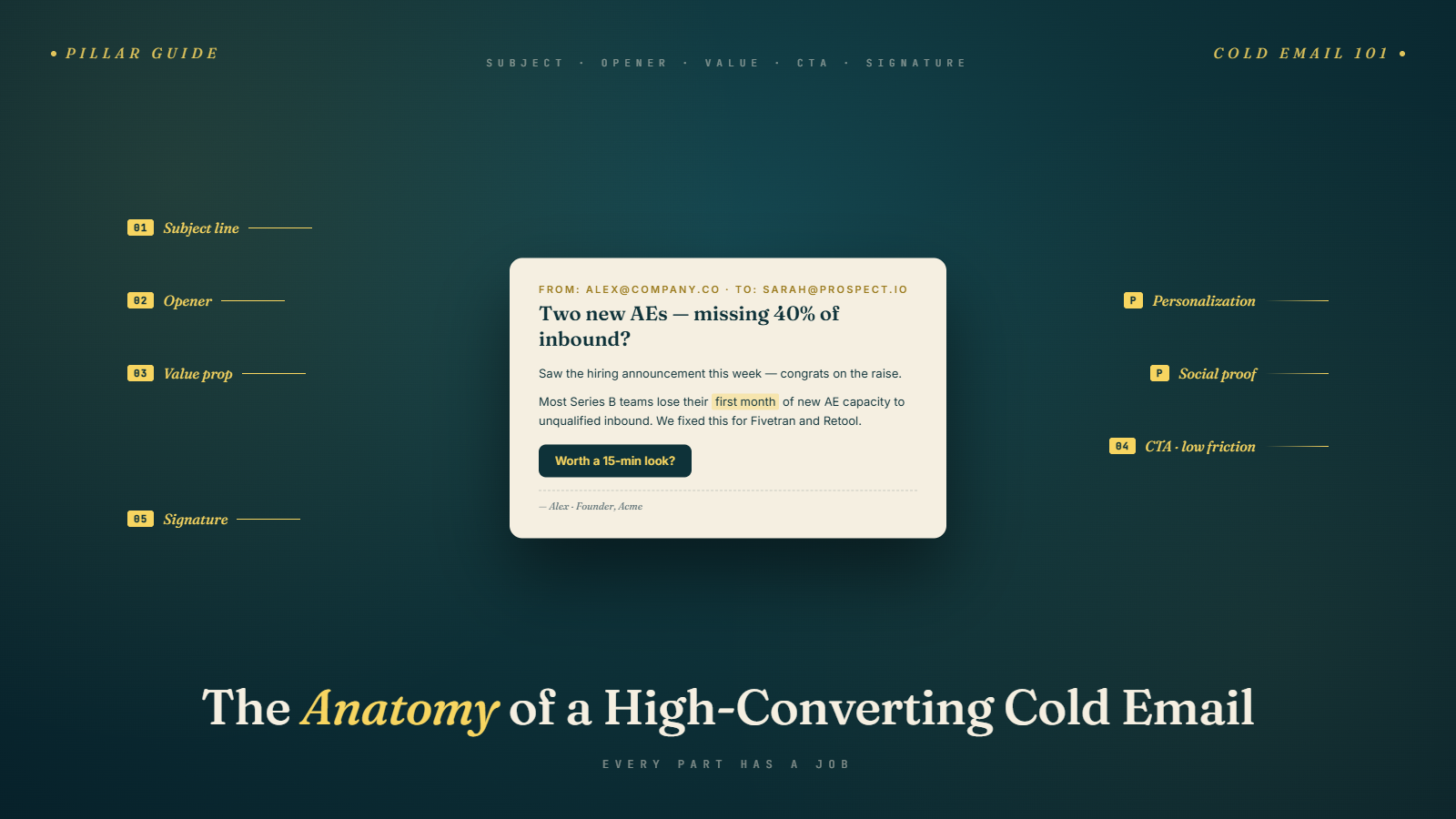
Putting the Anatomy Together: A Full Example
Here's how these components look assembled into a real cold email:
From: James Harper
Subject: Scaling your SDR team at [Company]
Preview: I've been watching your LinkedIn posts on outbound — thought this was worth sharing.
Hey Sarah,
Saw your post last week about the challenges you're seeing with SDR ramp time — you're not alone. Most sales leaders at [Company]'s stage tell me the same thing: new reps take 4–6 months to become fully productive, and half of them churn before they get there.
We work with teams like yours to cut that ramp time in half using a structured onboarding program that's now been validated across 40+ B2B SaaS companies. One of our clients, a Series B company similar to yours, went from 5-month average ramp to 11 weeks within one quarter.
Worth a 15-minute call to see if there's a fit for your team?
Best, James Harper Head of Sales | RampIQ james@rampiq.com | rampiq.com | LinkedIn
Notice what this email does: it personalizes on a real LinkedIn trigger, leads with the prospect's pain (not the product), makes a specific outcome claim with a real data point, and asks for something small. It's under 150 words. Every line earns its place.
The Principles Behind the Anatomy
A few meta-principles that apply across every component:
Every line should earn the next. The subject line's job is to get the email opened. The opening line's job is to get the second line read. The body's job is to get the CTA read. The CTA's job is to get a reply. Think of each component as a handoff, not a standalone.
Remove everything that doesn't add value. Most cold emails are 30–40% longer than they need to be. Filler phrases, throat-clearing, and unnecessary context all dilute the impact. Cut ruthlessly.
Write for scanning, not reading. Your recipient is busy. They scan before they read. Short sentences, clear structure, and white space make the email easier to process quickly. A wall of text — even well-written text — gets skipped.
Test one variable at a time. When you iterate on cold emails, change one thing at a time (subject line, opening line, CTA). Otherwise, you can't know what drove the change in performance.
What Phase 3 Covers
Over the next several articles, we go deep on each of these components:
- How to Write Subject Lines That Get Opened — frameworks, formulas, and A/B testing
- Personalization at Scale — making personalization work when you're not sending one-by-one
- Writing the Perfect Opening Line — the most impactful sentence in the email
- Crafting Value Propositions That Resonate — sharpening the core message
- CTA Strategies That Increase Replies — the science and art of the ask
- Short vs. Long Emails — what actually performs better and when
- Storytelling in Cold Emails — using narrative to create connection
- Avoiding Spam Trigger Words — keeping your email out of the junk folder
- Cold Email Templates for Different Industries — ready-to-adapt templates by vertical
The anatomy is the framework. The rest is the craft. Let's get into it.
Start with the highest-leverage component: How to Write Subject Lines That Get Opened.