
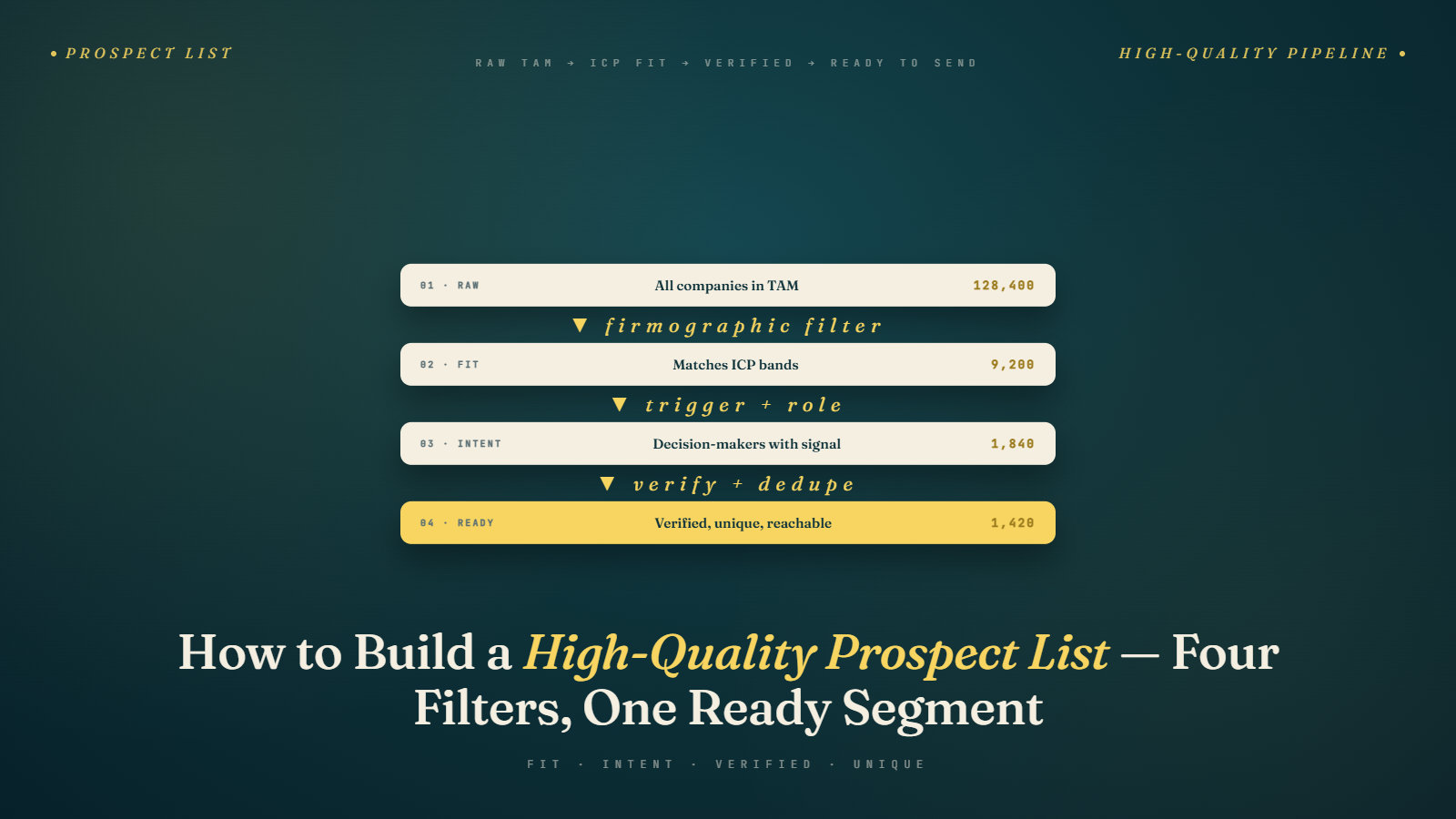
The Myth of "More Leads = More Results"
Here's a misconception that costs sales teams thousands of dollars and months of wasted effort: the idea that a bigger list is a better list.
You'll see it everywhere. Ads for databases promising "10 million verified B2B contacts." Tools that let you export thousands of leads in one click. Sales managers asking their SDRs to hit arbitrary activity quotas — "I need 200 new prospects in the pipeline by Friday."
The math seems to make sense on the surface. More prospects → more replies → more meetings → more deals. But the math only works if every prospect actually belongs on the list. And in practice, most bulk-built prospect lists are full of people who have nothing to do with your ICP.
What actually happens: you blast a massive list, your bounce rate climbs, your domain gets flagged, your reply rate tanks, and your sales team wastes hours on discovery calls with people who were never going to buy. You've burned your sending reputation and your team's time chasing the wrong people.
The reality is that 300 tightly-targeted prospects will almost always outperform 3,000 loosely-matched ones. The goal of list building isn't volume — it's precision.
This blog is a direct continuation of the ICP definition article. If you haven't done that work yet, do it first. Everything in this guide assumes you know exactly who you're looking for.
What Does "High-Quality" Actually Mean?
Before we get into the mechanics, let's agree on what we're actually trying to achieve. A high-quality prospect list has four characteristics:
1. High ICP Match Rate The vast majority of companies on the list fit your Ideal Customer Profile — right industry, right size, right stage, right signals. Not "could technically use our product." Actually should use it.
2. Accurate Contact Data The contacts associated with those companies are real people with correct titles, current email addresses, and active roles. Not outdated job titles, role-shifted contacts, or aliases nobody checks.
3. Appropriate Decision-Maker Level You're reaching the right person — the one who has budget, authority, or strong influence over the buying decision. Not the most junior person in the department because they were the only one you could find an email for.
4. Fresh Data B2B data has a shelf life. People change jobs, companies pivot, and decision-makers turn over constantly. Lists that are more than 6 months old without being refreshed have significant data decay.
If your list checks all four boxes, you're starting from a strong position. Let's talk about how to get there.
Step 1: Start with Your ICP Filters
The first thing you do when building a prospect list isn't opening a database — it's translating your ICP into a set of precise search filters.
Go back to your ICP document (we covered how to build this in detail in the previous article). Pull out every attribute and turn it into a filter:
- Industry: SaaS, e-commerce, logistics, etc.
- Employee count range: 50–500
- Revenue range: $5M–$50M (if available)
- Geography: US, UK, DACH, etc.
- Technology used: HubSpot, Salesforce, Shopify, etc.
- Keywords in job listings: "SDR," "outbound sales," "growth," etc.
- Funding status: Raised Series A or B in the last 12 months
- Keywords in company description: terms that signal a match
The more specific your filters, the smaller your initial pool — and that's fine. You're not building a mass list. You're building a targeted one.
A common mistake here is using only the filters your data tool supports out of the box. Most tools have basic firmographic filters. If you want technographic or trigger-based filtering, you may need to layer multiple tools or do manual enrichment. We'll cover the best tools for this in Best Data Sources for Cold Email Outreach.
Step 2: Build Your Company List First
List building happens in two layers: companies first, contacts second. Most people try to do both at the same time, which leads to sloppiness.
Start by building a list of companies that match your ICP. At this stage, you don't care about who to contact — you just want to confirm that the organization belongs on your list.
Where to find ICP-matching companies:
- LinkedIn: Search by industry, company size, geography, and keywords. Sales Navigator makes this significantly easier and more precise. We have a full guide on LinkedIn prospecting here.
- Apollo.io / ZoomInfo / Lusha: Major B2B databases with firmographic and technographic filtering
- BuiltWith / Wappalyzer: Great if you're targeting companies by tech stack (e.g., "all Shopify Plus stores")
- Crunchbase / Dealroom: Best for funding-stage signals and startup data
- Industry directories and associations: Niche but often high-quality
- Job boards: Companies actively hiring for specific roles are often in growth mode — a strong ICP signal
- Conference attendee lists and speaker directories: People who show up at industry events often match very specific ICP profiles
Build a spreadsheet with company name, website, LinkedIn URL, and any relevant attributes. This becomes your target account list — your source of truth before you add any contact-level data.
How many companies should you start with?
It depends on your campaign goals and send volume. A typical outbound sequence sends 4–6 emails per prospect over 2–3 weeks. If you want to contact 100 people per week, you need roughly 100 companies (assuming one contact per company) plus a buffer for companies that get disqualified during the contact-finding phase. I usually aim for 20–30% more companies than my target contact count.
Step 3: Find the Right Contact at Each Company
Now you move to the contact layer. For each company on your list, you need to find the right person — the decision-maker or strong influencer who matches your buyer persona.
Be deliberate about this. The right contact varies by deal size and company size:
- SMB (10–50 employees): The founder, CEO, or co-founder is often the right person. They own everything.
- Mid-market (51–500 employees): You typically want a VP or Director-level person in the relevant department. At this size, the CEO is busy and probably not in the buying process for tools.
- Enterprise (500+ employees): The buying process involves multiple stakeholders. You might start with a senior individual contributor or manager and work upward, or go straight to a VP and follow up lower.
Where to find the right contacts:
- LinkedIn: The most reliable source for confirming current titles and roles. Even if you get the contact's email elsewhere, always verify on LinkedIn that they're still in that role.
- Apollo, ZoomInfo, Lusha, Hunter: These databases give you name, title, and email in one place. Quality varies — more on that in the data sources guide.
- Company website: "About us" and "Team" pages are often overlooked but can be goldmines, especially at smaller companies.
- Email finding tools: Hunter.io, Snov.io, and similar tools can find emails once you know a person's name. We cover this in depth in Email Finding Techniques.
One contact per company is usually the right call for initial outreach, unless you're running an account-based motion where multi-threading is intentional.
Step 4: Enrich Your Contacts
Finding a name and email isn't enough. Enrichment is the process of adding additional data points to each contact that will make your outreach more relevant and personalized.
The data you want to enrich:
- LinkedIn profile URL — for research and to verify their role
- Direct phone number — useful for multi-channel sequences
- Company tech stack — helps you personalize to what they're already using
- Recent LinkedIn activity — did they post something relevant? Comment on something you can reference?
- Company news — recent funding, new hires, product launches, expansions
- Mutual connections — can you get an intro?
You don't need all of this for every contact. The level of enrichment should match the deal size. For enterprise accounts worth $50K+, spending 30 minutes per contact on manual research is absolutely worth it. For $500/month SMB deals, you need a faster, more automated approach.
This is also where you'll start building the personalization hooks that make your emails actually get replies. We'll cover how to use all of this data in Personalization Data: What to Collect and Why.
Step 5: Verify and Clean Your List
This step is non-negotiable, and it's one that a shocking number of people skip. Before you import your list into any sending tool, you need to verify your email addresses.
Here's why: even fresh data from reputable sources has errors. People change jobs. Email addresses get deactivated. Role-based emails (info@, sales@, hello@) often don't respond or even bounce. Catch-all domains appear to accept everything but deliver nothing.
A bounce rate above 2% starts to hurt your sender reputation. Above 5%, you're in serious trouble with most email service providers. Above 10%, you're likely to see your domain blacklisted.
Email verification tools check whether an address exists and is deliverable without actually sending an email. BulkMailVerifier is built specifically for this — it validates your list in bulk before you ever hit send, catching hard bounces, risky catch-all addresses, and disposable emails.
We go into the full detail on verification methods, tools, and bounce rate management in How to Verify Emails and Reduce Bounce Rate.
For now, the rule is simple: never send a cold email campaign without verifying your list first.
Step 6: Segment Before You Send
A list of 300 contacts isn't one list — it's multiple potential segments. Before you load everyone into a single sequence, look at your list and ask: are there meaningful subgroups here that should get different messaging?
Common segmentation dimensions:
- Industry vertical — A cold email to a logistics company should sound different from one to a SaaS startup
- Company size — Pain points and decision-making processes differ significantly between 20-person companies and 200-person companies
- Seniority level — A VP wants to hear about ROI and strategic impact; a manager wants to hear about workflow and execution
- Technology used — If you know they're on Salesforce vs. HubSpot, your integration pitch will be different
- Trigger signals — Recently funded vs. stable companies have different urgency levels
Even splitting one list into two segments with slightly different messaging can meaningfully improve your reply rate. We'll go deep on this in Segmenting Your Email List for Better Results.
Scoring and Prioritizing Your Prospect List
Not all prospects on your list are equal. Even within a well-defined ICP, some companies are better fits than others — more urgent timing, stronger trigger signals, higher estimated deal value, or more direct alignment with your strongest use cases.
Before you load your list into a sending sequence, consider adding a simple priority tier:
Tier 1 — Strong ICP + Active Trigger: These are your highest-priority prospects. The company matches all your ICP criteria and there's a recent signal (funding, new hire, product launch, competitive displacement) that indicates a good time to reach out. These get your most personalized, custom-researched outreach.
Tier 2 — Strong ICP, No Specific Trigger: Good fit, no specific timing signal. They go into your standard sequence. Still well-targeted, just not as time-sensitive as Tier 1.
Tier 3 — Partial ICP Match: The company hits most but not all of your ICP criteria. Maybe the size is slightly off, or the industry is adjacent rather than core. These might be worth testing in a separate campaign, but they shouldn't take priority over Tiers 1 and 2.
You don't need a complex scoring algorithm for this. A simple column in your spreadsheet — "Priority: High / Medium / Low" — is enough to ensure your best prospects get your best attention, and you're not spending the same energy on a marginal fit as you would on a perfect one.
Maintaining and Refreshing Your List
List building isn't a one-time task. A prospect list degrades over time as people change jobs, companies pivot, and market conditions shift. A list you built 12 months ago may have 15–25% data decay depending on the industry.
Build habits around list maintenance:
- Remove non-responders after your sequence ends. Don't keep hammering people who've been through your full sequence with no response.
- Update job titles and emails quarterly for your highest-priority targets.
- Remove unsubscribes and opt-outs immediately and permanently. This is both a compliance requirement and good hygiene.
- Re-verify your list if it's been sitting unused for more than 3 months.
- Add new prospects regularly rather than doing one massive build every 6 months. A rolling, always-fresh list is better than a periodic batch approach.
Common Mistakes in Prospect List Building
Mistake 1: Buying a Pre-Built List
Purchased lists from sketchy vendors are almost always garbage. They're recycled, out of date, full of duplicates, and often include addresses that have been spam-trapped. They'll destroy your sender reputation and your campaign results. Don't do it.
Mistake 2: Skipping the Company Layer
Jumping straight to finding individual contacts without first confirming the company fits your ICP means you'll end up with a list that looks full but is full of mismatches. Build the company list first.
Mistake 3: Using Only One Source
No single data source is perfect. Apollo might have great data for US SaaS companies but be weaker for European logistics firms. Layer multiple sources for the best coverage and accuracy.
Mistake 4: Not Verifying Before Sending
Already said it once, but it bears repeating. The few hours you save by skipping verification aren't worth the damage to your sending domain. Use a tool like BulkMailVerifier every single time.
Mistake 5: Building One Giant List Instead of Segmented Lists
A single unsegmented list forces you into generic messaging that won't resonate with anyone specifically. Smaller, segmented lists with tailored copy outperform large blasts every time.
Mistake 6: Treating the List as Finished
Your list is a living asset. Treat it that way. Review, refresh, and refine it continuously.
The Foundation Is in Place
If you've done the ICP work and now built a tightly-filtered, enriched, verified, and segmented prospect list — you're already ahead of most cold emailers in the market. Most people cut corners on both of these steps and then wonder why their campaigns underperform.
The next step is making sure you're pulling the best data to build these lists efficiently and accurately. Head over to Best Data Sources for Cold Email Outreach for a breakdown of which tools and sources actually deliver.
Up next: Best Data Sources for Cold Email Outreach — a breakdown of every major database, scraping tool, and manual research method, and when to use each one.