
The Scaling Trap
There's a pattern that plays out constantly in cold email:
A team sets up their infrastructure, warms up their domain, gets strong early results from a small test campaign. Reply rates are good. Meetings are booking. Someone decides to 10x the volume — more emails, more prospects, faster pace.
Within 2–4 weeks, open rates drop. Reply rates fall. The meetings stop booking. The team assumes the copy has gone stale or the market has changed. They iterate on messaging. Nothing helps.
What actually happened: they scaled too fast. The domain's reputation, which was in a fragile early-positive state, got overwhelmed by volume it wasn't ready for. High bounce rates from the larger list, more spam complaints from the broader audience, inconsistent sending patterns — all of it triggered filtering escalation that now affects every email they send, including to prospects who would have replied at lower volume.
Scaling cold email is not just a volume problem — it's a reputation management problem. This article covers the exact limits and scaling patterns that keep your sending infrastructure healthy as you grow.
The Baseline Numbers
Let's start with the practical numbers that most experienced cold email practitioners and infrastructure teams converge on.
Per-Inbox Daily Limits
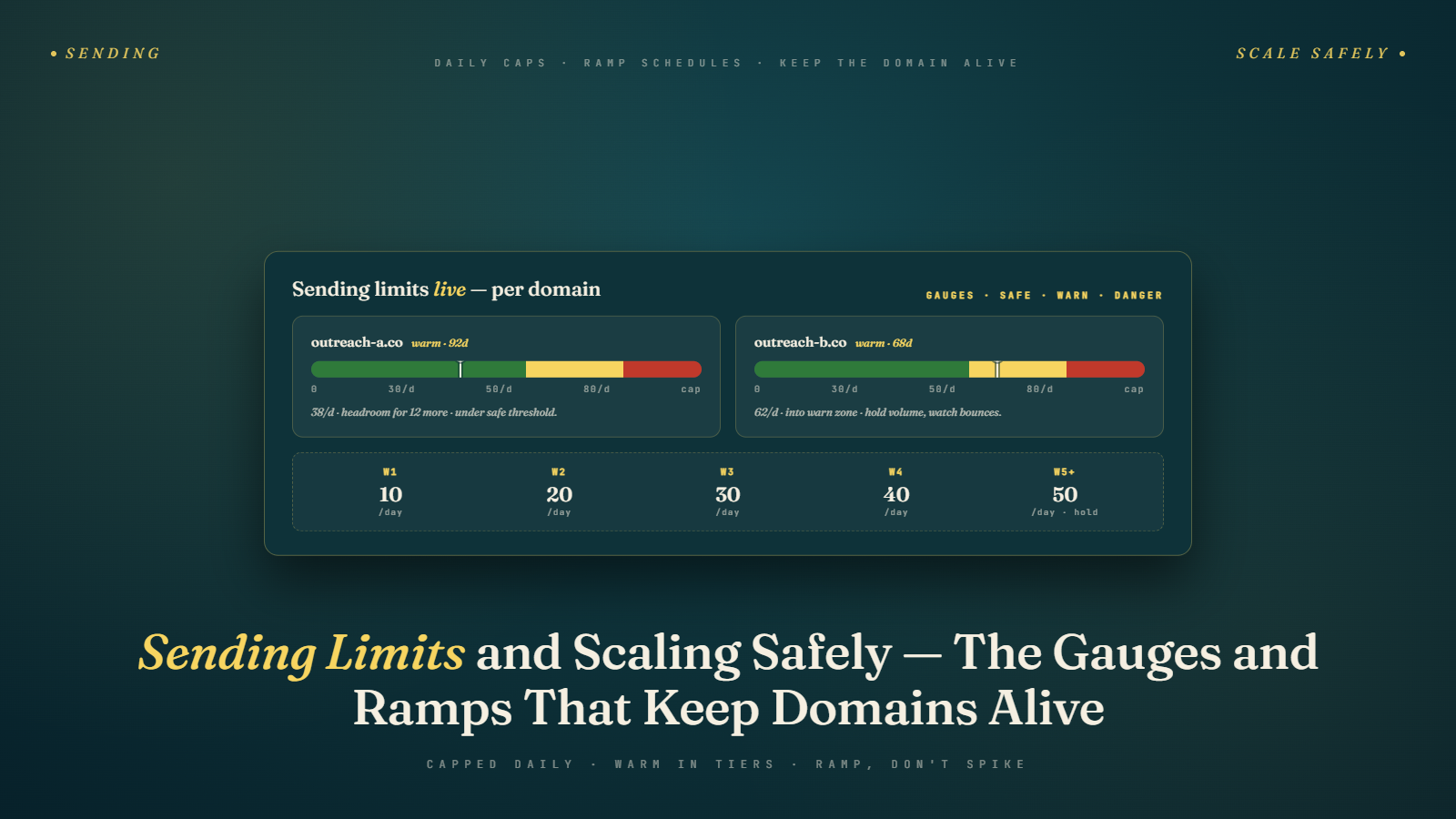
A properly warmed inbox (3–4 weeks of warm-up complete) can safely send:
- Conservative / newly warmed: 20–30 cold emails per day
- Standard / moderately established: 30–50 cold emails per day
- Well-established (2+ months of clean history): 50–80 cold emails per day
These are cold email limits specifically — emails to people who've never engaged with your domain before. If you're also sending warm follow-ups, replies, and other legitimate correspondence from the same inbox, factor that into your daily total.
Going above these limits isn't guaranteed to trigger problems immediately. But it's the zone where risk starts accumulating meaningfully — where a few bad list records or a slightly elevated complaint rate can tip from manageable to damaging.
The 80-email ceiling is a meaningful inflection point for Google Workspace inboxes specifically. While Google doesn't publish exact limits for cold email, practitioners consistently observe more filtering scrutiny above the 80 emails/day threshold from a single account.
Per-Domain Daily Limits
If a domain has multiple inboxes (say, three Google Workspace accounts), each inbox runs its own sending. There's no hard per-domain limit — the individual inbox limits apply. But common sense applies too: running 10 inboxes on one domain all sending 50 emails/day from the same IP range starts to look like coordinated automated sending.
A reasonable pattern: 2–3 inboxes per domain, each staying within individual limits, produces a natural, sustainable volume per domain.
Sending Platform Limits
Different sending platforms impose their own limits in addition to what your email infrastructure can handle:
- Google Workspace (manual sending): Hard limit of 500 emails per day per inbox total (across all emails sent)
- Google Workspace (via API/SMTP): More flexible, but API quotas apply
- Microsoft 365: Hard limit of 10,000 recipients per day per user account; rate limiting at higher volumes
- Dedicated cold email tools (Instantly, Lemlist, Smartlead): Typically enforce per-inbox daily limits and let you configure your own — respect the conservative guidelines above regardless of what the tool allows
How to Scale Volume Over Time
Scaling volume on a domain that's already sending should follow the same gradual principle as initial warm-up — just on a longer timeline.
The 20% rule: Don't increase your daily send volume by more than 20% per week on any given inbox or domain. If you're sending 30 emails/day this week, next week go to 36, the week after 43, and so on. Gradual growth looks organic. Sudden volume spikes look automated.
Practical scaling schedule from post-warm-up:
| Week | Emails/day per inbox |
|---|---|
| 1–2 (just launched) | 20–25 |
| 3–4 | 25–35 |
| 5–6 | 35–45 |
| 7–8 | 45–55 |
| 9+ (stable, clean history) | 50–60 |
Don't rush this. Most cold email teams that stick to this ramp rate maintain deliverability consistently. Those that jump from 20 to 80 in week 2 are the ones in the troubleshooting guide six weeks later.
Scaling Through Infrastructure, Not Volume Per Inbox
The cleanest way to scale cold email volume is not to push each inbox to its limits — it's to add more inboxes and domains.
If you need to send 200 cold emails per day:
- Wrong approach: Push one inbox to 200 emails/day
- Right approach: 5 inboxes, each at 40 emails/day
The math works out to the same total, but the infrastructure approach distributes risk and keeps each individual inbox well within safe limits.
This is the core of the multi-domain, multi-inbox architecture that serious cold email operations use. We cover the operational details of running multiple accounts in Managing Multiple Email Accounts, but the scaling principle is worth naming here: when you hit the ceiling on safe per-inbox volume, the answer is more inboxes, not higher volume per inbox.
Rough infrastructure guide by target volume:
| Target cold emails/day | Inboxes needed | Domains needed |
|---|---|---|
| 50–100 | 2–3 | 1–2 |
| 100–200 | 4–5 | 2–3 |
| 200–400 | 6–10 | 3–5 |
| 400–800 | 10–20 | 5–8 |
| 800+ | 20+ | 8+ |
These estimates assume 40–50 emails/day per inbox as the working target. Scale up the inbox count if you're running more conservatively, down if you're on established domains with strong history.
Time-of-Day Sending Patterns
When your emails are sent within the day is another dimension of appearing like a legitimate human sender rather than an automated blast machine.
Bad pattern: All 50 emails for the day sent at exactly 9:00 AM when the campaign triggers. This looks like a batch job — because it is one. Spam filters notice when thousands of emails arrive from the same domain at the same timestamp.
Good pattern: Emails spread across business hours with randomized delays between sends. Most cold email tools offer a "random send window" feature — something like "send between 8 AM and 5 PM, with 3–8 minute delays between emails." Use this.
Best practices:
- Send during business hours in your target geography (if you're reaching US contacts, that's 8 AM–6 PM EST/PST)
- Use randomized delays rather than uniform intervals
- Avoid sending on weekends if your ICP is B2B — weekend cold emails have lower open rates and look more automated
- Avoid sending on Monday mornings — inboxes are full after the weekend and competition for attention is highest
Some sending platforms allow timezone-aware scheduling — emails land in each prospect's inbox during their local business hours. If you're sending across multiple geographies, this is worth configuring.
Monitoring for Early Warning Signs
One of the biggest scaling mistakes is running campaigns without monitoring the signals that indicate you're approaching your infrastructure's limits.
Weekly metrics to track:
- Hard bounce rate per domain: If this is climbing above 1.5–2%, your list quality for that campaign needs attention — or you've exhausted the high-quality tier of contacts and are starting to send to riskier ones
- Spam complaint rate per domain: Any movement above 0.08% deserves immediate investigation
- Open rate trend: A gradual decline in open rate over several weeks, holding all other variables constant, is an early warning of reputation erosion
- Reply rate: A sudden drop in reply rate despite consistent targeting and copy is a deliverability signal
- Inbox placement (periodic test): Run a test through GlockApps or Mailreach every 2–3 weeks to spot-check actual inbox placement rates, not just delivery
When these metrics drift in the wrong direction, the response isn't to send more to compensate. It's to slow down, investigate the root cause, and fix it before continuing to scale.
The Cost-Benefit Math of Conservative Limits
Here's the argument for staying conservative that I find most compelling:
A domain that sends 30 emails/day at 40% open rate and 8% reply rate generates 2.4 replies/day.
A domain that pushes to 80 emails/day triggers reputation degradation and open rates fall to 15% with reply rates at 2% — generating 1.6 replies/day.
The second approach sends nearly 3x more emails and generates fewer replies, while simultaneously damaging the infrastructure that all future campaigns depend on.
This isn't hypothetical — it's the pattern that plays out when teams scale without monitoring. The marginal gain from pushing volume higher than the infrastructure supports is negative in the medium term.
Conservative limits, applied consistently across more inboxes and domains, produce more total output with better infrastructure health than aggressive per-inbox volume.
Dedicated IPs vs. Shared Infrastructure
Most cold email practitioners start on shared IP infrastructure — meaning their sending tool routes email through IP addresses shared with other users of the same platform. This is fine when you're starting out, but at higher volumes it introduces a risk: other senders on those shared IPs affect your deliverability.
When shared IPs become a problem: If you're consistently sending 200+ emails/day through a shared infrastructure and experiencing deliverability issues you can't trace to your own behavior, the shared IP pool may be contributing. Other senders generating complaints or hitting blacklists can drag down everyone's deliverability on that pool.
Dedicated IP options: Some sending platforms offer dedicated IPs for higher-tier accounts. A dedicated IP means your sending reputation is entirely your own — no cross-contamination from other senders. The tradeoff: dedicated IPs start with no reputation history, which means you need to warm them up the same way you warm up a new domain.
For most cold email operations under 500 emails/day, shared infrastructure is fine if you choose a reputable platform with strong reputation management. Above that threshold, dedicated IPs become worth investigating.
The Google Workspace / Microsoft 365 alternative: Sending through your own Google Workspace or M365 inbox (connected to your sending tool via SMTP or API) means you're sending from Google's or Microsoft's infrastructure — which has established, extremely positive IP reputation. Many practitioners prefer this over third-party sending infrastructure precisely because Gmail-to-Gmail and Gmail-to-Outlook sends carry the trust weight of Google's own servers. The tradeoff is lower daily limits per inbox, which is why the multi-inbox architecture covered above exists.
Scaling Across Different Stages of Growth
Early stage (just starting, 1–2 inboxes): Focus on reply rate optimization, not volume. At 30 emails/day, you don't need more infrastructure — you need better copy, better targeting, and sharper ICP definition. The bottleneck is conversion quality, not volume.
Growth stage (2–5 inboxes, 100–200 emails/day): This is where infrastructure investment starts to matter. Build the domain portfolio proactively. Add inboxes before you need them so they're warmed up and ready. Start building the operational systems for managing multiple accounts.
Scale stage (5+ inboxes, 200+ emails/day): Infrastructure becomes a full operational function. Monitoring, domain rotation, warm-up management, and reporting need systemized processes. This is when most teams either hire dedicated outbound operations staff or invest in a sending platform with strong account management features.
The Role of Time-Between-Emails
One dimension of sending limits that often gets overlooked: it's not just how many emails you send per day, it's the time interval between them.
Sending 50 emails in 10 minutes looks completely different to a mail server than 50 emails spread across 8 hours. The first pattern matches automated blasting behavior — the hallmark of spam operations. The second matches the behavior of a person sending individual emails throughout their workday.
Most cold email platforms offer "send window" settings that spread your daily sends across business hours. Use them. The settings that matter:
Send window: Configure the hours during which your campaign sends. Typically 8 AM–6 PM in your target geography. Emails that would send outside this window are held until the next sending window.
Minimum delay between sends: Set a minimum interval between individual emails — something like 3–5 minutes minimum. This prevents your 50 daily emails from sending in a single burst.
Randomized delay: Even better than a fixed minimum, use a randomized interval (e.g., 3–8 minutes between sends). Randomization looks more human than a perfectly regular cadence.
Business days only: Most cold email platforms let you send on weekdays only. This is appropriate for B2B — weekend emails have lower open rates and the automated pattern is more obvious when business-focused people receive commercial outreach on a Saturday.
These settings add no meaningful delay to your campaign — spreading 50 emails across 8 hours means you're still reaching everyone on your daily list within one business day. But they make the sending pattern look far more human to the systems evaluating your reputation.
Handling Spikes and Surges
Real-world sending volume isn't perfectly smooth. Some days you might have 150 new prospects ready; other days you might have 20. How do you handle volume spikes without triggering reputation problems?
The holding queue approach: Don't add all new prospects to active campaigns immediately when you have a large batch. Add them at a consistent daily rate — even if you have 500 verified contacts ready, drip them into campaigns at your normal daily pace rather than launching a 500-person campaign all at once.
Emergency pause: If a situation arises that requires a temporary pause (a domain issue, a list quality concern, a business reason to stop outreach), don't try to compensate afterward by sending double the volume. Resume at normal pace and accept that the missed days are simply lost — the makeup volume isn't worth the reputation cost.
Holiday and off-week planning: Around major holidays when open rates are low anyway (Thanksgiving week, Christmas/New Year, major national holidays in your target market), consider reducing volume or pausing campaigns. Low engagement during holiday periods can drag down your engagement averages. Resuming after the holiday at normal pace is fine — no spike required.
What Not to Do When Scaling
Don't Compensate for Poor Results with Higher Volume
If campaigns are underperforming, more emails will amplify the problem, not solve it. Fix the targeting, the copy, or the offer before scaling volume.
Don't Reuse Burned Domains at Higher Volume
If a domain has deliverability problems, sending more from it doesn't help. Take it offline, investigate the cause, and bring up a fresh domain while it recovers.
Don't Let Volume Outrun Your Warm-Up Pipeline
When you decide you need 3 more inboxes next month, start warming them up this week. Warm-up takes 3–4 weeks. Planning ahead means your infrastructure is always ready when growth calls for it.
Don't Ignore Platform Rate Limits
Google Workspace has hard daily limits. Hitting them — especially with errors or bounce-backs — creates account risk beyond just deliverability. Stay meaningfully below the platform caps, not at their ceiling.
Next up: Managing Multiple Email Accounts — the operational systems, tools, and workflows for running a multi-domain, multi-inbox cold email operation without losing your mind.