
The Risk Nobody Talks About Until It's Too Late
Most people who start cold email use their company's main domain. It's the obvious choice — it's what's on their business card, it's what they use for everything else, it matches the brand they're building.
Then, six months into a cold email program, their main domain gets blacklisted. Or their Google Workspace account gets suspended. Or their emails — all of their emails, including internal ones and replies to warm prospects — start going to spam for every recipient.
This is the risk of using your primary domain for cold email, and it's entirely preventable with one simple structural decision: use a secondary domain for all cold outreach.
This article covers everything you need to know about setting up a domain infrastructure for cold email — why you need secondary domains, how to choose and name them, how to configure DNS correctly, how to connect them to your sending tools, and how many you actually need.
This builds directly on the email deliverability overview from the start of Phase 4. If you haven't read that yet, it gives you the context for why this infrastructure matters.
Why Your Primary Domain Should Never Touch Cold Email
Your primary business domain — the one in your main company email, your website, your marketing materials — carries brand equity and business critical communication. It's the domain your best customers reply to. It's the domain your investors email you on. It's the domain that's in every signed contract.
Cold email, done at any meaningful scale, creates deliverability risks:
- Bounce rates from imperfect list data damage domain reputation
- Spam complaints from irrelevant or annoying outreach hurt your standing with Google and Microsoft
- High-volume sending patterns from a single inbox trigger rate limiting and scrutiny
- Blacklisting is possible if things go wrong, and recovering a blacklisted domain is slow and painful
- Reputation contamination means that even emails you send from your primary domain for legitimate purposes (proposals, follow-ups with warm prospects, partner communications) can start landing in spam
None of these risks are hypothetical. They happen to teams that skip domain separation, usually during or after an aggressive scaling push.
The separation is simple: use your primary domain for all inbound, transactional, and relationship emails. Use dedicated secondary domains for all outbound cold email.
What Is a Secondary Sending Domain?
A secondary sending domain is a different domain — separate from your main one — that you register specifically for cold email outreach. It typically looks like a slight variation of your main domain.
For a company with the primary domain acmesales.com, secondary domains might look like:
tryacme.comgetacme.comacme-hq.comuseacme.comacmeteam.comwithacme.com
The domain needs to feel professional and legitimate — something a prospect who Googles it wouldn't find suspicious. It doesn't need to be identical to your primary domain, but it should be recognizably connected to your brand.
What to avoid:
- Random-seeming domains with no brand connection:
outreach-emails-7492.com - Domains that look like phishing attempts:
acme-security-alert.com - Hyphenated or number-heavy domains that look spammy:
a-c-m-e-sales.net - Country-code TLDs unless you're specifically targeting that country and it looks natural
Acceptable TLDs for secondary domains: .com is always the safest. .io, .co, .net, and .org are generally fine. Avoid obscure TLDs (.xyz, .click, .email) — they're more associated with spam and will get extra scrutiny from filters.
How Many Secondary Domains Do You Need?
The answer depends on your sending volume. Here's the math:
A well-warmed inbox can safely send 30–50 cold emails per day without triggering reputation damage (more on this in Sending Limits & Scaling Safely). Each domain typically has one or more inboxes.
If you want to send 200 cold emails per day at 40 emails/inbox/day, you need 5 inboxes. Those 5 inboxes can be distributed across 2–3 secondary domains.
General guidelines:
- 1–50 emails/day: 1 secondary domain, 1–2 inboxes
- 50–150 emails/day: 2 secondary domains, 3–4 inboxes
- 150–400 emails/day: 3–5 secondary domains, 5–10 inboxes
- 400+ emails/day: Scale proportionally; most teams at this volume are using dedicated sending infrastructure
Running more domains than you need isn't a problem — it gives you more flexibility and reduces risk. If one domain develops deliverability issues, others continue running unaffected. Domain isolation is a useful operational principle: problems are contained rather than spreading to your whole sending operation.
Step-by-Step: Registering and Configuring a Secondary Domain
Step 1: Register the Domain
Register your secondary domain(s) from a reputable registrar — GoDaddy, Namecheap, Google Domains (now Squarespace Domains), or Cloudflare Registrar are all solid choices. Cloudflare offers particularly clean DNS management, which matters for the next steps.
Register for at least 1 year, ideally 2–3 years. Domain age is a minor but real reputation signal — domains registered for multiple years look more legitimate than domains with 1-year registrations.
Step 2: Set Up a Redirect to Your Main Website
Your secondary domain should redirect to your main website. When a prospect receives your cold email and is curious about the company, they'll often type the domain from your email signature into their browser. If that domain returns a 404 error or a blank page, it looks like a ghost domain — suspicious, and a trust signal in the wrong direction.
A simple 301 redirect from your secondary domain to your primary website is all you need. Set this up at the domain registrar level or via your DNS provider.
Step 3: Set Up Email Hosting
You need to configure email hosting on the secondary domain so it can send and receive emails. Options:
- Google Workspace (~$6–$12/month per inbox): The most trusted email infrastructure for cold email. Gmail has excellent deliverability reputation and its accounts tend to perform well in cold outreach.
- Microsoft 365 (~$6/month per inbox): Strong deliverability, especially when reaching Outlook inboxes.
- Zoho Mail (free tier available): A lower-cost option, though some cold email practitioners report slightly lower deliverability than Google Workspace on Zoho-hosted domains.
Set up at least one inbox on the secondary domain. For multi-inbox domains, create 2–3 inboxes with realistic-sounding names (firstname.lastname format: mike.reynolds@tryacme.com).
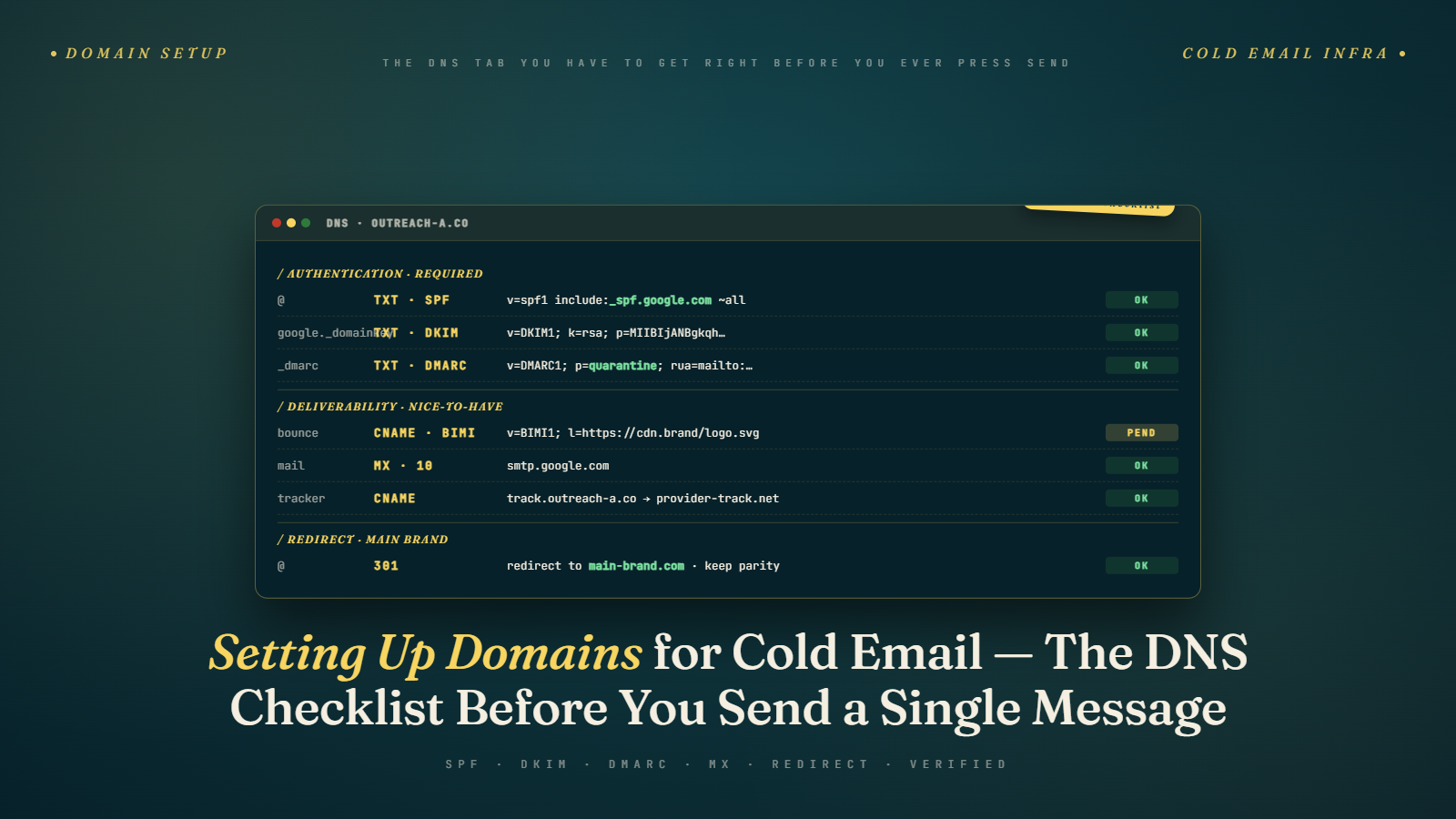
Step 4: Configure DNS Authentication Records
This is the critical step that most non-technical founders and sales leaders either skip or do incorrectly. Your secondary domain needs three DNS records set up correctly:
- SPF record — specifies which servers can send on behalf of your domain
- DKIM record — adds a cryptographic signature to outgoing emails
- DMARC record — defines how failures are handled and sends you reports
We cover the exact setup process for each in SPF, DKIM, DMARC Explained Simply. For now, know that these three records are non-negotiable — without them, many receiving mail servers will filter or reject your emails outright, and Google/Yahoo's 2024 bulk sender requirements make them a hard requirement for volume sending.
After setting up the records, verify them using MXToolbox (mxtoolbox.com/spf, /dkim, /dmarc) or similar DNS lookup tools. This is important — misconfigured records can be worse than no records because they signal something is wrong.
Step 5: Set Up Custom Tracking Domain (Optional but Recommended)
If you're using link tracking in your cold email campaigns, you should configure a custom tracking domain. By default, most cold email tools use their own shared tracking domain (something like trk.yoursendingtool.com) for click tracking. This means your emails use a tracking domain shared with thousands of other senders — some of whom may have poor sending behavior that has already damaged that domain's reputation.
A custom tracking domain (something like track.tryacme.com) keeps your tracking infrastructure isolated and professional. Most cold email platforms support this and the setup takes about 10 minutes.
Step 6: Begin Warm-Up
Before sending a single real cold email from a new domain, you need to warm it up. A brand-new domain with no sending history that suddenly sends 50 cold emails a day looks like exactly what spammers do — register a domain, blast it for a week, abandon it when it gets blacklisted, repeat.
The warm-up process — covered in full in Email Warm-Up: Why It Matters & How to Do It — gradually builds your domain's sending history and reputation before you start real campaigns. Plan for 2–4 weeks minimum on a new domain before it's ready for live outreach.
Naming Your Inboxes
The inbox name (the "From" name in sent emails) should look like a real person. Mike Reynolds <mike.reynolds@tryacme.com> looks legitimate. Acme Sales Team <sales@tryacme.com> looks like a mass email system.
Best practices:
- Use real first and last names for each inbox
- Vary the names across inboxes if you have multiple (don't have five inboxes all named "Mike")
- Match the name in the From field to the name in the email signature — consistency builds trust
If you have multiple SDRs, each gets their own inbox under their real name. If it's a founder-led or solo operation, you can create 2–3 variations of your name across domains (mike@, m.reynolds@, michael.reynolds@) — each is a separate inbox.
Managing the Domain Portfolio Over Time
Secondary domains don't last forever in perfect condition. Over time, even a well-run domain will accumulate some reputation friction — a handful of spam complaints, periods of higher bounce rate, or just the natural wear of sending thousands of emails.
When to retire a domain: If inbox placement drops significantly, complaint rates spike, or the domain appears on a blacklist that's affecting deliverability — and you can't recover it within a few weeks of clean sending — retiring and replacing it is often faster than rehabilitation. Keep new secondary domains in the warm-up pipeline so you always have fresh infrastructure ready.
Domain rotation: Some high-volume teams deliberately rotate domains on a 6–12 month cycle, retiring older ones before they degrade and cycling in freshly warmed ones. This is more operational overhead but maintains consistently strong deliverability at scale.
Keep records: Maintain a simple document tracking each secondary domain, its creation date, which inboxes are on it, which sending platform it's connected to, and its current health status. As your domain portfolio grows, this becomes important operational knowledge.
A Common Setup Mistake: Sharing Secondary Domains Across Use Cases
Some teams register a secondary domain and then use it for everything — cold outbound, marketing newsletters, transactional emails, even some internal communications. This defeats the purpose of domain separation.
The value of secondary domains for cold email comes from isolation. If your cold email domain has high bounce rates, it only damages that domain's reputation — not your primary business domain. If you muddle the two together, you lose that protection.
Keep your secondary cold email domains for cold email only. Marketing emails should go from a marketing-specific subdomain or domain. Transactional emails (receipts, login confirmations) should go from a transactional-specific infrastructure. Each use case has its own deliverability profile and deserves its own sending infrastructure.
Setting Up a Custom Tracking Domain
One technical step that's often missed in domain setup guides: the tracking domain.
When you use a cold email platform's link tracking feature, every link in your email gets wrapped in a redirect through the platform's tracking server — so the tool can record who clicked. By default, most platforms use their own shared subdomain for this tracking URL.
The problem: that shared tracking domain is used by thousands of other customers. If some of those customers are sending spam or generating complaints, the tracking domain's reputation suffers — and since your emails contain links through that domain, your emails carry the reputation baggage.
The fix: configure a custom tracking domain on one of your secondary sending domains. This is usually a CNAME record pointing to the platform's tracking server, with the subdomain being something like track.tryacme.com or click.tryacme.com.
Setup steps (varies slightly by platform but generally):
- In your sending platform, find the custom tracking domain setting (usually under Settings → Sending or Settings → Domain)
- The platform gives you a CNAME record name and value
- Add the CNAME to your DNS provider
- Wait for propagation, then verify in the platform settings
This is a 15-minute setup that gives your tracking URLs a clean, isolated reputation. Worth doing for every domain you actively send from.
How Domain Age Affects Deliverability
Domain age is a minor but real factor in initial deliverability. Domains registered recently — especially in the last 30–60 days — start with a slight disadvantage because they have no history. Mail servers can't validate that this domain has been a legitimate sender over time.
This is another reason why the order of operations matters: register domains before you need them. If you know you'll be scaling up your outreach in 3 months, register your secondary domains today. A domain that's 3 months old before it starts sending performs better than one that was registered yesterday.
Some practices that accelerate credibility for new domains:
- Set up a simple landing page (even a one-pager) that resolves when someone types the domain into a browser
- Send a few internal test emails immediately after setup — giving the domain a tiny sending history even before warm-up begins
- Configure WHOIS privacy but make sure the registration period is at least 1–2 years (short registrations look more suspicious)
None of these are transformative, but combined with proper warm-up, they help new domains establish legitimacy faster.
The Full Picture
Setting up secondary domains correctly is the first physical step in building a cold email infrastructure. Get this right and you have:
- Primary business domain fully protected from cold email reputation risk
- A portfolio of sending domains that can scale with your outreach volume
- Isolated risk — problems in one domain don't contaminate others
- A foundation that can be warmed, monitored, and replaced systematically
Everything downstream — warm-up, authentication, sending limits, account management — builds on this domain structure.
Next up: Email Warm-Up: Why It Matters & How to Do It — how to take a brand-new domain from zero reputation to campaign-ready, and the tools that make it faster.