
The Invisible Problem Killing Your Cold Email
Here's a scenario that happens more often than most people realize.
A sales team spends two weeks building a targeted prospect list, writes a strong sequence, verifies their emails, and launches a campaign to 400 contacts. Open rates come back at 4%. Reply rates are close to zero. The team assumes the messaging is off, rewrites the copy, relaunches. Same result.
They never find out the real problem: 60% of their emails were landing in spam folders. Not because their copy was bad. Not because the list was wrong. Because their sending infrastructure wasn't set up correctly — no proper DKIM, a domain with no prior sending history, and a bounce rate from the first campaign that damaged their reputation before the second one even started.
This is a deliverability problem, and it's invisible unless you know what to look for.
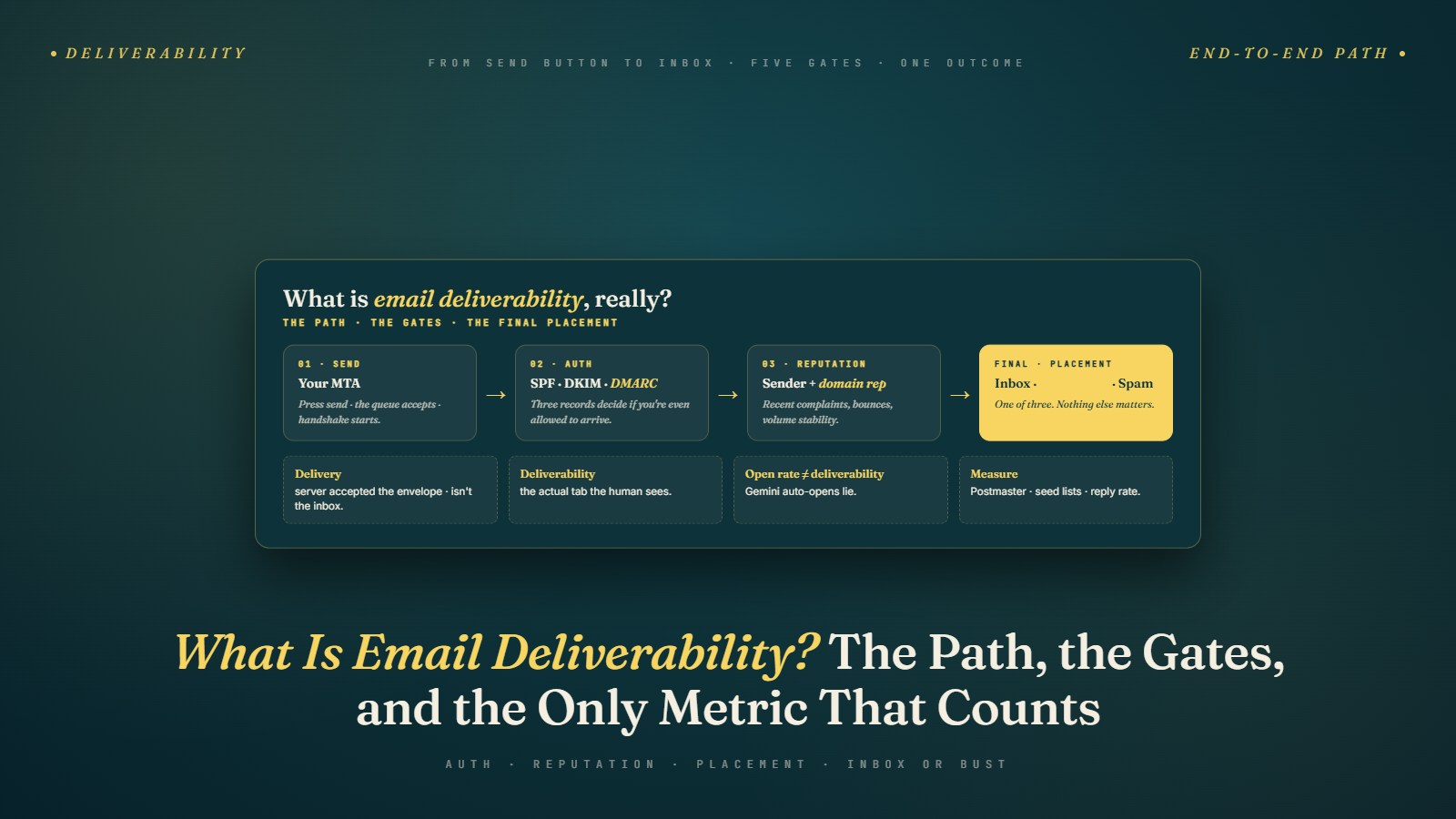
Deliverability is not the same as sending. An email can "send" successfully — meaning no error was returned by your sending platform — and still never reach the inbox. It might land in spam. It might get silently dropped. It might sit in a promotions tab that nobody checks. The fact that your ESP says "delivered" means almost nothing about whether a human eye ever saw it.
Phase 4 of this cold email series is entirely about infrastructure and deliverability — the technical foundation that everything else depends on. You can have the best copy in the world (we covered that in Phase 3) and a perfectly targeted, verified list (we covered that in Phase 2) — but if your emails are landing in spam, none of it matters.
This pillar article maps the full deliverability landscape and introduces each of the technical topics we'll cover in depth throughout this phase.
Delivery vs. Deliverability: The Distinction That Matters
These two terms are often used interchangeably, but they mean different things.
Email delivery is a binary: did the receiving mail server accept the message? A "delivered" email is one that wasn't returned with a hard bounce. The receiving server acknowledged receipt.
Email deliverability is about inbox placement: did the email land in the primary inbox, the promotions tab, the spam folder, or get filtered before the user ever saw it?
An email can have 100% delivery rate and still have terrible deliverability if all of those delivered emails are going to spam. Most cold email metrics — open rates especially — are only measuring what reaches the inbox and gets seen. If you're seeing low open rates, the first question isn't "is my subject line bad?" — it's "are my emails even reaching the inbox?"
The distinction matters enormously for diagnosis. A deliverability problem and a subject line problem look identical in the aggregate metrics (both produce low open rates) but require completely different fixes.
The Four Pillars of Email Deliverability
Deliverability is not a single thing you configure once and forget. It's the result of four distinct, interdependent systems all working correctly at the same time.
Pillar 1: Technical Authentication
Email authentication is the set of DNS records that tell the receiving mail server: "Yes, this email was legitimately sent by the domain it claims to be from." Without proper authentication, your email looks like it might be spoofed — a red flag that triggers spam filtering or outright rejection.
The three authentication standards are:
- SPF (Sender Policy Framework): Specifies which IP addresses and mail servers are allowed to send email on behalf of your domain
- DKIM (DomainKeys Identified Mail): Adds a cryptographic signature to your email that proves it hasn't been tampered with in transit
- DMARC (Domain-based Message Authentication, Reporting & Conformance): Tells receiving servers what to do if SPF or DKIM checks fail, and gives you visibility into authentication failures
All three working together form the authentication baseline that every legitimate sender needs. We break down how to set up each one in SPF, DKIM, DMARC Explained Simply.
Since 2024, Google and Yahoo have required SPF, DKIM, and DMARC for senders sending more than 5,000 emails per day to their users. For cold emailers, this isn't optional compliance — it's baseline infrastructure.
Pillar 2: Sender Reputation
Even with perfect authentication, your emails can still land in spam if your sender reputation is poor. Reputation is a score maintained by major email providers (Google, Microsoft, etc.) for your sending domain and IP address. It's based on:
- Bounce rate: How many of your sent emails hard-bounce? High bounce rates signal you're sending to unverified, bulk-acquired lists — a spam behavior pattern.
- Spam complaint rate: How many recipients mark your emails as spam? Google's threshold for intervention is as low as 0.1%.
- Engagement rate: Do people open, click, and reply? Or do they delete without reading, unsubscribe, or ignore? High engagement is a positive reputation signal. Low engagement is a negative one.
- Sending history: Has this domain been around for a while with a consistent, legitimate sending pattern? Or was it registered last week and immediately sent 500 emails? New domains have no reputation — neither good nor bad — which is why warm-up matters.
- Blacklist status: Is your domain or sending IP on any industry spam blacklists?
Sender reputation is what makes email warm-up necessary and what makes using secondary domains for cold email a standard practice.
Pillar 3: List Quality
Your list quality directly affects your deliverability metrics. A list full of outdated, invalid, or mismatched email addresses will produce high bounce rates, low engagement, and potentially spam trap hits — all of which damage your sender reputation and trigger filtering.
This is the connection between Phase 2 and Phase 4. The prospect list building, data sourcing, and email verification work from Phase 2 is not just about targeting quality — it's also a deliverability investment. A clean, verified list protects your sending infrastructure.
Sending to unverified lists is one of the fastest ways to destroy a domain's reputation. A 5% bounce rate from one campaign can take weeks or months of good behavior to recover from.
Pillar 4: Content and Engagement Signals
Modern spam filters evaluate email content — not just for specific words, but for patterns associated with spam: HTML heaviness, link density, promotional language, formatting inconsistencies, and engagement behavior after delivery.
We covered the content side in detail in Avoiding Spam Trigger Words. In Phase 4, we extend this into the full picture of how content interacts with spam filter systems in 2026 — in Avoiding Spam Filters in 2026.
The Key Metrics That Reveal Your Deliverability Health
You can't improve what you don't measure. Here are the metrics that actually tell you how your deliverability is performing:
Inbox Placement Rate
This is the most important deliverability metric and the hardest to measure. Inbox placement rate tells you what percentage of your delivered emails actually landed in the primary inbox (vs. spam or promotions).
Most sending platforms don't report this directly — they only report delivery (accepted by the receiving server). To measure inbox placement, you need a dedicated inbox placement testing tool like GlockApps, Litmus, or EmailOnAcid, which send test emails to a panel of seed addresses across major providers and report where each one landed.
Run inbox placement tests before and during major campaigns to catch deliverability degradation early.
Hard Bounce Rate
The percentage of emails that permanently failed to deliver — address doesn't exist, domain doesn't exist, or the server permanently rejected it. Keep this below 2%. Below 1% is the target.
This is primarily controlled through list verification — covered in How to Verify Emails and Reduce Bounce Rate.
Spam Complaint Rate
The percentage of recipients who actively mark your email as spam. Google's threshold for action is 0.1%. Keep it as close to zero as possible.
High complaint rates are usually a targeting problem (you're reaching people your email isn't relevant to) or a frequency problem (too many emails, too close together).
Open Rate as a Proxy
Open rate is an imperfect but practical proxy for deliverability. A sudden drop in open rate — with no change in your copy or subject lines — is often the first visible signal of a deliverability problem. If open rates drop 30% overnight, your emails may have shifted from inbox to spam.
Note: with iOS Mail Privacy Protection and similar features, open rates have become less reliable as an absolute number. But relative changes over time from your own baseline are still meaningful signals.
Reply Rate
People don't reply to emails they don't see. Reply rate is arguably a better engagement signal than open rate because it requires real intent. A sustained drop in reply rate despite consistent targeting and copy quality is a deliverability signal worth investigating.
Why Cold Email Specifically Creates Deliverability Risk
Cold email is inherently higher-risk for deliverability than permission-based marketing email, for several reasons:
Recipients haven't opted in. They may not recognize the sender, they may not want the email, and some will mark it as spam even if it's well-targeted. Even a 0.1% complaint rate means 1 in 1,000 people is actively flagging you.
Lists come from third-party sources. Unlike a newsletter where you know every subscriber consented to give you their address, cold email lists come from databases, scrapers, and manual research — all of which have data quality issues that affect bounce rates.
Volume ramps up quickly. Cold email campaigns often send hundreds of emails from a single account in a short period — a pattern that triggers rate-limiting and reputation scrutiny from receiving mail servers.
You're sending from domains that may be new. Many cold email practitioners use secondary or dedicated domains for outreach. Those domains start with zero reputation and need to be warmed up before volume sending.
None of this means cold email is undeliverable — millions of effective cold email campaigns run every day. But it means the infrastructure and hygiene requirements are higher than for permission-based email, and the consequences of getting it wrong are steeper.
The Phase 4 Map
Here's what we cover across the remaining articles in this phase, all building toward a complete, production-ready deliverability infrastructure:
- Setting Up Domains for Cold Email — why your primary domain shouldn't touch cold email, and how to set up secondary domains correctly
- Email Warm-Up: Why It Matters & How to Do It — establishing sender reputation before you start real campaigns
- SPF, DKIM, DMARC Explained Simply — setting up the authentication records that make your emails look legitimate
- Avoiding Spam Filters in 2026 — how modern spam filter systems work and what's changed recently
- Sending Limits & Scaling Safely — how to grow your outbound volume without triggering reputation damage
- Managing Multiple Email Accounts — the operational layer for running cold email across multiple domains and inboxes
- Troubleshooting Low Open Rates — a diagnostic framework for when campaigns underperform
Deliverability is the foundation. You can hire the best copywriter, build the most targeted list, and run the most sophisticated sequence strategy — and watch it all fail silently if the infrastructure isn't right. Build the foundation first.
The Hidden Cost of Poor Deliverability
Most teams measure their cold email program by visible metrics: meetings booked, pipeline generated, deals closed. What's rarely measured is the cost of emails that never arrived.
If your campaign generates 20 meetings from 500 emails sent, and your inbox placement rate is 60% (meaning 200 of those 500 emails went to spam), you're actually looking at 20 meetings from 300 visible emails — a 6.7% meeting rate. If inbox placement were 95%, the same campaign would have reached 475 people, and at the same rate would have generated 32 meetings.
That's a 60% increase in output from the same list, the same copy, the same targeting — just fixing where the emails land.
This is why deliverability is not a technical side project. It is directly tied to revenue output. Every percentage point of inbox placement that you lose to spam filters is a proportional reduction in the value your cold email program generates.
The good news: inbox placement is largely within your control. It's a function of infrastructure decisions, process discipline, and ongoing monitoring — all of which are learnable and systematizable.
What "Good" Deliverability Looks Like in Practice
Here's what well-managed deliverability looks like for a cold email program that's operating correctly:
Hard bounce rate: Consistently below 1%. Often below 0.5% for teams using thorough list verification.
Spam complaint rate: Below 0.05%. Teams with tight ICP targeting and relevant outreach generate almost no complaints.
Inbox placement rate: 85–95%+ across Gmail and Outlook inboxes. This means the vast majority of delivered emails are landing in primary inboxes, not spam folders or promotions tabs.
Open rate (as a proxy): 30–50%+ for well-targeted, personalized campaigns from clean domains. If you're seeing below 15%, there's likely a deliverability component even if delivery metrics look fine.
These numbers are achievable. They're not exceptional performance — they're the baseline for a properly configured cold email operation. The Phase 4 articles walk through exactly how to reach and maintain them.
Where to Start
If you're setting up cold email infrastructure from scratch, the order matters:
- Register secondary domains — before you send a single email
- Set up authentication records (SPF, DKIM, DMARC) on those domains
- Connect to a sending tool and begin warm-up
- Complete the warm-up period before starting real campaigns
- Verify your prospect list (or re-verify if it's been sitting)
- Monitor deliverability metrics from day one
If you're already sending and seeing problems, the troubleshooting guide at the end of this phase gives you the diagnostic framework to identify where the breakdown is occurring.
Let's start at the beginning.
Next up: Setting Up Domains for Cold Email — why you need secondary domains, how to choose them, and how to configure everything before your first send.