
The New Domain Problem
You've done everything right in the setup phase. You've registered a secondary domain as covered in Setting Up Domains for Cold Email. You've configured your SPF, DKIM, and DMARC records. You've connected the inbox to your sending platform. You're ready to launch.
One thing stands between a properly configured domain and a campaign-ready one: reputation.
A brand-new domain has no sending history. No prior emails have been sent. No one has received a message from it, opened it, replied to it, or marked it as not-spam. From the perspective of receiving mail servers — Gmail, Outlook, Yahoo — it's a ghost. And when something that looks like a ghost suddenly starts sending 50 emails a day to people it has no relationship with, the spam filters do exactly what they're designed to do.
Email warm-up is the process of establishing a positive sending reputation for a new domain before you use it for real outreach. It's not optional, it's not something you can shortcut significantly, and skipping it is one of the fastest ways to destroy a new sending infrastructure before it ever has a chance to work.
This article explains the mechanics of why warm-up works, how to do it both manually and with tools, and what a realistic warm-up timeline looks like.
Why Mail Servers Care About Sending History
To understand warm-up, you need to understand how receiving mail servers evaluate new senders.
When your email arrives at Gmail's servers, Google's systems don't just evaluate the content. They also look at the sender:
- Has this domain sent emails before? How long has it been sending?
- Do people who receive emails from this domain typically open them?
- Have any recipients marked emails from this domain as spam?
- Has this domain ever triggered a bounce rate spike or a sudden volume surge?
- Is the sending behavior consistent and gradual, or is it erratic and sudden?
A domain with six months of consistent, well-engaged sending history is fundamentally different in Google's eyes from a domain that registered last week and is now sending hundreds of emails to strangers.
Legitimate senders — a company newsletter, a customer communications platform, an internal email system — build their sending volume gradually over time as their customer base grows. The pattern of gradual growth is itself a trust signal.
Cold email on a new domain inverts this pattern: volume comes immediately, without prior history, to recipients who've never engaged with the domain before. Without warm-up, this looks indistinguishable from what spammers do.
Warm-up mimics the gradual growth pattern of a legitimate sender. It gives the domain a sending history with positive engagement signals before the real outreach begins.
What Warm-Up Actually Does
At the technical level, warm-up accomplishes several things simultaneously:
Builds positive engagement signals. Warm-up emails are sent between inboxes that are configured to receive them, open them, click them, reply to them, and — critically — move them out of spam folders when they land there. Each one of these actions is a positive engagement signal that improves the domain's reputation score.
Establishes a sending pattern. Mail servers track the volume and cadence of emails from your domain over time. A gradual ramp — starting at a few emails per day and increasing slowly — looks like an organic, growing sender. Jumping immediately to high volume looks like an automated blast.
Triggers reputation scoring to begin. Major email providers don't have a reputation score for domains they've never seen. A new domain is in a kind of neutral limbo. Warm-up generates enough sending history for the provider to begin building a reputation profile — which starts neutral and, with good behavior, trends positive.
Surfaces authentication issues early. When warm-up emails bounce or fail to authenticate properly, you find out before real campaigns are affected. It's a rehearsal that catches configuration mistakes in a low-stakes environment.
Manual Warm-Up vs. Automated Tools
There are two ways to warm up an email account: manually or with a dedicated warm-up tool.
Manual Warm-Up
Manual warm-up means having real people send and receive emails from your new account to gradually build reputation.
In practice, this typically involves:
- Asking colleagues, friends, or team members to receive emails from your new account and engage with them (open, reply, occasionally forward)
- Sending and receiving a few emails daily from personal Gmail accounts
- Incrementally increasing the number of these exchanges over several weeks
Pros: No tool cost. The engagement signals come from real, distinct email accounts with their own established reputations — which can be more valuable than tool-generated signals.
Cons: Time-consuming to coordinate. Hard to scale. Difficult to generate the volume needed for domains that will eventually send hundreds of emails per day. Most people can't sustain it consistently for the full warm-up period.
Manual warm-up is a viable approach for very small operations (1–2 inboxes, low planned send volume) or as a complement to an automated tool.
Automated Warm-Up Tools
Warm-up tools manage the entire process automatically. They connect to your email inbox and simulate the behavior of a legitimate, engaged email network:
- Sending emails from your inbox to a pool of other inboxes in the tool's network
- Those receiving inboxes open, click, and reply to your emails
- If your email lands in spam, the tool automatically moves it to the primary inbox and marks it as not-spam
- The process runs daily with volume that gradually increases according to a schedule you configure
Popular warm-up tools:
- Lemwarm (by Lemlist): One of the most well-established warm-up networks, with strong engagement signals
- Instantly's built-in warm-up: If you're using Instantly for sending, their native warm-up tool is well-integrated
- Mailreach: Focuses heavily on inbox placement rates and gives detailed reporting
- Warmbox: Offers a large network of warm-up inboxes and multiple warm-up strategy options
- Smartlead's warm-up: Native to the Smartlead platform; convenient if that's your sending tool
Most of these tools charge $15–$40/month per inbox. For the protection they provide, this is one of the highest-ROI investments in cold email infrastructure.
One caveat: All automated warm-up tools generate artificial engagement — emails being opened and replied to by bots or other tool users, not real humans interested in what you're sending. Mail providers are aware that these networks exist and are getting better at identifying them. This doesn't mean warm-up tools don't work — they do, reliably, for most practitioners. But it means warm-up tool signals are somewhat less potent than genuine engagement signals, and they're not a substitute for maintaining real-world deliverability hygiene once campaigns are live.
The Warm-Up Schedule
There's no single universal warm-up schedule — the right duration and ramp rate depends on your target send volume. Here's a practical framework:
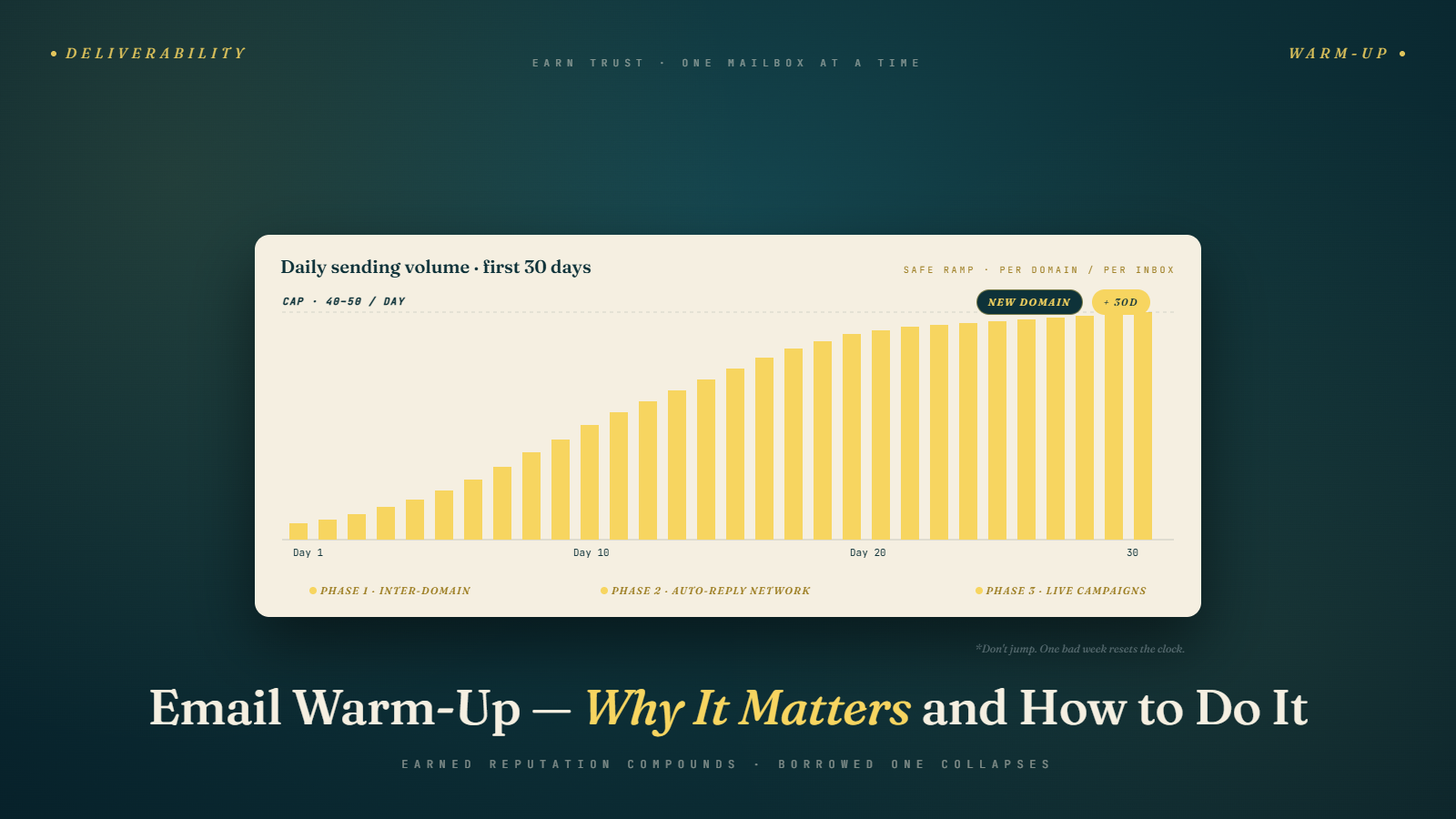
Phase 1: Foundation (Weeks 1–2)
Start slowly. Very slowly.
- Days 1–3: 2–5 emails per day, entirely within your own network or warm-up tool
- Days 4–7: 5–10 emails per day
- Week 2: 10–20 emails per day
During this phase, no real cold outreach at all. The domain is establishing its initial sending pattern. All emails should be engaged with — opened, replied to, never marked as spam.
Phase 2: Building (Weeks 3–4)
- Week 3: 20–30 emails per day
- Week 4: 30–40 emails per day
Toward the end of week 4, you can begin introducing a small number of real cold emails — no more than 20% of daily send volume — mixed in with your warm-up sends. Monitor closely. If you see any deliverability red flags (emails landing in spam, bounce rate spiking), pause real sends and extend the warm-up phase.
Phase 3: Production (Week 5 onwards)
By week 5, a well-warmed domain can typically sustain 40–50 cold emails per day per inbox, with warm-up continuing in the background.
Most practitioners keep warm-up running permanently — even on domains that are actively sending cold email. The ongoing warm-up signals maintain the positive engagement pattern and offset any negative signals that accumulate from real cold outreach. Think of it as a continuous reputation maintenance system, not a one-time setup step.
Signs Your Warm-Up Is Working (and When It Isn't)
Signs it's working:
- Warm-up tool reports show inbox placement rates above 85–90%
- Emails sent through your warm-up tool are consistently landing in primary inbox, not spam
- Spam folder placement is low and decreasing over time
- No bounce rate spikes from your warm-up sends
Signs something is wrong:
- Warm-up emails are consistently landing in spam even after 2+ weeks
- Bounce rates from warm-up sends are elevated (could signal a DKIM or SPF configuration issue)
- Your warm-up tool reports authentication failures — check your DNS records
- Inbox placement drops suddenly during warm-up — may indicate your IP or domain has been flagged
If something is wrong during warm-up, diagnose it before starting real campaigns. Common causes:
- SPF or DKIM records misconfigured — verify with MXToolbox
- Domain on a blacklist — check Spamhaus, Barracuda, and MXToolbox blacklist checker
- Email hosting provider (Google Workspace, Outlook) not fully set up — verify the account is in good standing and has no restrictions
Warm-Up for Existing Domains
Warm-up isn't only for brand-new domains. If you've taken a break from cold email on a domain for more than a few weeks, or if you've recently changed your sending platform, or if you've recovered from a deliverability problem — treat the domain as if it needs a fresh warm-up.
A domain that was sending 50 emails per day, then went quiet for two months, then suddenly starts sending 50 emails per day again will see a temporary reputation dip. A gradual re-ramp over 1–2 weeks helps re-establish the sending pattern.
Similarly, if you migrate a domain from one sending platform to another (say, from Lemlist to Instantly), the sending IP changes. The domain's reputation carries over, but the new IP is unknown to receiving servers. A brief warm-up on the new platform before ramping to full volume is good hygiene.
What to Do While Waiting for Warm-Up to Complete
The 3–4 week warm-up period can feel like dead time, but it's actually the best possible moment to complete the work that comes before sending:
- Finalize and segment your prospect list
- Verify your email list through BulkMailVerifier if you haven't already
- Write and refine your email sequences using the frameworks from Phase 3
- A/B test subject lines and opening lines in small internal reviews before going live
- Set up tracking and reporting so you have a clean baseline when campaigns start
By the time your domain is warmed up and ready, your campaign should be completely prepared to launch. Day one of live sending should be campaign day one — not "let me figure out what I'm going to send."
Warm-Up for Google Workspace vs. Microsoft 365
The warm-up dynamics differ slightly between Google Workspace and Microsoft 365 inboxes, and it's worth understanding the differences.
Google Workspace warm-up considerations:
Google's spam filter is the most sophisticated in the industry and the most actively maintained. Gmail users mark spam at higher rates than Outlook users on average, which means Gmail inboxes are simultaneously the most valuable (highest open rates, most engaged users) and the most sensitive (easier to trigger filtering).
Google Workspace inboxes benefit significantly from warm-up networks that include a high proportion of Gmail-to-Gmail sends, since those generate the engagement signals that Gmail's own systems weight most heavily. Most major warm-up tools have large Gmail representation in their networks precisely for this reason.
Google Postmaster Tools is also only available for Google Workspace domains, giving you direct visibility into your domain's reputation as Gmail classifies it. Set this up from day one of warm-up — it's free and the data is invaluable.
Microsoft 365 warm-up considerations:
Microsoft's filtering (via Exchange Online Protection) is somewhat less aggressive than Gmail's for cold email, but Outlook users are a significant portion of business email. Microsoft 365 inboxes are often preferred for enterprise-targeted campaigns because many enterprise organizations run on Microsoft infrastructure.
The warm-up timeline is similar to Google Workspace, but Microsoft's reputation signals update more slowly. A 4-week warm-up rather than 3 weeks is a safer default for M365 before going to full campaign volume.
One practical note: if you're targeting primarily Gmail users (more common in tech and startup verticals), warm up your Google Workspace inboxes more aggressively. If you're targeting enterprise users likely on Outlook, the M365 inbox may perform better for that audience.
Common Warm-Up Mistakes
Mistake 1: Skipping Warm-Up Entirely
The most common and most damaging mistake. If you're new to this, the temptation is to see warm-up as unnecessary overhead and just start sending. Some people get away with it briefly. Most don't — they burn the domain within a few weeks and have to start over.
Mistake 2: Stopping Warm-Up Once Campaigns Start
Warm-up is most valuable as a continuous background process, not a one-time setup step. Keep it running while you send live campaigns. The ongoing positive engagement signals help offset the reputation cost of cold outreach.
Mistake 3: Warming Up Too Fast
Doubling your send volume every 2 days is too aggressive. Gradual and consistent is what looks natural to mail servers. A sudden volume spike — even during warm-up — can trigger rate limiting.
Mistake 4: Not Running Warm-Up in Parallel Across Multiple Inboxes
If you're planning to run multiple inboxes across multiple domains, start warming up all of them simultaneously. Don't finish warming up domain 1, then start on domain 2. Running parallel warm-ups means all your infrastructure is ready at the same time.
Mistake 5: Using Warm-Up as a Substitute for Authentication
Warm-up helps build reputation. Authentication (SPF, DKIM, DMARC) establishes legitimacy. You need both. A well-warmed domain without proper authentication will still see deliverability problems because authentication is checked before reputation for many filter systems.
The Patience Payoff
Warm-up feels slow. Three to four weeks of waiting when you have a prospect list ready and sequences written is genuinely frustrating. But the math is clear: a properly warmed domain can sustain reliable cold email outreach for months or years. A domain that skips warm-up often lasts weeks before deliverability collapses.
The patience investment at the start pays dividends every day your campaign runs cleanly afterward.
Next up: SPF, DKIM, DMARC Explained Simply — the exact DNS records you need to set up, how each one works, and how to verify them without needing a technical background.