
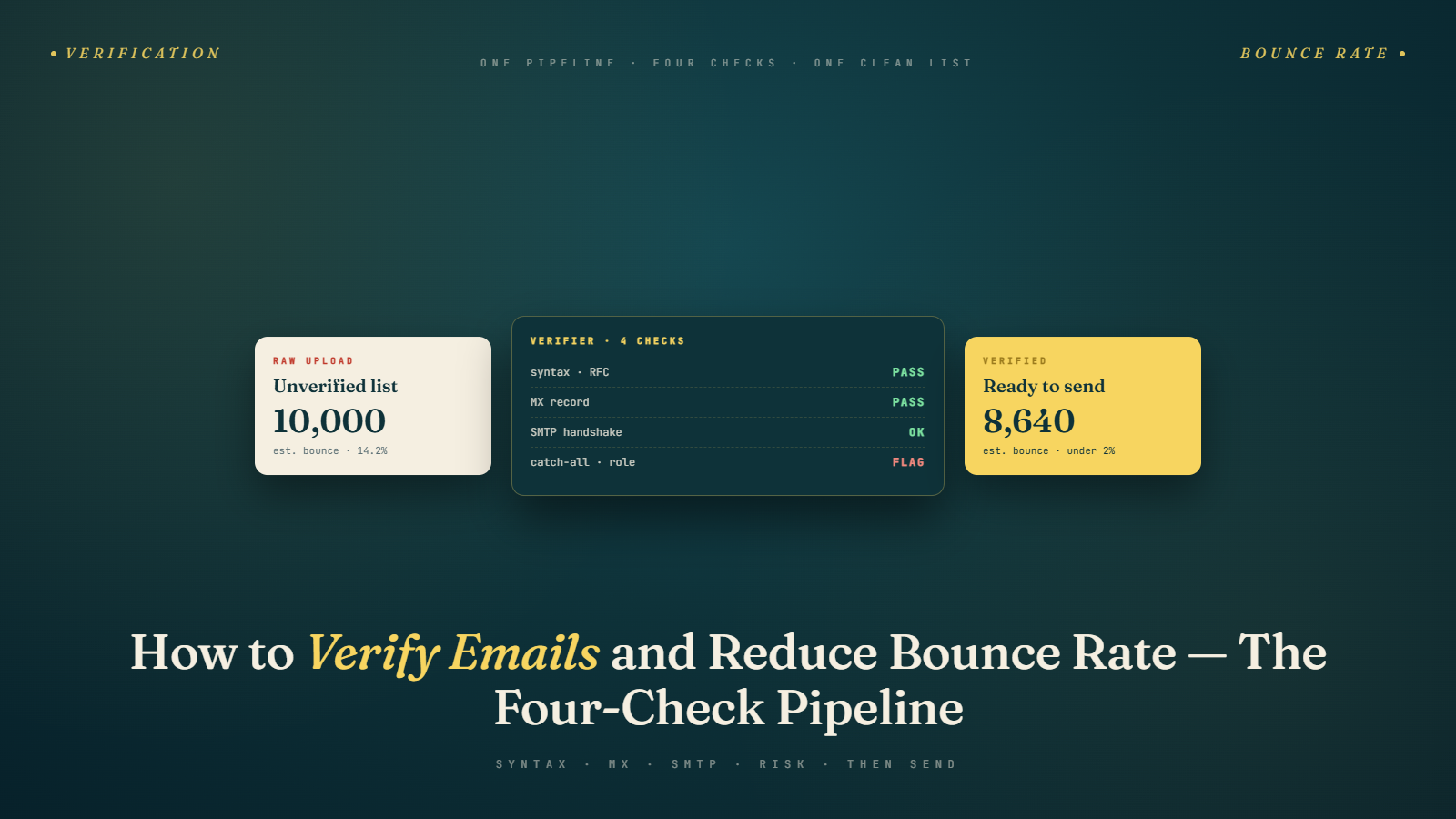
When Good Prospecting Work Goes to Waste
You've done everything right up to this point. You've defined your ICP, built a targeted prospect list, used multiple data sources, done your LinkedIn research, and found email addresses using a combination of tools and manual methods.
Then you import the list, start your campaign, and within 48 hours your email service provider sends you a warning. Bounce rate too high. Sending temporarily suspended. In some cases: domain flagged.
This is one of the most common ways cold email campaigns go wrong — and it's almost entirely preventable. The culprit is almost always the same: unverified email lists.
Email verification is not optional. It's not a "nice to have" step that advanced practitioners do while beginners skip it. It's the quality gate between list building and outreach. Skip it, and you're gambling with your sending domain's reputation.
This article covers exactly what email verification is, why bounce rates matter so much, how verification tools work, and how to build a clean, deliverable list every time.
Understanding Bounce Rates and Why They Matter
When you send an email and it can't be delivered, it "bounces" — you get a delivery failure notification. There are two main types:
Hard Bounces
A hard bounce is a permanent delivery failure. The email address doesn't exist, the domain doesn't exist, or the server has permanently rejected the message. Common causes:
- Invalid email address (typo, made-up address, or deleted account)
- Domain doesn't exist or has been deactivated
- The email account has been closed
Hard bounces are the most damaging to your sender reputation. Email service providers (ESPs) like Google Workspace, Outlook, and sending platforms like Instantly, Lemlist, and Mailshake track your hard bounce rate closely. Most platforms set a threshold of 2–3% — exceed it and you'll start seeing sending limits, warnings, or suspension.
Soft Bounces
A soft bounce is a temporary delivery failure. The address exists but the email couldn't be delivered right now. Common causes:
- The recipient's mailbox is full
- The server was temporarily unavailable
- The message was too large
Soft bounces are less serious — most sending tools will automatically retry soft bounces after a delay. Persistent soft bounces (the same address soft-bouncing across multiple campaigns) should be removed from your list.
Why Your Bounce Rate Is a Reputation Signal
ESPs use bounce rate as a signal for whether you're a legitimate sender or a spammer. Legitimate senders with opted-in, current lists have very low bounce rates because people choose to hear from them. Cold emailers working from databases have higher bounce rates because contact data goes stale.
When your bounce rate is high, it signals to the ESP: this sender is blasting to unverified, bulk-acquired lists. That's exactly the behavior pattern of spammers. The result: your domain gets downgraded in sender reputation scoring, and your future emails are more likely to land in spam — even for valid recipients.
Keep your hard bounce rate below 2%. Ideally, below 1%.
What Email Verification Actually Does
Email verification is the process of checking whether an email address is valid and deliverable before you send anything to it. Here's the technical process, simplified:
Step 1: Format Check
First, verify that the address is properly formatted. This catches obvious errors like missing @ symbols, spaces in the address, or invalid characters. Basic but necessary.
Step 2: Domain/MX Record Check
The tool checks whether the domain in the email address exists and has valid MX (mail exchange) records. If the domain doesn't exist or has no mail server configured, no email can ever be delivered to any address at that domain.
Step 3: SMTP Verification
The tool connects to the mail server and simulates the beginning of an email delivery — enough to ask "does this mailbox exist?" — without actually sending an email. Most servers respond with either a confirmation or a rejection.
This is the step that catches deleted accounts, made-up addresses, and inactive mailboxes.
Step 4: Catch-All Detection
As we covered in the email finding techniques guide, some domains are configured as "catch-all" — they accept emails sent to any address at the domain, whether or not the mailbox exists. Verification tools flag these as "risky" because you can't confirm the specific address.
Step 5: Disposable Email Detection
Some addresses use temporary or disposable email services. These auto-expire and are never monitored. Sending to them is wasted effort and potentially a spam signal.
Step 6: Role-Based Email Detection
Addresses like info@, hello@, support@, sales@, admin@ are shared inboxes, not individual mailboxes. They're technically valid but almost never result in a reply from a decision-maker. Good verification tools flag these so you can filter them out.
Using BulkMailVerifier for Your Campaigns
BulkMailVerifier is built specifically for cold email and bulk outreach. It handles the full verification workflow — from format checking through SMTP verification — and processes large lists fast.
The workflow is simple:
- Export your prospect list with email addresses to a CSV
- Upload the CSV to BulkMailVerifier
- It processes each address and returns a status: Valid, Invalid, Catch-All, Risky, Disposable, or Role-Based
- Download the cleaned list — keep Valid emails, decide on your Catch-All strategy, remove everything else
- Import the clean list into your sending platform
For a list of a few hundred prospects, this takes minutes. For lists in the thousands, it takes a bit longer but still far less time than manually checking addresses.
The most important thing it catches is hard bounces before they happen — the Invalid category. Every email marked Invalid that you remove before sending is one less hard bounce protecting your domain reputation.
We've covered email verification tools more broadly in the Best Data Sources article — the principle is the same everywhere. Whatever source your email came from, verify it independently.
Verification Statuses Explained
When you get your verification results back, here's how to act on each status:
Valid: The email address exists and the mailbox is active. Safe to send. These go into your campaign.
Invalid: The address doesn't exist or the mailbox is closed. Do not send. Remove from your list.
Catch-All (Accept-All): The domain accepts all emails regardless of whether the mailbox exists. Risk level varies. For high-volume campaigns, skip these. For small campaigns targeting specific high-value companies, you might send to a few cautiously.
Risky: The tool wasn't able to confirm the address one way or another — often due to server-side blocking of verification attempts. Treat similarly to Catch-All.
Disposable: Temporary or throwaway email service. Skip these entirely.
Role-Based: Shared alias (info@, support@). Skip these for cold outreach targeting specific decision-makers.
Unknown: Verification inconclusive. Treat with caution — include only if the company is a very strong ICP match and you're willing to take some risk.
Building a Zero-Bounce Sending Practice
Verification before sending is the core practice, but there's more you can do to keep your bounce rate consistently low:
Keep Your Lists Fresh
Email data has a shelf life. B2B contact data decays at roughly 20–25% per year — that means in 12 months, one in four email addresses on your list may be stale. If you've built a list and sat on it for 6+ months, re-verify before using it.
Remove Non-Responders Over Time
Someone who's been through your full email sequence — all 4–6 touches — with zero engagement is a signal. They didn't reply, didn't click, didn't bounce, just... nothing. These contacts should be moved to a re-engagement list or removed rather than recycled into new campaigns indefinitely.
Monitor Your Sending Platform Metrics
After every campaign, review:
- Hard bounce rate (aim for under 1%)
- Soft bounce rate
- Spam complaint rate (should be as close to zero as possible)
- Unsubscribe rate
If any of these spike, investigate immediately. A sudden jump in bounces usually means a data quality issue somewhere in your prospecting workflow.
Warm Up New Sending Domains
If you're starting outreach from a new domain or email account, don't jump straight into volume. Warm up the account first — gradually increasing send volume over 2–4 weeks to build sender reputation. This isn't directly about verification, but it affects how bounce rate events impact your reputation. New domains have no positive history to offset negative signals.
Never Send to Purchased Lists
Purchased lists are some of the worst data quality you can get. They're recycled, outdated, and often include spam-trap addresses — email addresses maintained specifically to catch mass senders. Landing in a spam trap is one of the fastest ways to get your domain blacklisted. We covered this in How to Build a High-Quality Prospect List, but it bears repeating here.
How Bounce Rate Connects to Deliverability
Bounce rate is one piece of a larger deliverability picture. When your bounce rate is high, it affects your:
Sender reputation score: Major ESPs (Gmail, Outlook) maintain a reputation score for your sending domain and IP. High bounce rates lower this score, meaning more of your future emails get filtered to spam.
Domain blacklisting: Severe or sustained bounce rate problems can result in your sending domain being added to industry blacklists. Once you're on a major blacklist (Spamhaus, Barracuda, etc.), getting removed is a slow, painful process.
ESP account health: Sending platforms like Lemlist, Instantly, and Smartlead will suspend or restrict accounts that have consistently high bounce rates. They're protecting their own IP reputation by not allowing bad senders to use their infrastructure.
Inbox placement rates: Even for emails that technically deliver, a poor sender reputation means more of them land in spam instead of the primary inbox. This affects your open rates, reply rates, and ultimately your pipeline.
Good verification practice directly protects all of these. It's not just about one campaign performing better — it's about maintaining the health of your sending infrastructure for all future campaigns.
When to Re-Verify
You should re-verify your list in any of these situations:
- Before every new campaign if the list has been sitting unused for more than 3 months
- Before importing to a new sending platform — especially if you're migrating tools
- After purchasing or downloading data from any source — regardless of what "verified" claims the vendor makes
- When you see a spike in bounces mid-campaign — stop sending, remove the bounced addresses, and assess whether the whole list needs a re-verification pass
- Annually for your CRM contacts — even warm prospects change jobs and email addresses over time
Common Verification Mistakes
Mistake 1: Verifying Once and Considering It Done
Verification is not a one-time event. Lists go stale. Re-verify regularly.
Mistake 2: Trusting "Pre-Verified" Claims from Data Vendors
Almost every B2B data vendor claims their data is "verified." What that often means is that it was verified at some point in the past, with some methodology that may or may not match what you need. Run independent verification on everything.
Mistake 3: Sending to Catch-Alls Without Monitoring
If you're going to include catch-all addresses in your campaign, monitor the actual bounce results closely. If you're seeing bounces from those addresses, remove them immediately.
Mistake 4: Ignoring Role-Based Emails
info@ and support@ look like valid emails, and verification tools will often classify them as valid because they technically are. But they're not the decision-maker you're trying to reach. Filter them out of cold email campaigns.
Mistake 5: Not Having a Bounce Removal Process
What happens when an email bounces in your sending platform? It should automatically be suppressed from future sends. Most platforms do this by default, but confirm it's working. Sending to a bounced address more than once compounds the reputation damage.
Email Verification and Compliance
There's a compliance dimension to email verification that's worth mentioning, especially if you're sending into Europe.
GDPR, CAN-SPAM, CASL, and other email regulations all have requirements around the accuracy and legitimacy of the contact information you use. Sending to outdated or non-existent addresses isn't just a technical problem — in some jurisdictions, maintaining demonstrably inaccurate data in your prospect lists can create compliance exposure.
More practically: verification is your documented proof that you took reasonable steps to ensure data accuracy. If a complaint is ever raised about your outreach, being able to show that your list was verified by a reputable tool before sending is a meaningful defensible position.
For GDPR purposes specifically, if you're contacting EU prospects at personal email addresses, verification alone doesn't solve your legal basis question. But it does ensure you're not spraying invalid addresses around, which matters both technically and optics-wise.
What Good Verification Looks Like at Scale
If you're running cold email at meaningful volume — say, a few hundred to a few thousand new contacts per month — verification should be woven into your standard list preparation process, not an afterthought.
A few principles for scaling verification:
Verify in batches, not individually. Tools like BulkMailVerifier are built for batch processing. Upload your full list at once rather than checking one address at a time. It's faster and gives you a complete picture of list quality before you make any sending decisions.
Set quality thresholds. Before importing any list into your sending platform, decide on your thresholds: for example, only import contacts where the verification status is Valid. Create a separate review process for Catch-All and Risky results.
Log your verification results. Keep a record of what you verified, when, and what the results were. This is useful for spotting data quality trends across your sources. If Apollo consistently returns 80% valid and one list you purchased returns 40% valid, that's a data source quality signal you should act on.
Automate where possible. Some sending platforms integrate with verification tools via API so that every contact added to a list is automatically verified before it can be included in a campaign. If your platform supports this and your volume justifies it, it's worth setting up.
The Verification Habit
Verification is not glamorous work. It doesn't feel like crafting the perfect subject line or optimizing your sequence timing. But it's foundational — it's what makes everything else work. A campaign built on a clean, verified list can survive imperfect copy. A campaign built on a dirty list will fail no matter how good the writing is.
Build the habit: every list that goes into a sending tool has been verified first. No exceptions.
Once your list is verified and clean, you're ready to think about how to structure it for maximum impact. That's what we cover next — segmentation.
Next up: Segmenting Your Email List for Better Results — how to split your verified prospect list into targeted segments so each group gets messaging that actually resonates with them.