
The Email That Never Gets Read
You've spent time writing a solid cold email. The opening line is personalized. The value proposition is sharp. The CTA is low-friction. You hit send and it lands directly in the prospect's spam folder, where it will never be seen by human eyes.
This is a real and common problem in cold email — and one that's often misunderstood. Most people think spam filtering is a simple word-matching system: include certain "bad" words and you get filtered. Don't include them and you're fine.
The reality is more nuanced. Modern spam filters — particularly Google's and Outlook's — are machine-learning systems that evaluate dozens of signals simultaneously: sender reputation, email authentication, engagement history, content patterns, link density, formatting, and yes, specific language patterns. No single factor gets you filtered, but certain combinations reliably do.
This article is about the language and formatting dimension — what to avoid writing and why. But we'll also cover the technical context, because spam filtering isn't purely a copywriting problem. Even perfect copy can land in spam if the technical foundation is broken.
For the full picture on email deliverability and bounce rates, see How to Verify Emails and Reduce Bounce Rate. This article focuses specifically on content-side spam risks.
How Spam Filters Actually Work (The Non-Technical Version)
Modern spam filters don't just look for specific words — they look for patterns that are statistically associated with spam. This includes:
Content signals: Language, formatting, structure, and link usage that correlates with spam emails in the training data.
Sender signals: Your domain and IP reputation, authentication records (SPF, DKIM, DMARC), sending history, and engagement rates with past emails.
Engagement signals: Do people who receive your emails open them? Click? Reply? Or do they immediately delete, mark as spam, or let them sit unread? Poor engagement history is a strong spam signal.
Structural signals: HTML-heavy formatting, large images, excessive links, hidden text, font color manipulation — all associated with promotional/spam email patterns.
For cold email, the most controllable dimension is content. You can't immediately fix a poor domain reputation (that takes time and clean sending history), but you can immediately stop writing like a spam template.
The Language Patterns That Get You Filtered
Category 1: Financial and Urgency Language
These are the classic spam words — the ones that low-quality marketers and scammers have burned into spam filter models over 20 years.
High-risk terms:
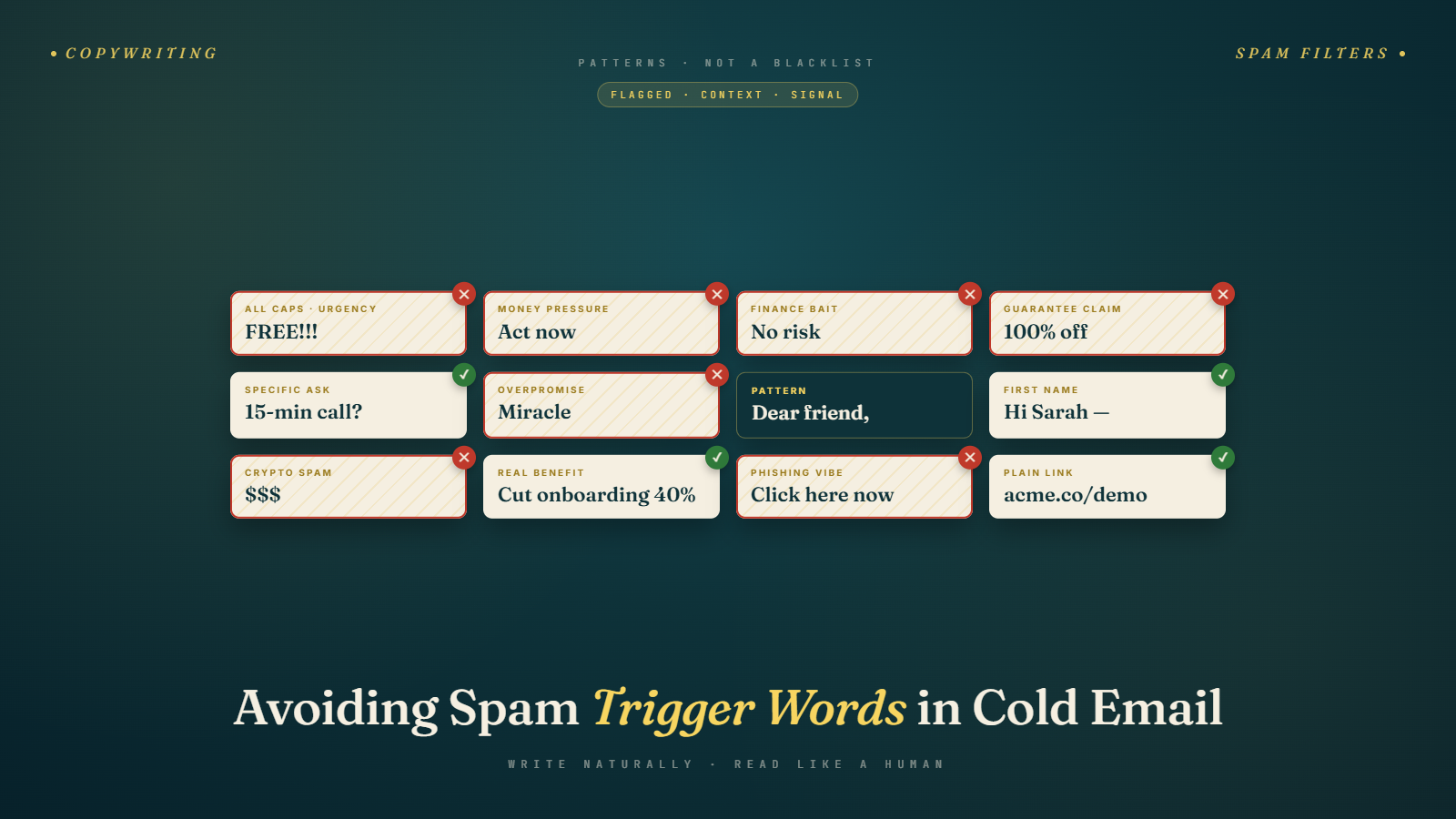
- "Free money" / "Free gift" / "Free offer" / "No cost"
- "Make money" / "Earn money" / "Extra income"
- "Risk-free" / "No risk" / "Guaranteed"
- "Act now" / "Limited time" / "Expires soon" / "Don't delay"
- "Save big" / "Special promotion" / "Exclusive deal"
- "100% free" / "Absolutely free"
These terms appear so frequently in spam that their presence alone elevates your spam probability score significantly, even in otherwise legitimate emails.
What to do instead: If you're offering something free (a demo, a trial, a resource), describe it specifically rather than using "free" as the hook. "Would it be useful if I sent over a worked example from a similar company?" is different from "Get your FREE analysis now!"
Category 2: Fake Familiarity and Misleading Headers
These patterns are designed to trick the recipient into opening an email by implying a prior relationship or correspondence.
High-risk patterns:
- "RE:" or "FWD:" in subject lines when there's no actual prior thread
- "Following up on our conversation" when there was no prior conversation
- "As we discussed" / "Per our last call"
- "You signed up for..."
Using these patterns when there's no real context is deceptive — spam filters know this and penalize it. More importantly, when a prospect opens the email and realizes there was no conversation, you've permanently damaged trust.
Category 3: Excessive Promotional Language
These are the phrases that make an email sound like a mass marketing campaign rather than a personal outreach.
High-risk terms:
- "Best price" / "Lowest price" / "Unbeatable offer"
- "Click here" / "Click below" / "Visit our website"
- "Order now" / "Buy now" / "Sign up today"
- "Increase sales" / "Boost revenue" / "Grow your business"
- "Take advantage of" / "Don't miss out" / "This is your chance"
- "Winner" / "You've been selected" / "Congratulations, you've won"
Even when used in a legitimate B2B context, these phrases carry spam signal weight because of their association with bulk promotional email.
Category 4: Spam Signal Phrases in B2B Disguise
These are subtler patterns that appear in B2B cold email specifically but still trigger filters:
- "Unlimited" (as in "unlimited leads" or "unlimited access")
- "Guarantee" (especially "we guarantee results")
- "100%" (as in "100% success rate")
- "Number one" or "#1" in claims
- "Perfect solution for you" / "Tailored specifically for you"
- "Multi-level" / "Work from home" / "Opportunity"
Category 5: Formatting-Based Spam Signals
These aren't words but formatting patterns that spam filters flag:
- ALL CAPS words or sentences — associated with shouting/scam tactics
- Excessive exclamation points!!!
- Multiple different font sizes and colors — signals HTML marketing template
- Large image files — image-heavy emails are more likely to be filtered
- Multiple links in one email — especially link shorteners or redirect links
- Dollar signs followed by numbers — "$5,000 savings inside"
- Overuse of bold and italics for emphasis throughout the email
The safest formatting for cold email is plain text, or near-plain text — minimal HTML, no images (or one small signature image), limited links, consistent font.
Words That Are Fine in Context
Here's an important nuance: many words that appear on "spam word lists" are fine in normal professional usage. The issue is density, context, and combination — not the word in isolation.
"Free" used once in a normal sentence context ("I'm happy to send this resource for free if that's helpful") is very different from "FREE TRIAL — CLAIM YOUR FREE ACCESS NOW."
"Guarantee" used once in a professional context ("I can't guarantee it'll be the right fit, but worth 15 minutes to check") is different from "GUARANTEED RESULTS OR YOUR MONEY BACK."
Spam filter sophistication means they're evaluating pattern and density, not just presence. Writing naturally and professionally, without stacking multiple spam signals in one email, is generally sufficient to stay out of the filter even if a handful of context-appropriate flagged words appear.
The Technical Foundation You Can't Ignore
Content is one dimension of deliverability. Even with perfect copy, you can land in spam if the technical foundation is broken.
Email authentication (SPF, DKIM, DMARC): These are DNS records that tell receiving mail servers your email is coming from an authorized sender on behalf of your domain. If these aren't set up correctly, your email looks unauthenticated — a major spam signal.
Domain and IP reputation: If your sending domain has a poor reputation — either from past high bounce rates, spam complaints, or blacklisting — new emails from that domain will be filtered regardless of content.
Sending volume ramp: Sending 500 emails on day one from a brand-new domain is a spam signal. Mail servers expect legitimate senders to start slowly and build volume gradually. This is why domain warm-up matters.
Engagement history: If your previous campaigns have had poor engagement (emails sent but not opened, immediately deleted, or marked as spam), future emails from that domain carry more risk.
None of this is fixed by better copy — it requires fixing the sending infrastructure. How to Verify Emails and Reduce Bounce Rate covers the bounce rate dimension. For full sender reputation repair, you typically need a combination of cleaning your list, improving your authentication, and gradually re-establishing sending history with a warm, engaged audience.
The Link Density Problem
Most cold email copywriting advice focuses on words — what to avoid saying. But links are just as important a spam signal, and they're consistently underappreciated.
Here's the issue: spam emails typically contain multiple links. They link to landing pages, unsubscribe pages, tracking pixels, image CDNs, and promotional URLs. Spam filters have learned this pattern. An email with 4+ links is statistically more likely to be spam than an email with 1 link or no links.
For cold email, the practical implications:
One link maximum in your initial email. If you include a link, make it count — a relevant case study, a calendar link if appropriate, your LinkedIn. Don't include your website, a product tour, a resource library, and a Calendly link all in one email.
Prefer plain text links over hyperlinked anchor text. A plain URL (https://company.com/case-study) is slightly less flagged than formatted hyperlink text. Many cold email practitioners avoid anchor text links entirely in first emails.
Avoid link shorteners. Bitly, TinyURL, and other link shorteners are heavily associated with spam and phishing. Mail servers and spam filters flag them aggressively. Always use direct domain links.
Tracking pixels count as links. If your sending platform auto-embeds a tracking pixel for open tracking, that's a link. Some practitioners turn off open tracking entirely on cold email to reduce this signal, accepting that they lose open rate data in exchange for better deliverability.
Signature links. Your email signature typically contains at least 1–2 links (website, LinkedIn). Those count toward your link density. A signature with 4 links plus 2 links in the email body puts you at 6 total — firmly in the spam-risk range.
The safest cold email from a link-density standpoint: no links in the body, one link maximum in the signature. If you need to reference something, do it in text and offer to send the link if they're interested.
Testing Your Emails Before You Send
Before running any significant cold email campaign, test your email for spam score.
Tools for spam testing:
- Mail-Tester (mail-tester.com): Send your email to a test address they provide, and they return a detailed spam score breakdown showing what's flagged and why.
- GlockApps: More sophisticated inbox placement testing that shows where your email will land across multiple providers (Gmail, Outlook, Yahoo, etc.).
- Litmus: Comprehensive email testing including spam and rendering across clients.
- MXToolbox: Good for checking domain authentication (SPF, DKIM, DMARC) and blacklist status.
A spam score test takes five minutes and can save you from sending a campaign that's going to land in spam. Run it on every new email template before you deploy it at scale.
Also: send test emails to your own Gmail and Outlook addresses and check where they land. Primary inbox, Promotions tab, or Spam? This is the fastest real-world test.
The Promotions Tab Problem
Gmail's Promotions tab is a separate inbox area where Gmail routes emails it determines are promotional. It's not spam — users can still find these emails — but open rates in Promotions are significantly lower than in Primary.
For cold email, landing in Promotions instead of Primary is a meaningful problem. Gmail uses a combination of signals to route emails:
- HTML formatting — highly designed HTML emails almost always go to Promotions
- Unsubscribe links — if you're using a mass email tool that auto-adds unsubscribe links, that's a Promotions signal
- Multiple links — links to landing pages, tracking pixels, and URLs signal marketing email
- Large sender volume — sending hundreds of emails from one account quickly
Plain-text cold emails sent from a personal-style sending account (mike@company.com) with minimal links are much more likely to land in Primary than heavily formatted HTML campaigns. This is one of the strongest arguments for keeping cold email copy clean and simple.
Writing Naturally Without Triggering Filters
The best way to avoid spam trigger words isn't to memorize a list — it's to write the way you'd write a professional email to someone you know. If a sentence sounds like something from a promotional flyer or an infomercial, it probably contains spam signals. If it sounds like something you'd write to a colleague, it's probably fine.
Quick self-test: Read your email out loud and ask: "Would I say this in a business conversation?" If the answer is no — if you wouldn't actually say "Act now before this limited opportunity expires" in a conversation with a potential client — don't write it.
Second test: Would this sentence feel at home in a cold email from a trusted peer? Or does it feel like it belongs in a promotional newsletter? The register matters enormously.
The emails that get through spam filters consistently are the ones that look and read like personal, professional correspondence — because that's what they're trying to be.
The Spam Complaint Problem
Beyond spam filters, there's another deliverability threat that's even more damaging: spam complaints.
When a recipient marks your email as spam — by clicking the "Report spam" button in Gmail or Outlook — it sends a direct signal to their mail provider that your email was unwanted. A high spam complaint rate (above 0.1% in Gmail's Postmaster Tools) will significantly damage your sender reputation and may result in your domain being throttled or blocked.
Spam complaints happen for several reasons:
Irrelevant targeting: The email was clearly not meant for this person. It wasn't personalized, it wasn't relevant to their role, and they had no good reason to respond — so they reported it instead. This is fundamentally a list quality problem, not a content problem. Revisit your ICP definition and prospect list building if you're seeing high complaint rates.
Frequency harassment: Too many follow-ups, too close together, without enough value between them. A prospect who's been in your sequence for 4 weeks and has received 8 emails is much more likely to hit "report spam" out of frustration. Respect the cadence — don't hammer.
No easy unsubscribe: When someone wants to get off your list and can't easily find a way to do it, "report spam" becomes the only option they have. Include a simple one-line unsubscribe option at the bottom of your emails ("Reply 'unsubscribe' to remove yourself from this list"). It reduces friction for opting out and protects your complaint rate.
Email tone/content mismatch: Sending something that looks like promotional email to someone who didn't opt in to receive promotional content creates a legitimate complaint. Cold email that reads like a newsletter is more likely to be reported than cold email that reads like a professional inquiry.
What Spam Avoidance Looks Like in Practice
Here's a before/after showing how to clean up spam-risk language:
Before: "Act now and claim your FREE demo today! Our solution GUARANTEES a 100% improvement in your email deliverability. Don't miss out on this limited-time opportunity to boost your revenue and make more money from your email campaigns."
After: "If your team is seeing bounce rates climb on cold email campaigns, we've helped a number of similar teams get back under 1% within a few weeks. Happy to walk through how it works if that's relevant."
The second version says something real, is specific, and reads like a human wrote it. The first version is a collection of spam triggers and would be filtered before any human saw it.
Next up: Cold Email Templates for Different Industries — Phase 3 wraps up with ready-to-adapt templates across major B2B verticals, built on everything we've covered.