
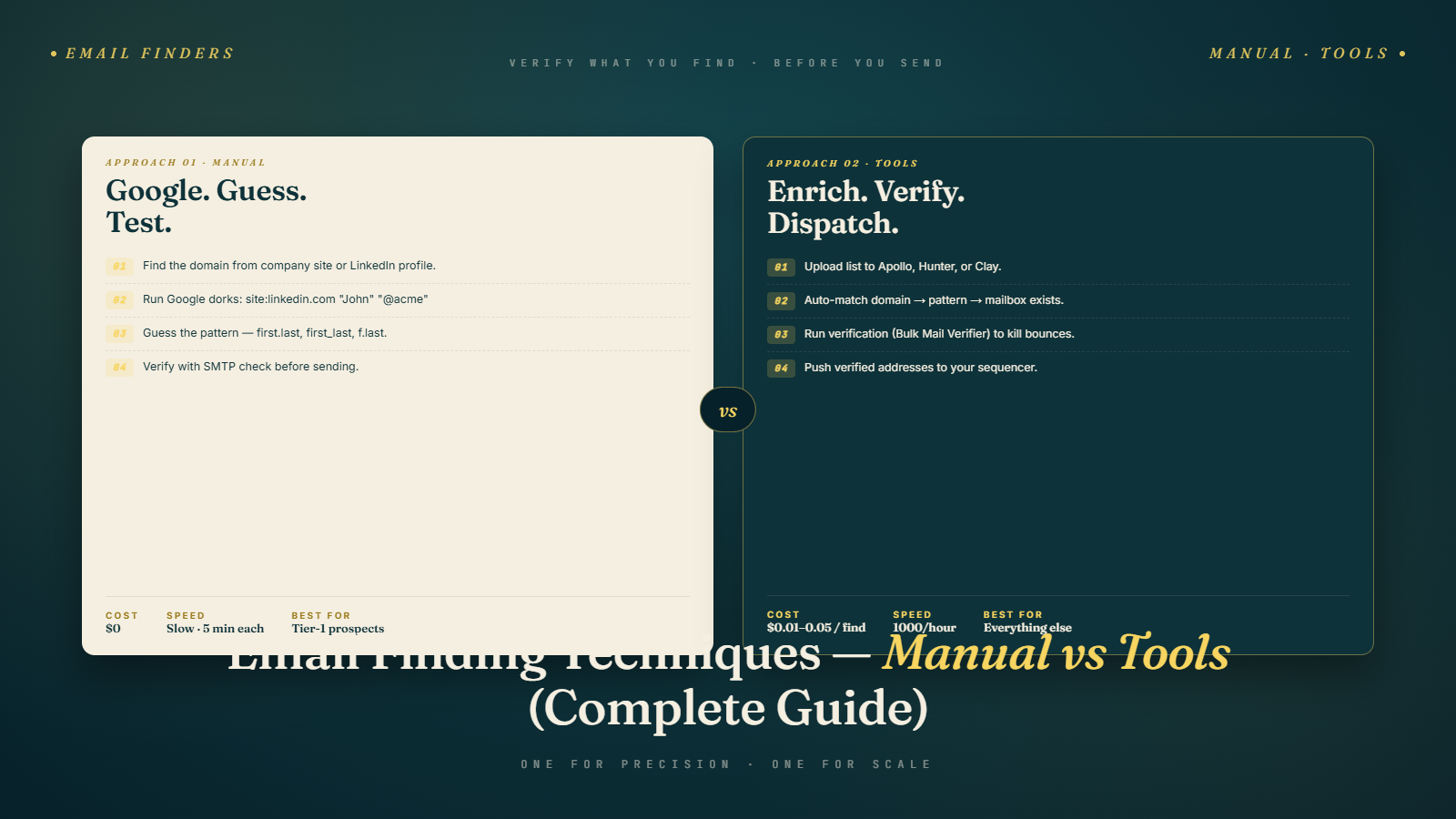
The Email Address Problem
You've built your target account list. You've identified the right contacts using LinkedIn. You know the company, you know the person, you know they're a strong ICP match. Now comes the step that stops a lot of people cold: you need their email address.
It sounds like it should be the easy part, right? In practice, it's one of the most frustrating parts of the cold email process. Some people are findable in 30 seconds. Others seem to have made a deliberate effort to be unfindable. And then there's the accuracy problem — even when you find an address, you're not always sure it's current and deliverable.
This guide covers every practical method for finding email addresses, from the free and manual to the automated and tool-based. We'll look at what each method is good for, where it fails, and how to verify what you find so it doesn't blow up your sender reputation.
This is a direct continuation of LinkedIn Prospecting: Step-by-Step Guide — once you've found the right person on LinkedIn, this is how you find their actual contact information.
Method 1: The Company Website
It sounds obvious, but you'd be surprised how often the email address is sitting right there on the company's website and people don't look.
Where to check:
- The "Contact Us" or "About Us" page
- Individual team member profiles (common on smaller company sites)
- The blog or resource section (authors sometimes have a bio with contact info)
- The footer (some companies list a general contact or press email)
- Press releases and case studies (often have a contact email for media inquiries)
Limitations: This mostly works for small companies where individuals are prominently featured on the site. Mid-market and enterprise companies rarely list individual employee emails.
Pro tip: Even if you only find a general email format (like info@company.com or press@company.com), you may be able to infer the pattern used for individual addresses. Which brings us to the next method.
Method 2: Email Pattern Inference
Most companies use a consistent format for all employee email addresses. The most common patterns are:
- firstname@company.com
- firstname.lastname@company.com
- f.lastname@company.com
- flastname@company.com
- firstname_lastname@company.com
- lastname@company.com
If you know one person's email at the company, you know everyone's. And often, you can find at least one email address on the company website, in a press release, in a LinkedIn post, or in a public document.
How to find the pattern:
- Look for any publicly listed email from the company (often an author email on a blog post, a conference speaker bio, a job listing contact)
- Check tools like Hunter.io — their free tier will show you the email pattern for a domain and a confidence score
- Search Google for
site:company.com "@company.com"— sometimes the email pattern is embedded in page metadata, PDFs, or team pages
Once you know the pattern, building the address for your specific contact is trivial. You just need their first and last name (which LinkedIn provides easily).
Method 3: Google Search Operators
Google can find email addresses that aren't obviously surfaced anywhere. The trick is using search operators to be precise.
Useful search queries:
"firstname lastname" "company.com" email — A basic search that finds pages mentioning the person alongside their company domain and the word email.
site:company.com "firstname" — Looks for the person on the company's own website.
"firstname lastname" "@company.com" — Searches for the email address pattern directly.
"firstname lastname" site:linkedin.com OR site:twitter.com OR site:company.com — Casts a wider net across platforms.
"firstname lastname" filetype:pdf "@company.com" — PDFs (like whitepapers, reports, and presentations) often contain email addresses that aren't on the main website.
This takes some patience but can surface email addresses that no tool has indexed. It's particularly effective for people at niche companies or in markets underrepresented in major databases.
Method 4: Email Finder Tools
For most outbound teams doing prospecting at any meaningful scale, manual methods aren't sustainable. This is where email finder tools come in.
These tools have indexed email addresses from around the web — websites, social profiles, public records, corporate directories — and give you a searchable database matched to names and companies.
Hunter.io
Hunter is one of the most widely used email finder tools, and for good reason. It's reliable, well-designed, and has a generous free tier (25 searches/month free).
What it does well:
- Domain search: enter a company domain and get a list of all email addresses Hunter has found, plus the email pattern
- Email finder: enter a name + company domain and Hunter guesses the address using the detected pattern
- Bulk email finding: upload a CSV with names and domains and Hunter processes the whole list
- Email verification built in (basic level)
Limitations: Hunter's coverage isn't perfect, especially outside English-speaking markets. And like all tools, it can have outdated data.
Snov.io
Snov.io is a solid all-in-one prospecting and email finding platform that combines email discovery, verification, and sequencing in one tool.
What it does well:
- LinkedIn integration: the Chrome extension finds emails directly from LinkedIn profiles
- Domain search: similar to Hunter but with different source coverage
- Email drip campaigns built in (if you want prospecting and sequencing in one place)
- B2B contact enrichment
Limitations: Accuracy can vary. You'll want to verify anything it finds before using it in a campaign.
Apollo.io
We covered Apollo in the data sources guide as an all-in-one B2B database, but its email finding capability deserves mention here. Apollo's Chrome extension works on LinkedIn profiles and company websites to surface email addresses directly in your browser.
For teams already using Apollo for prospecting, using it for email finding too is a natural fit since you're working in one ecosystem.
Lusha
Lusha's browser extension is particularly strong for finding direct phone numbers alongside email addresses — useful if you're running a multi-channel sequence that includes cold calling alongside cold email. We covered Lusha in more detail in the data sources guide.
RocketReach
RocketReach aggregates contact data from a wide variety of public sources. It often surfaces emails for senior executives who are harder to find in databases like Apollo.
Best for: Finding C-suite and senior leadership contacts at mid-market and enterprise companies.
Clearbit Connect
Clearbit's Gmail extension lets you search for email addresses directly in your inbox. Good for one-off lookups; less useful for bulk prospecting.
Method 5: LinkedIn Premium / InMail
If you truly can't find a valid email address for a high-value prospect, LinkedIn InMail is a fallback worth considering. Sales Navigator includes 50 InMail credits per month.
InMail bypass the need for an email address entirely — you're messaging within LinkedIn. Response rates vary significantly. For very senior prospects who are active on LinkedIn, InMail can work well. For everyone else, cold email tends to outperform.
Think of InMail as a supplement to cold email, not a replacement. And if someone responds to your InMail, move the conversation to email as quickly as possible so you can run your structured follow-up sequence.
Method 6: Twitter/X and Other Social Platforms
Some professionals, particularly in marketing and tech, list their email in their Twitter/X bio or pin it in a post. It's not a systematic method, but it's worth a 10-second check for any high-value prospect who's active on social.
Similarly, some personal websites and portfolio sites list contact emails. If a prospect has a personal brand, their personal site is often your best source.
Method 7: Mutual Connections and Warm Intros
This isn't technically "finding" an email, but it's worth including because it's often more effective than cold emailing:
If you share a mutual connection with a prospect, ask for an introduction. A warm intro from a shared contact dramatically increases the probability of a reply. The email from your mutual connection serves as both a delivery vehicle and a trust signal.
Check LinkedIn for mutual connections before you go the cold email route for your highest-value targets.
Manual vs. Tools: When to Use Each
Here's an honest breakdown:
| Scenario | Best Approach |
|---|---|
| Individual high-value target, big deal | Manual research (Google, LinkedIn, company site) |
| Batch of 50–500 ICP-matched prospects | Email finder tool (Hunter, Snov.io, Apollo) |
| Senior executive at a large enterprise | RocketReach, manual, or mutual connection intro |
| Fast bulk prospecting for SMB outreach | Apollo or Snov.io with bulk processing |
| European market compliance concerns | Cognism (built-in GDPR-compliant data) |
| Unknown email pattern, niche company | Google search operators + Hunter domain search |
The pattern I use: for any batch of prospects, I run through a database tool first (Apollo for US tech, Cognism for EMEA). Whatever doesn't return a result, I process through Hunter.io with a domain search to check the email pattern and guess the address. For my top 5–10% of highest-value targets, I do a quick manual check to make sure the guess is right.
What to Do After You Find an Email Address
Finding an email is not the end of the process. Before you add it to any sending tool, verify it.
Here's why this matters: even a well-matched address from a reputable tool might be outdated, a catch-all, a shared alias, or simply wrong. The difference between a 1% bounce rate and a 5% bounce rate can mean the difference between a healthy sending domain and one that's on a blacklist.
Email verification tools check whether an email address is valid and likely to deliver without actually sending anything. The process typically checks:
- Format validity — Is this even a correctly formatted email address?
- Domain validity — Does the domain exist and have valid MX records?
- Mailbox existence — Does this specific mailbox exist on the server?
- Catch-all detection — Does the server accept all emails regardless (catch-all), making it impossible to confirm individual mailboxes?
- Disposable/role-based detection — Is this a temporary address or a shared role alias (like info@, support@)?
BulkMailVerifier handles all of this in bulk — you can upload a list of hundreds or thousands of emails and get results back in minutes, with each address categorized so you know exactly what's safe to send to. We go into the full detail on verification in the next article in this series: How to Verify Emails and Reduce Bounce Rate.
For now, the rule is: never send to an email you haven't verified. Even if you found it on LinkedIn. Even if Apollo said it was "verified." Verify again with a dedicated tool.
Handling Catch-All Domains
Catch-all domains (also called "accept-all" domains) are domains where the mail server is configured to accept emails sent to any address at that domain, regardless of whether the mailbox exists. This means a verification tool can't confirm whether the specific address is real — the server accepts everything.
About 20–30% of company domains are catch-all. That's a lot of uncertainty.
Your options when you encounter a catch-all:
Option 1: Skip them. If you have enough other verified prospects, don't send to catch-alls at all. Your bounce rate will be lower and your deliverability will be cleaner.
Option 2: Send at low volume. If the company is a strong ICP match and you really want to reach them, send a small batch to catch-all contacts and monitor the bounce results closely. If the actual bounce rate is low, continue. If it's high, stop.
Option 3: Try to verify differently. Sometimes you can verify a catch-all address by using a secondary lookup tool that approaches verification from a different angle.
For most campaigns, I recommend skipping catch-alls unless you have a very small list where every contact really matters.
When You Genuinely Can't Find an Email
Some prospects are just hard to find. Senior executives at large companies, founders who deliberately keep a low profile, and people at organizations with strict security postures sometimes don't have findable email addresses.
Here's what to do when every standard method fails:
Try a different format. If the standard firstname.lastname@company.com returns nothing, try the other common patterns manually: flastname@, firstname@, f.lastname@, etc. Run each variant through a quick verification check to see which one passes.
Look for a secondary contact at the same company. Sometimes you can find an email for someone else at the company first, confirm the pattern, and then construct the harder-to-find address from the pattern.
Use LinkedIn InMail as a fallback. If you have Sales Navigator, this is one of the legitimate uses for InMail credits — reaching out to a high-value prospect whose email you simply can't find anywhere.
Try the company's general inbox first. For small companies where the founder is likely checking everything, an email to hello@ or the contact form sometimes works. Keep it short and explicitly ask them to forward it to the right person or confirm the best address to use.
Revisit your priority tier. If a prospect is truly unfindable and the deal potential isn't large enough to justify significant time, move on. There are always more prospects on the list. Spending an hour chasing one email address when there are 50 other verified contacts waiting is a bad trade.
The key insight: your time spent finding emails should scale with deal value. Be systematic for your whole list but manual and creative only for your highest-priority targets.
Common Email Finding Mistakes
Mistake 1: Not Verifying Guessed Addresses
If you used email pattern inference to construct an address, that address might be wrong. The person might have a nickname, a middle initial in their email, or an exception to the usual pattern. Always verify.
Mistake 2: Relying on One Tool
Each email finder has gaps. Layer at least two tools before giving up on finding an address for a high-value prospect.
Mistake 3: Using Role-Based Emails
info@, hello@, support@, sales@ — these are shared inboxes, not personal emails. They're almost never monitored by a decision-maker, rarely result in responses, and can hurt your deliverability. Avoid them.
Mistake 4: Treating "Catch-All" as "Valid"
A catch-all domain does not mean the address is valid. It means the server accepts everything. Treat catch-alls as unknown, not valid.
Mistake 5: Not Checking for Recency
An email address that was valid 2 years ago may not be valid today. If your data is old or came from a source that doesn't update regularly, re-verify before using it.
Putting It Together
Finding email addresses is a workflow, not a single tool. The best results come from layering methods:
- Check your primary database tool (Apollo, ZoomInfo, etc.) for email addresses
- Cross-reference with Hunter.io to confirm the email pattern and fill gaps
- For high-value targets, do a quick manual check (LinkedIn, company site, Google)
- After finding, verify every address with a bulk verification tool
- Remove or flag invalid, risky, and catch-all addresses before loading into your sending platform
Once you've got a list of verified, accurate email addresses for ICP-matched contacts, you're ready to focus on deliverability — specifically, how to keep your bounce rate low and your sender reputation strong.
Up next: How to Verify Emails and Reduce Bounce Rate — everything you need to know about email verification, bounce rates, and protecting your sending domain.