
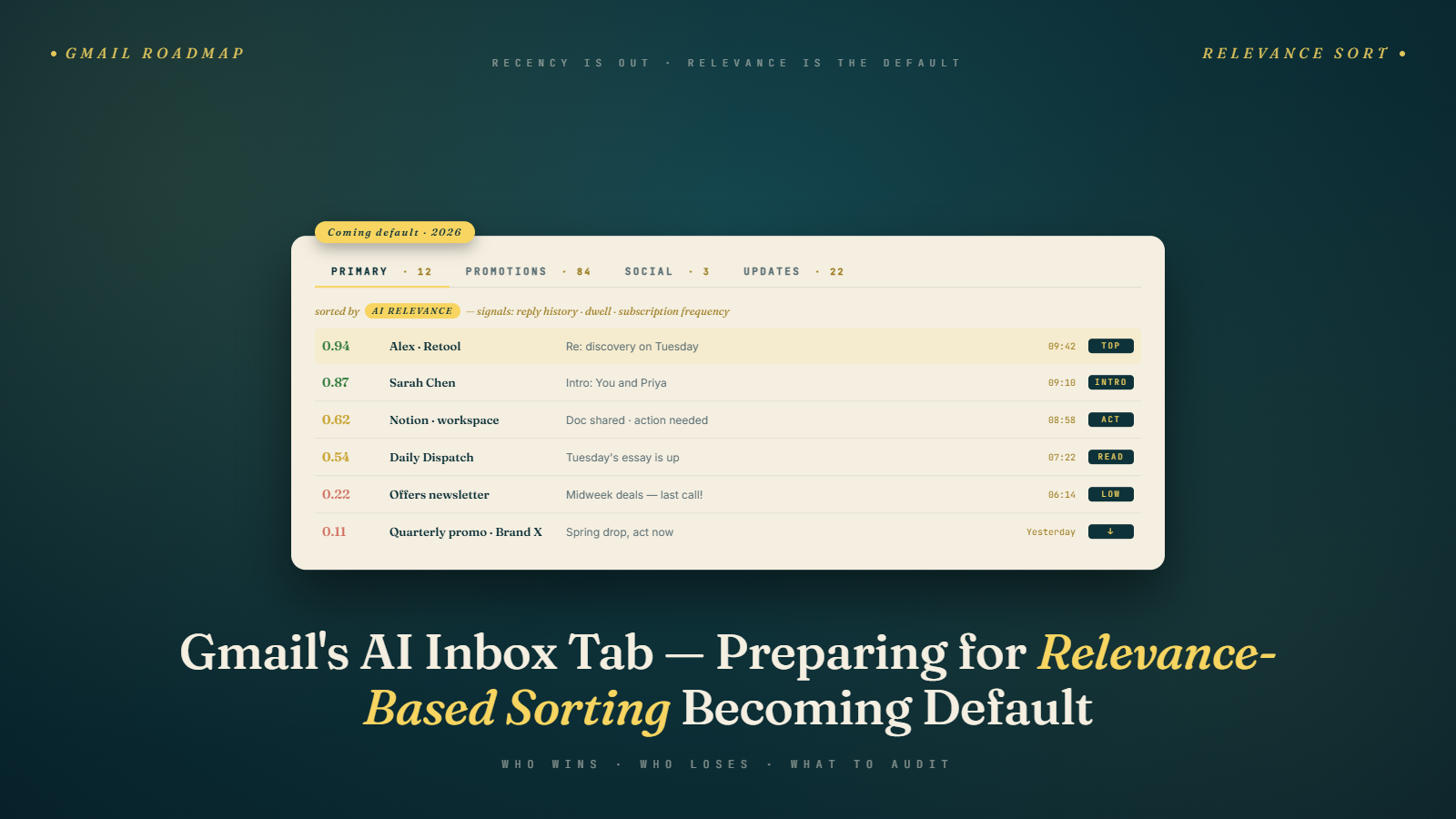
My personal Gmail account looks different this morning than it did six weeks ago. The Primary tab is no longer ordered strictly by recency. An email from my travel agent from Tuesday sits above a newsletter sent this morning. A reply thread with my accountant sits above a transactional receipt. I did not change any settings. Gmail did, quietly, for my account, as part of what Google is rolling out as relevance-based sorting.
The rollout is gradual and, at the time of writing, still partial. My team has tracked the change across roughly 40 monitored inboxes on Google Workspace and personal Gmail. We are seeing it on about 55 percent of accounts and growing weekly. The trajectory is clear. By late 2026, relevance sorting will likely be the default experience for most Gmail users, and the old Promotions tab will look like a quaint artifact.
If that sounds dramatic, consider what it means for an email marketer. Recency was a signal you could control by sending at the right time. Relevance is a signal you can only influence by earning engagement over months. The tools changed. The preparation has to change with them.
What Signals Gmail Is Actually Using
Google has not published a full list. What we can infer from observed behavior, from Postmaster Tools data, from public statements at events like M3AAWG, and from patterns across thousands of monitored sends.
Engagement history is the heaviest weight. If a subscriber opens, clicks, replies to, or stars your messages consistently, your new sends appear higher in their inbox. If a subscriber has not opened you in 60 days, your next send may not even appear above the fold. This is not a tab relegation. It is an in-tab suppression.
Content relevance scoring matters next. Gmail's models appear to score whether the email content matches the recipient's interests based on their own email reading behavior, their Google activity, and their stated preferences. A tech enthusiast who reads hardware reviews will see hardware newsletters surfaced higher. The same newsletter sent to someone whose inbox is dominated by parenting content will sink.
Sender relationship strength influences placement. One-to-one correspondence with actual back-and-forth pushes threads to the top. Bulk mail with consistent engagement sits below. Bulk mail with weak engagement sits further down. The hierarchy mirrors what humans actually care about.
Frequency fit plays a role I did not fully appreciate until we started testing. Sending three times a week to a subscriber who engages once a month appears to suppress placement. Sending twice a month to that same subscriber holds placement better. Gmail seems to detect the mismatch between what you send and what the recipient actually reads, and it adjusts.
Recency still matters, just less than it did. A brand new email from a high-engagement sender will still appear near the top. But a brand new email from a low-engagement sender may sit below a three-day-old message from a sender the user actually cares about.
How This Differs From The Old Promotions Tab
The Promotions tab was a category. Marketing mail went there. Transactional mail went to Primary. The rules were blunt but they were predictable. You could structure templates to influence categorization, avoid certain elements, reduce image-to-text ratio, and change placement.
Relevance sorting is not a category. It is a ranking. Within every tab, including Primary, emails get ordered by a relevance score that is personalized per recipient. Your newsletter might rank high in Primary for one subscriber and low in Promotions for another. There is no universal "Promotions tab problem" anymore. There is a per-recipient placement problem.
This is actually worse news for mediocre senders and better news for good senders. In the old model, you could land in Promotions and reach the subset of users who checked that tab. In the new model, if your engagement signals are weak, you do not land in Promotions. You land at the bottom of Primary, where users do not scroll. The floor is lower.
In the old model, a strong sender in Promotions still had a visibility ceiling. In the new model, a strong sender can ride engagement signals all the way to the top of Primary regardless of template formatting. The ceiling is higher.
Senders Who Benefited And Senders Who Got Crushed
We have been tracking placement for 140 active sender programs since December 2025. The picture is consistent across verticals.
Senders with 20 percent plus engaged read rates, low complaint rates (below 0.1 percent as our complaint rate ceiling post covered), and a history of consistent reply generation saw placement improve. One B2B SaaS client of mine saw their weekly product update move from roughly 40 percent Primary tab placement in Q4 2025 to 71 percent in March 2026. Nothing else changed. Their engagement was already strong. Gmail just started weighting it more.
Senders with engagement under 10 percent got crushed. A retail client sending five times a week to a large list with roughly 6 percent engaged read rate watched their Primary tab placement collapse from 28 percent to 9 percent in the same window. Same list, same creative. The AI decided their subscribers did not actually want what was being sent, and acted accordingly.
High-frequency senders with moderate engagement were the most interesting segment. They held placement better than low-engagement senders but worse than high-engagement senders, and their placement was highly volatile week to week. The AI appears to be actively recalibrating whether the frequency matches actual interest, and placement swings accordingly.
Low-frequency senders with moderate engagement held up well. A client sending once a month to a loyal audience of roughly 18,000 subscribers saw essentially no placement change. They were never going to be kings of the inbox, and they did not fall either. Gmail seems to reward consistency and match of frequency to interest.
Auditing Placement With Test Accounts
You need eyes on actual placement. ESP reports will tell you opens and clicks but not where your email sat in the inbox. Here is the framework I use with clients.
Set up 8 to 12 monitored Gmail accounts that mirror your real audience behaviors. Not bots. Actual accounts you use, or that a provider like GlockApps, Inbox Monster, or Everest operates. Some accounts should have full engagement profiles, opening, clicking, replying to messages like your target subscriber would. Some should be dormant. Some should engage only with transactional messages. You are building a spectrum.
For every send, capture screenshots of each account's inbox within 30 minutes of delivery. Record the position of your message: top of Primary, middle of Primary, bottom, Promotions, Updates, Spam. Track this over time in a spreadsheet.
Correlate placement with engagement metrics on each monitored account. If the account with high engagement puts you at the top and the account with low engagement puts you at the bottom, you are seeing relevance sorting work as expected. Good news: your fundamentals matter. If placement is random or inverse, something else is going on, authentication, reputation, content scoring.
Run the test weekly, not monthly. Placement behavior shifts as Gmail updates its models. A baseline from November 2025 is already stale.
Postmaster Tools Domain Reputation And AI Relevance
Domain reputation in Postmaster Tools is not a direct input to AI relevance sorting, but it is a strong correlated signal. Here is what we have observed.
Senders with "High" reputation almost never land in Spam, and they see the full benefit of positive engagement signals translating into Primary placement. The AI trusts them, the user's history elevates them.
Senders with "Medium" reputation see more volatile placement. Their messages get delivered but they lose the tiebreakers. If the user has not engaged recently, Medium reputation messages sink further than High reputation messages with the same engagement profile.
"Low" and "Bad" reputation senders may be delivered to inbox but their placement is so poor that open rates look like spam folder placement even when they are not. I have seen Bad reputation senders deliver to inbox with an effective open rate under 1 percent because nobody scrolled far enough to see them.
The practical implication: chase High reputation in Postmaster Tools relentlessly. Fix authentication. Fix complaint rates. Fix list hygiene. If you skip this and try to win on relevance signals alone, you will lose tiebreakers and your engaged subscribers will never see you. We covered the authentication side of this in our Gmail 550 rejection post.
What Frequency Looks Like When Gmail Is Watching
Here is the contrarian take: for most senders, you should be sending less than you are. Not because your audience is fragile, but because Gmail's relevance signals now include a frequency-to-engagement match. Sending to inactive subscribers does not just waste a send. It actively suppresses your placement for the engaged subscribers on the same list.
A fashion retailer client of mine sends five times a week. Their engaged segment (top 25 percent by recent opens) sees every email. Their middle segment sees maybe 30 percent of sends in a visible position. Their bottom segment barely sees any. When we cut sends to the bottom segment entirely and ran a re-engagement sequence to the middle, the engaged segment's CTR jumped 19 percent in four weeks. Removing the dead weight improved placement for the live audience.
The math works because relevance sorting is personalized. You are not competing for a single inbox placement. You are competing for each recipient's attention model. Every subscriber who opens your mail and does nothing is a minor negative signal. Suppress those sends, or trim those subscribers, and your signal cleans up.
Read our piece on spam complaint rate ceilings and the 48-hour unsubscribe rule if you have not already. The fundamentals they describe are the same fundamentals that now determine AI placement.
The Mistakes That Still Show Up in Audits
Across the client programs I have audited through Q1 2026, a few mistakes keep appearing despite the signals being reasonably clear.
Treating placement as a one-time project. A program that audits placement in January, makes some changes, and does not look again until June discovers that Gmail's model has drifted and their placement has drifted with it. Placement monitoring needs to be continuous, not episodic. The team that watches placement weekly catches degradation early. The team that watches quarterly catches it after it has compounded.
Relying on ESP open rate metrics as the health signal. Open rate inflation from Gemini prefetching (covered in the post on the death of the open rate) means a program can look healthy in ESP reports while their actual placement and human engagement are sliding. The relevance sorting system does not care what your ESP reports. It cares about what subscribers actually do with your messages.
Sending the same cadence to everyone because "the list is a list." Relevance sorting exposes this approach. A subscriber in your engaged top tier who opens four times a week and a subscriber in your bottom tier who has not opened in five months cannot be served the same frequency without degrading placement for the engaged tier. The tooling to segment by engagement exists in every major ESP. Using it is usually the difference between placement that compounds positively and placement that compounds negatively.
Treating reply rate as a vanity metric. Programs that never ask for replies leave the strongest positive signal on the table. A weekly email that ends with a genuine question and a monitored reply address generates an engagement signal the AI weights heavily. The subscribers who reply become higher-priority in the AI's model for future sends, which elevates placement for everyone else on the list too. This ties directly to the thought leadership email format that has been outperforming traditional promotional sends in 2026.
The Short Answer For Snippets
Gmail's AI inbox sorting ranks messages by personalized relevance, not recency. Primary signals include engagement history with the sender, content match to recipient interests, sender relationship strength, and frequency-to-engagement fit. Senders with high engagement and low complaints ride to the top. Senders with weak engagement get in-tab suppressed, not tab-relegated, which is worse. Domain reputation in Postmaster Tools remains a foundational requirement even if it is not a direct input.
What I Recommend Building Now
You need a placement monitoring program, not a one-off test. Pick a monitoring tool or stand up your own with a small panel of monitored Gmail accounts. Capture placement weekly. Correlate with Postmaster Tools data. Build a dashboard.
You need a segmentation strategy that matches sends to engagement. If you are sending the same cadence to everyone, you are suppressing your own placement. Cut sends to low-engagement segments. Keep your top 25 percent on full cadence. Put the middle on a reduced schedule. Re-engage or remove the bottom.
You need to fix your reply rate. Reply rate is the cleanest positive signal available and most senders ignore it. Ask questions. Offer a real human reply address. Make the reply the point of at least some of your sends. Our engagement metrics post goes deeper, but the short version: one reply is worth twenty opens.
You need to audit your template library for summarization resistance and engagement incentive design. Emails that give away all their value in the preview or first screen do not earn clicks in an AI-mediated inbox.
What To Do Tomorrow Morning
Open Postmaster Tools. Check your domain reputation. If it is not High, put a fix plan on the calendar this week. Open your ESP and pull engagement metrics for your last 90 days segmented by engagement recency. Identify the bottom 25 percent of your list and suppress them from your next three sends. Watch what happens to your open and click rates on the top 75 percent. If the pattern holds, you will see the numbers move within two weeks. That will be your first real signal that relevance sorting is rewarding you.
Pair the suppression with list hygiene. The bottom 25 percent of your engagement distribution often contains addresses that have been drifting toward stale and that will eventually produce bounces or complaints if you try to reactivate them. Running that segment through email verification before any re-engagement attempt catches the dead addresses and leaves you with a list you can segment cleanly. Relevance sorting rewards programs that act like the engaged subscribers are the program, with the rest being optional. Start acting that way before Gmail's model forces you to.