
A client called me in a panic last spring. Their open rates had dropped by half overnight. Nothing had changed in their templates, their list, or their sending schedule. What had changed was their spam complaint rate, which had been sitting at 0.28% for two weeks. They thought they were fine because they'd read that Google's threshold was 0.30%. They were wrong, and that misreading cost them three weeks of degraded inbox placement.
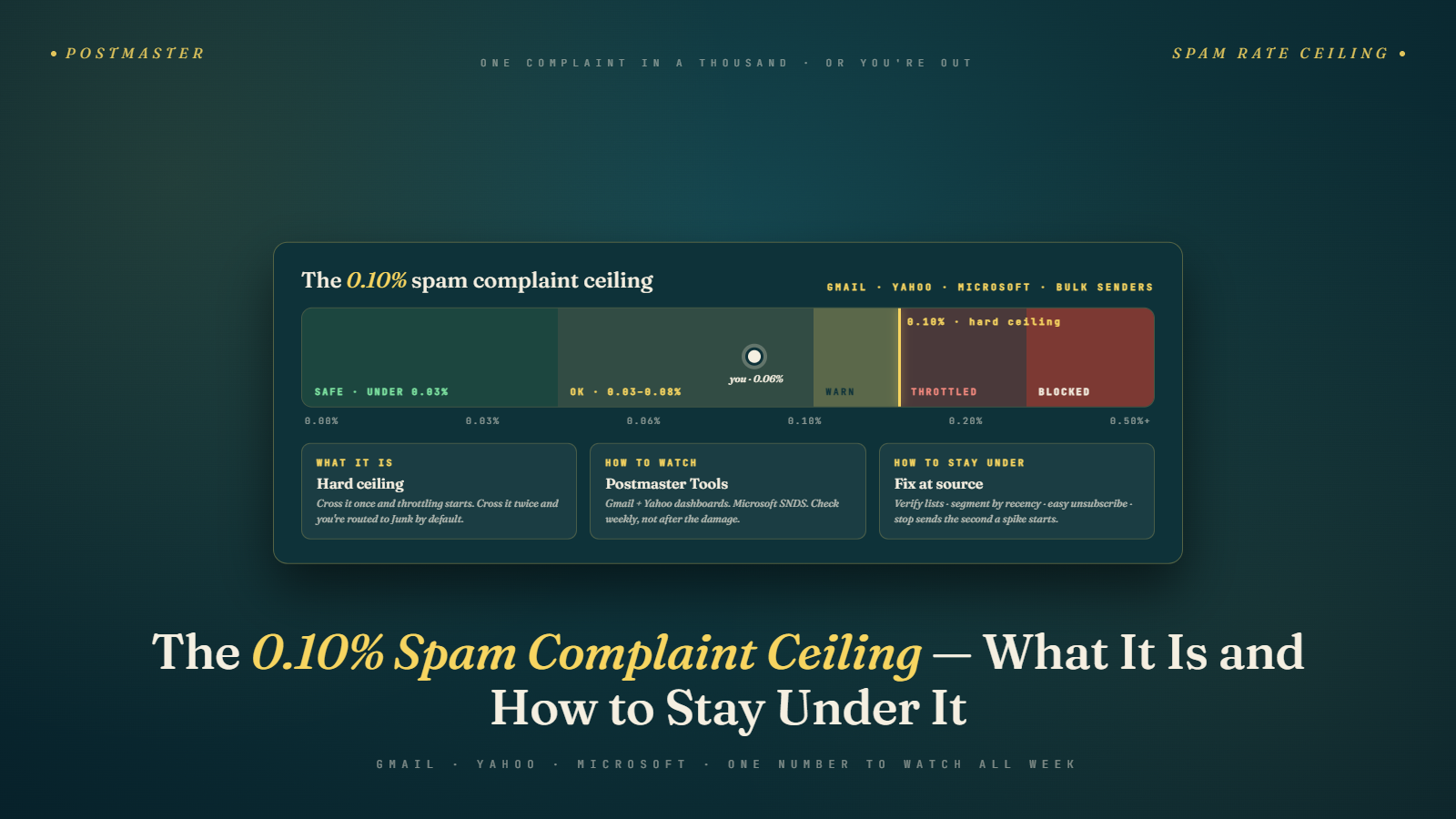
The 0.30% figure is not the safe zone. It is the hard floor below a cliff. Google's February 2024 sender requirements set the actionable ceiling at 0.10%, and the number you should be actively managing toward is closer to 0.05%. If you are running campaigns at 0.20% and feeling comfortable, you are operating with about six inches of margin before serious damage begins.
Let me break down what the actual thresholds mean, how to measure your real complaint rate, and what recovery looks like if you have already crossed the line.
What Google's 0.10% Threshold Actually Means
Google's February 2024 bulk sender requirements established two numbers. Senders should stay under 0.10% spam complaints on any given day. Complaints should never exceed 0.30% even briefly.
The way most people read this: "I'm fine as long as I'm under 0.30%." The way Google actually applies it: if you exceed 0.10% consistently, you start seeing deliverability degradation. If you hit 0.30% even once, you are in emergency territory.
There is a meaningful difference between a brief spike that resolves the same day and a sustained rate sitting between 0.10% and 0.30% for multiple days. Brief spikes above 0.10% can happen with poorly segmented campaigns without permanent damage. Sitting at 0.20% across a week of sends is a different problem entirely.
Google measures complaint rate as the number of spam complaints divided by the total number of messages successfully delivered to Gmail inboxes. Not sent. Delivered. That denominator matters.
Why Your ESP's Complaint Rate and Your Real Rate Are Different Numbers
This is where most senders get confused. Your email service provider (ESP) reports complaints that come through the Feedback Loop (FBL) they have registered with mailbox providers. ESPs typically show you complaints they receive via the Internet Service Provider feedback mechanism.
Gmail does not operate a traditional FBL in the way AOL or Yahoo did. Gmail complaints are tracked through Google Postmaster Tools, and that data is not sent back to your ESP. So the complaint rate your ESP shows you is not your Gmail complaint rate. It is a partial picture, often missing the most important piece.
I have seen senders with a 0.01% complaint rate in their ESP dashboard sitting at 0.18% in Google Postmaster Tools. The ESP number looked fine. The Gmail number was quietly damaging their sender reputation. They found out when inbox placement reports showed a steep drop in Gmail-hosted addresses specifically.
Your real measurement tool for Gmail complaints is Google Postmaster Tools. You can find your complaint rate under the "Spam Rate" section. Google shows data by domain, with a 7-day view and a 30-day view. The data is only available for domains with sufficient volume, so low-volume senders may see limited data.
How to Set Up Google Postmaster Tools the Right Way
Go to postmaster.google.com. You will need to verify domain ownership through DNS, which typically takes a few minutes. Once verified, you need sending volume before the dashboard populates. Google requires at least a few hundred Gmail deliveries per day before the charts show meaningful data.
Once it is running, watch three metrics closely: spam rate, domain reputation, and IP reputation.
The spam rate chart shows you your actual Gmail complaint rate. Green typically means you are under 0.10%. Yellow means you are in the warning zone, generally 0.10% to 0.30%. Red means you have a serious problem.
Domain reputation is a separate signal. A domain can have a Low, Medium, High, or Bad reputation. This reputation lags your complaint rate by a few days, so you can fix a complaint spike and still see Bad domain reputation for a week afterward. Do not let that discourage you. The reputation rating will catch up once the complaint rate stabilizes.
IP reputation shows the sending IP's standing. If you share IP addresses with other senders (common on shared ESP infrastructure), a spike in their complaint rate can affect your IP reputation without any change in your own sending behavior. This is a good argument for dedicated IPs if your volume supports it, generally above 50,000 emails per month.
Yahoo and Microsoft Measure Complaints Differently
Gmail gets most of the attention because of its market share, but Yahoo and Microsoft both enforce their own complaint thresholds, and the measurement methods differ.
Yahoo does operate a traditional FBL (Feedback Loop) that sends complaint data back to your ESP. The Yahoo complaint data in your ESP dashboard is therefore more accurate than the Gmail data. Yahoo's threshold is generally considered to be 0.30%, though their enforcement approach is less transparent than Google's published guidelines.
Microsoft's enforcement through Outlook, Hotmail, and Live uses its own signals, including data from the Smart Network Data Services (SNDS) program and the Junk Mail Reporting Program (JMRP). Microsoft's DMARC enforcement rollout added another layer to their filtering, separate from complaint rate alone.
A common mistake is optimizing entirely for Gmail complaint rates while ignoring Yahoo deliverability. I worked with one ecommerce brand whose Gmail complaint rate was excellent at 0.04%, but their Yahoo complaint rate had drifted to 0.35% over six months of ignored FBL data. Their Yahoo-based subscriber segment was showing open rates of 3% while Gmail was at 28%. They had been burning their Yahoo list silently.
What Triggers Spam Complaints in the First Place
The obvious answers: sending to people who did not opt in, mailing stale lists, no easy unsubscribe. Those matter. But the complaint drivers that catch experienced senders off guard tend to be more subtle.
Frequency mismatch is one of the most common. A subscriber signs up expecting monthly updates and then receives daily promotional emails for a holiday sale. They do not unsubscribe because that feels like effort. They click the spam button because that takes one second. Complaint rates often spike during promotional calendar periods precisely because frequency spikes at the same time.
Subject line-body mismatch drives complaints from otherwise engaged subscribers. The email promises a discount that is not in the body, or teases news that turns out to be an ad. People feel deceived and complaint. These are subscribers who were already on your list, which means a healthy opt-in process does not protect you from this kind of complaint.
List age matters more than most senders acknowledge. Subscribers who joined more than 18 months ago and have not engaged in the last six months are genuinely higher-risk from a complaint standpoint. They may not remember signing up, and they may have signed up with an email address they no longer actively monitor, meaning when they do finally see your email, context has been lost.
Segmentation fixes a surprising amount of this. Reducing bounce rates through verification helps, but so does simply not mailing your most disengaged segments to Gmail and Yahoo addresses during high-frequency periods.
How to Measure Complaint Rate the Right Way, With Real Numbers
Here is a practical calculation. If you send 100,000 emails and 92,000 are delivered to Gmail accounts, and 95 of those recipients mark your email as spam, your Gmail complaint rate is 95 divided by 92,000 or 0.103%. That is just over the 0.10% threshold.
The number of complaints that causes that 0.103% rate might feel small. Ninety-five complaints out of 100,000 sends sounds like rounding error. But Google's algorithm does not grade on effort. 0.103% is over the line.
Postmaster Tools will show you this rate directly. But if you want to cross-check, look at your ESP's delivery data for Gmail-domain recipients specifically, not your total list. Your complaint count from the FBL, supplemented by any complaints your ESP's suppression list captures, divided by Gmail deliveries, gets you close.
One more detail on the denominator: Gmail deliveries means messages that reached a Gmail inbox or spam folder, not messages that bounced. Hard bounces and soft bounces are a separate signal, but they reduce your delivered count and can actually make your complaint rate look mathematically worse if you have high bounce rates pulling down the denominator.
What Recovery Looks Like After Breaching the Threshold
If you have already crossed into problem territory, the path back is methodical. There is no quick fix, and there is no back-channel to Google to speed things up. Recovery typically takes three to six weeks of consistent clean sends before domain reputation moves from Bad back to High.
Start by stopping the bleeding. Do not send another campaign to your full list. Identify the sending domain and IP that generated the complaints, and pull back volume on them immediately.
Segment your list into engagement tiers based on the last 90 days of open and click activity. The top tier, people who opened or clicked in the last 30 days, is your recovery list. Send only to them until your complaint rate returns to green in Postmaster Tools.
Review your complaint sources. If you have Yahoo FBL data, look at which campaigns drove the most complaints. Was it a specific subject line pattern? A particular segment? Time of day is rarely the primary cause, but campaign type almost always correlates.
During the recovery period, your inbox placement will still be degraded even after complaint rates drop. Domain reputation lags about a week behind complaint rate improvement. Do not interpret the continued poor placement as evidence that your changes are not working.
After two weeks of clean sends at under 0.05% complaint rate, gradually re-expand to your next engagement tier, people who opened in the last 60 days. Add them in batches, not all at once. Monitor daily in Postmaster Tools.
I have seen senders try to speed this up by switching to a new domain. This almost never works. A new domain has no reputation, and high volume from a new domain triggers different filters. You end up with both the old domain damaged and the new domain flagged.
The Client Anecdote That Taught Me to Stop Trusting Weekly Averages
A B2B SaaS client with about 180,000 active subscribers came to me in October 2025 convinced their complaint rate was fine. Their weekly average in Postmaster Tools was 0.07%. On paper, green zone. In practice, their inbox placement to Gmail had dropped from 94% to 71% over a six-week stretch, and they could not figure out why.
When I pulled the daily view instead of the weekly average, the picture changed completely. Three days each week were running at 0.18% to 0.22%. The other four days were at 0.01% or lower because they sent almost nothing on those days. Averaged together, the math looked clean. Google, however, was applying daily thresholds, not weekly averages. Those three spike days were doing the real damage, and the low-send days were masking the problem in the reporting layer.
The fix was awkward but simple. We split their Tuesday promotional blast into two smaller sends across Tuesday and Wednesday, and we removed anyone with zero opens in the last 75 days from the promotional list entirely. That took about 42,000 names off the file. The daily complaint rate on their heavy send days dropped from an average of 0.19% to 0.06% within two weeks. Inbox placement started recovering around day 18 and was back to 89% by the end of the sixth week.
The lesson I pulled from that engagement: weekly and monthly averages hide the days that matter. If you are reporting complaint rate to a marketing leader or a CFO, report the worst single day of the week, not the average. The worst day is what Google is grading on, and that is the number that determines whether the next month of campaigns lands in the inbox. This same measurement discipline applies to the new engagement metrics shaping the AI inbox, where granular daily signals matter more than rolled-up reports.
Complaint Rate Is a Stakeholder Communication Problem
Most of the complaint-rate trouble I see at growing companies is not a measurement problem. It is a communication problem between the email team and the rest of the business. The marketing director wants to hit revenue targets and pushes for a bigger, more frequent send. The email operator knows the complaint rate will spike. Nobody translates that technical risk into business language, and the send goes out anyway.
The conversation that works: put a dollar figure on what a breached complaint rate costs. If your Gmail segment is 60% of your list and inbox placement drops by 20 points during a reputation incident, your revenue from that segment drops by roughly the same amount for the duration of the degradation. For a company doing 400,000 dollars in monthly email revenue, that is a 48,000 dollar hit per month, and the recovery period is typically four to six weeks. That framing tends to change how aggressively the business pushes for send frequency increases.
I also recommend a standing weekly review that includes one slide: current complaint rate, trendline over 30 days, and any campaigns planned for the coming week that could stress the number. Five minutes of forewarning prevents most of the disasters I get called in to fix. The shift toward quality over quantity in email programs is partly a response to this exact dynamic: frequency-driven growth plans that ignore deliverability consequences until the consequences arrive.
The Number You Should Actually Be Targeting
Forget 0.30%. Forget 0.10% as a target. Aim for 0.05% or lower as your operating normal.
At 0.05%, you have meaningful buffer before the warning zone. You can run a seasonal campaign with slightly elevated complaints without immediately crossing into dangerous territory. You have room for a list segment to behave unexpectedly without a business emergency.
Senders I've seen consistently operate at 0.02% to 0.04% share a few habits. They suppress anyone who has not opened in 90 days before major campaigns. They run re-engagement sequences before suppressing long-dormant subscribers rather than keeping them on the main list. They check Postmaster Tools every week, not just when something seems wrong.
Running your list through Bulk Mail Verifier before major campaigns removes invalid and risky addresses that contribute to bounces and can degrade inbox placement, which indirectly keeps your complaint rate denominator clean and your delivery metrics stable.
Understanding your overall sender reputation and complaint rate are connected. A sender with a stable domain reputation and consistent low complaints will recover faster from an occasional spike than one with a volatile history.
The 0.10% ceiling is the public number. Your private target should be well below it. The senders who treat 0.10% as the goal are the ones calling in a panic when their inbox placement collapses.
Tomorrow, open Google Postmaster Tools and look at your spam rate chart for the last 30 days. If you see any days in the yellow range, that is your starting point. Pull the send dates that correspond to those spikes, identify the campaigns, and look at the segment you mailed. The pattern will usually be visible in the first pass.