
A founder I work with called me last month to defend his open rate. He was proud of it: 38 percent across a 200,000 subscriber list. I asked him what his reply rate was. He did not know. I asked what his scroll depth was on mobile. He did not know. I asked whether Gmail's AI treated his sends as conversations or as broadcasts. He did not know, and he had never thought to ask.
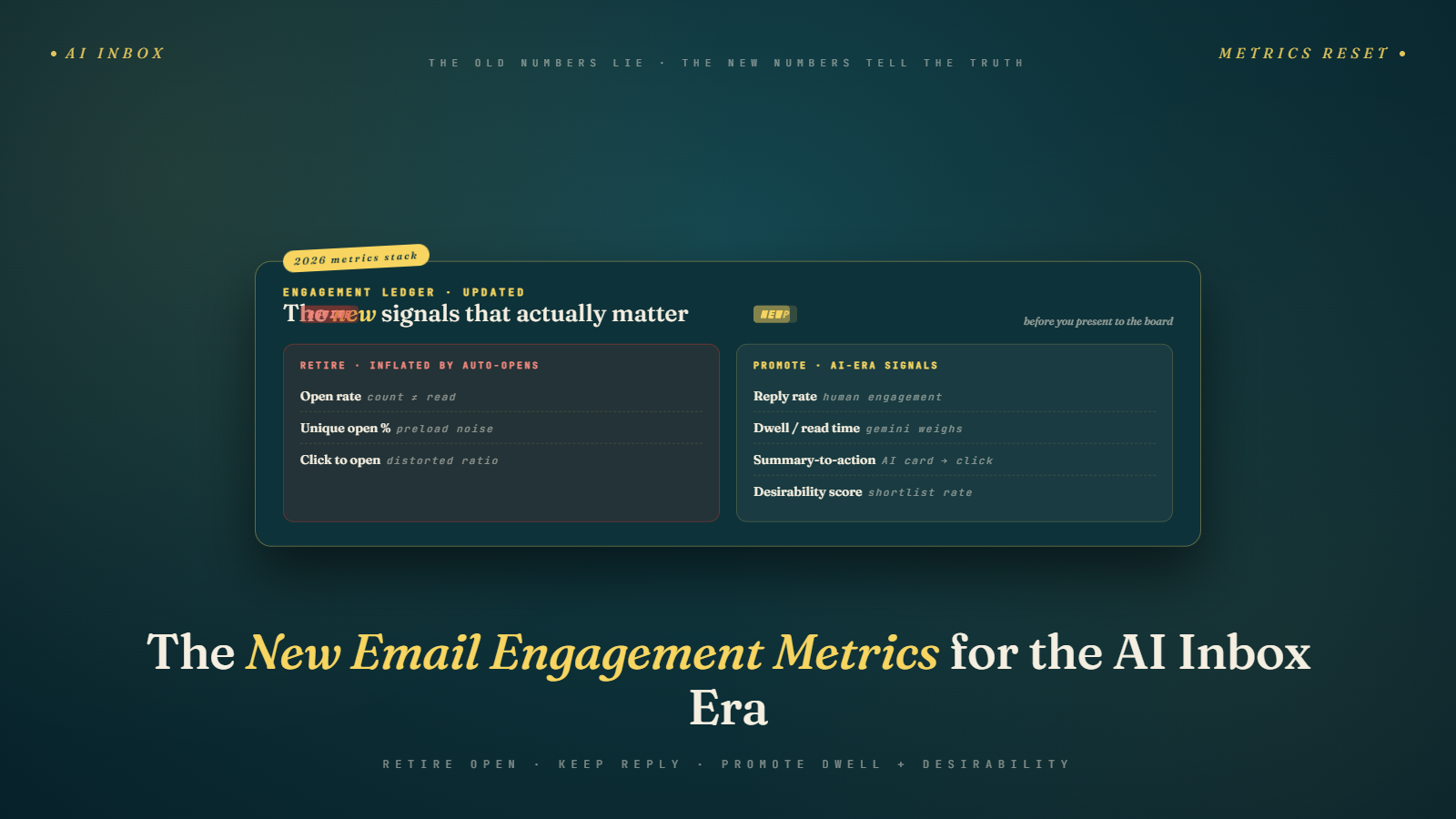
That conversation is replaying across the industry right now. Open rate, once the cornerstone of email measurement, is so compromised by auto-opens and privacy protections that it is closer to a vanity metric than a health metric. The metrics Gmail's AI actually weighs are ones most marketers do not measure, and a couple that most marketers cannot directly measure at all.
The right response is not to abandon measurement. It is to rebuild the measurement stack around signals that correlate with what the AI sees. Some of those signals you can capture from your ESP today. Some you can only infer. The gap between what the inbox rewards and what your dashboard shows is the work to be done.
Traditional Metrics Are Degrading
Open rate is the worst offender. Apple Mail Privacy Protection continues to pre-fetch images, inflating opens from iOS users. Gmail's Gemini-driven auto-opens, which we dug into in our death of open rate post, added a second inflation layer. The result is that open rate on a typical list now overstates real human engagement by somewhere between 30 and 60 percent depending on your Apple and Gmail mix. Using open rate as a primary signal is measuring noise.
Click-through rate is degrading too, though more slowly and for different reasons. We covered this in our CTR decline post-Gemini piece. Summaries cannibalize clicks when the email's value can be captured in two sentences. CTR still correlates with engagement, but its absolute level has dropped and its meaning has shifted. A 3.5 percent CTR in 2026 is not the same as a 3.5 percent CTR in 2023. The comparison is broken.
Unsubscribe rate is the most honest traditional metric left standing, and it is more important than it has ever been. With Manage Subscriptions exposing your frequency to every subscriber, unsub is the clearest signal of the mismatch between what you send and what recipients want. It has not degraded. It has gotten more important by default.
Complaint rate matters even more post-Yahoo/Gmail 0.10 percent ceiling enforcement. It is not an engagement metric in the classical sense, but it is a binary signal of program health.
What Gmail's AI Actually Weighs
This is the observed and inferred list, based on patterns across monitored accounts, Postmaster Tools correlations, and public statements from Google at industry events.
Reply rate is the strongest positive signal in the system. A real reply from a real human is treated as strong evidence that the email was wanted. A thread with back-and-forth is treated as even stronger evidence. Gmail elevates future sends from senders whose messages earn replies. This appears to be weighted significantly more heavily than opens or clicks.
Scroll depth on the email itself appears to influence relevance scoring. If a user opens your email and scrolls through it, that is read as engaged consumption. If they open and dismiss, that registers differently. Gmail does not publish the mechanics, but testing indicates this is measured.
Dwell time matters. How long a user spends with the email open correlates with perceived value. An open that lasts four seconds reads differently from an open that lasts 45 seconds. Dwell is especially important on mobile where scroll and click behavior is often truncated.
Hover behavior on web Gmail feeds engagement data even without clicks. Mousing over a link, pausing on an image, hovering the star button, all appear to produce micro-signals the AI aggregates. This is one of the metrics marketers cannot directly measure but can infer.
Archive versus delete matters. A user who archives your email is telling Gmail something different from a user who deletes it. Archive preserves the option to come back; it reads as "I may want this later." Delete reads as "I do not want this now or ever." Both are better than a sit-in-inbox unread scroll-past, which reads as "I ignored this."
Star or pin behavior is a direct positive signal. So is moving the message to another folder for later reference. So is searching for the sender after receiving their message, which indicates active interest.
Which You Can Measure From Your ESP
Reply rate is the most important one, and most ESPs make it possible to measure if you set up for it. The requirements are a real reply address (not no-reply), a server that captures inbound responses, and a way to count them back against the campaign that generated them. Tools like Postmark, SendGrid, Customer.io, Klaviyo, and HubSpot all support this in various ways. If your ESP does not, set up a mail routing rule that forwards replies to a tracked inbox and do the correlation manually.
Click patterns over time per subscriber are available in every ESP and underused. A subscriber who has clicked three times in the last 90 days is behaving differently from a subscriber who has never clicked. Most ESPs expose engagement scoring or recency cohorts. Build segments by engagement recency and measure your program's performance per segment, not in aggregate.
Time-on-page data from your site, cross-referenced with the email click that brought the visitor, gives you a proxy for dwell time. It is not email dwell time but it tells you whether the click was valuable. Pair this with Google Analytics or whichever analytics platform you use, connected via UTM parameters.
Forward and share rates, where your ESP tracks them, tell you whether your content earned enough value to pass along. Most ESPs track native forwarding; few track social sharing without extra instrumentation.
Cohort unsubscribe rates by subscriber tenure and acquisition source give you the cleanest signal on what is actually working in your acquisition. Subscribers who unsubscribe in the first 30 days are telling you your onboarding is wrong. Subscribers who unsubscribe after 18 months are telling you your ongoing content is wrong. The distinction matters.
Which You Have To Infer
Dwell time inside the email itself is not directly measurable by a sender. You infer it through proxies: click-through rate on lower-placed links (people only click deep links if they scrolled far), time-on-site after clicking, completion rates on embedded actions.
Scroll depth inside the email is also not directly measurable. Proxy it with link-position data. If your hero link drives 80 percent of clicks and your footer link drives zero, readers are either scrolling past without engaging or they are only seeing the hero. If clicks distribute across the email, you have scroll.
Hover behavior is entirely opaque to senders. There is no way to capture this directly. The best proxy is rapid follow-up engagement metrics: if subscribers who opened without clicking still return to your brand through search or direct visit within 24 hours, hover-style engagement is happening even without clicks. Correlating email send times to organic traffic spikes is a crude but useful proxy.
Archive versus delete is invisible to senders. Again, infer from future behavior. A subscriber who opens your next email has not deleted you with prejudice. A subscriber who stopped opening suddenly after a specific send may have deleted you or put you in a filter rule.
Why Reply Rate Is The Most Underrated Metric
One reply is, by my observation, worth somewhere between ten and twenty opens as a relevance signal to Gmail. And it is not just Gmail. Any mail provider running AI-driven filtering and sorting (Outlook does this, Yahoo does this) treats replies as strong positive signals. You are training the algorithms with every human response you earn.
Most marketers never consider reply rate because their infrastructure does not capture it. No-reply addresses remain common. Even when replies are technically possible, they are not counted, not routed, not responded to. That is a missed loop.
I ran a test with one client, a small retail brand. Their standard broadcast email was roughly 800 subscribers, one way send, no reply handling. We modified one campaign to include a single sentence at the bottom: "Hit reply and tell us which one is your favorite, we read every response." We routed replies to a shared inbox and a team member actually responded to each one within 24 hours.
That single campaign earned 37 replies against roughly 800 sends. Approximately 4.6 percent reply rate. More importantly, the campaign that shipped two weeks later to the same list had a 19 percent higher open rate and a 28 percent higher click-through rate. Gmail had, by our working hypothesis, updated its relevance scoring for this sender based on the reply signal.
We replicated this across three more clients. Every time, a campaign that earned a non-trivial reply rate saw measurable lift on the next send. The effect appears to persist for roughly two to four weeks before decaying back toward baseline, which tells you how often you need to be earning replies. The industry consensus for what makes a "good" reply rate for a broadcast does not exist yet. I would call anything over 1 percent excellent and anything over 0.3 percent healthy.
How To Design Campaigns That Earn Replies
Ask a question whose answer you actually want. Not a rhetorical setup. A real question about something the recipient has an opinion on. "Which of these three features should we build next?" Works. "What are you struggling with this week?" Works. "Hit reply if you have questions about our spring collection." Works, but is weaker because it offers an action, not a provocation.
Make the reply address a real human's name. Not sales@domain.com. Not hello@domain.com. A real person with a real inbox who will respond. Yes, you can set up automation to deliver the first response at scale. The key is that the reply address feels like a reply, not a drop box.
Keep the email short. Long emails make replies feel disproportionate. A two-sentence note that ends with a question earns more replies than a thousand word essay that ends with the same question.
Reply with speed. Responses within 24 hours earn more subsequent replies from the same subscriber on future campaigns. You are training them to see email from you as a conversation.
Signal back-and-forth. Include something in your next campaign that references prior responses in aggregate. "Last week I asked you about your biggest challenge. Most of you said X. Here is what I am doing about it." This rewards past repliers and invites future ones.
ESP Features That Surface These Signals
Customer.io, Klaviyo, HubSpot, and Iterable all now offer reply tracking as first-class features. Check whether yours does before you build something custom.
Litmus and Email on Acid offer engagement analytics that include dwell time proxies through their tracking pixels and interactive content tracking. If you are serious about measuring dwell, these tools will get you closer than ESP-native analytics.
MailerLite and ActiveCampaign expose click recency and engagement scoring at the subscriber level, which lets you build segments based on implied attention.
Segment.com and similar CDPs let you unify email engagement with site behavior, giving you the cross-channel view that is increasingly necessary to measure what a single email actually did.
The Short Answer For Snippets
Open rate is compromised by auto-opens and privacy protections. Gmail's AI weighs reply rate (strongest positive signal), scroll depth, dwell time, hover behavior, archive versus delete, and star/pin actions. Reply rate is the most underrated metric: a 1 percent reply rate can lift subsequent campaign performance by 15 to 30 percent through improved AI relevance scoring. Most of these signals require ESP configuration changes and proxy measurement because they are not directly available to senders.
Building The Proxy Framework
Start with what you can measure: reply rate, click patterns, cohort unsubscribe rates, time-on-site from email traffic, engagement scoring per subscriber. Instrument these in your ESP or your CDP. Build a dashboard that includes them alongside the old metrics so you can watch both.
Add proxies for what you cannot measure: distribution of clicks across email positions as a scroll proxy, organic traffic lifts correlated with send times as a hover proxy, purchase or conversion lifts within 48 hours of a send as a dwell proxy.
Watch the inferred signals for correlation. Over 90 days, you will see which proxies move with your campaign performance and which do not. Drop the proxies that do not correlate. Double down on the ones that do.
Calibrate against competitor benchmarks carefully. Your reply rate goal is not someone else's. It is whatever is moving your subsequent send performance. Test, measure, iterate.
The Stakeholder Dashboard That Actually Works
One detail that separates programs that make the transition well from programs that struggle is the dashboard they present to leadership. The teams that keep their budgets through the metric shift have dashboards with three layers: a headline metric layer (revenue, conversion, direct business outcomes), a leading-indicator layer (reply rate, engagement recency, click-to-conversion ratio), and a diagnostic layer (open rate with prefetch caveats, CTR, unsubscribe rate).
The ordering matters. Leadership sees the headline metric first, which is what they care about. Marketing sees the leading-indicator layer, which is what drives the headline metric. The diagnostic layer is available for troubleshooting but is not the lead. Teams that front-load the diagnostic layer (showing CTR and open rate as primary metrics) put themselves in the position of explaining declines in metrics that no longer measure what everyone assumes. Teams that front-load the business outcome layer have an easier conversation because the business outcome usually looks fine.
Pair this reframe with list hygiene so your engagement signals are coming from real subscribers. Email verification removes the dead addresses that produce confusing prefetch opens without any real engagement, which makes the signals in the leading-indicator layer cleaner and the diagnostic layer easier to read.
What To Do Tomorrow Morning
Set up a real reply inbox for your next broadcast. Not no-reply. A named human address. Add a sentence to the email that invites a real response about something you actually want to know. Count the replies. Respond personally to every one within 24 hours. Then send your next campaign two weeks later and compare its open and click rates to your recent baseline. If you see a 15 percent or greater lift, you have proof the reply signal is working for your program, and you have a new lever to pull forever.