
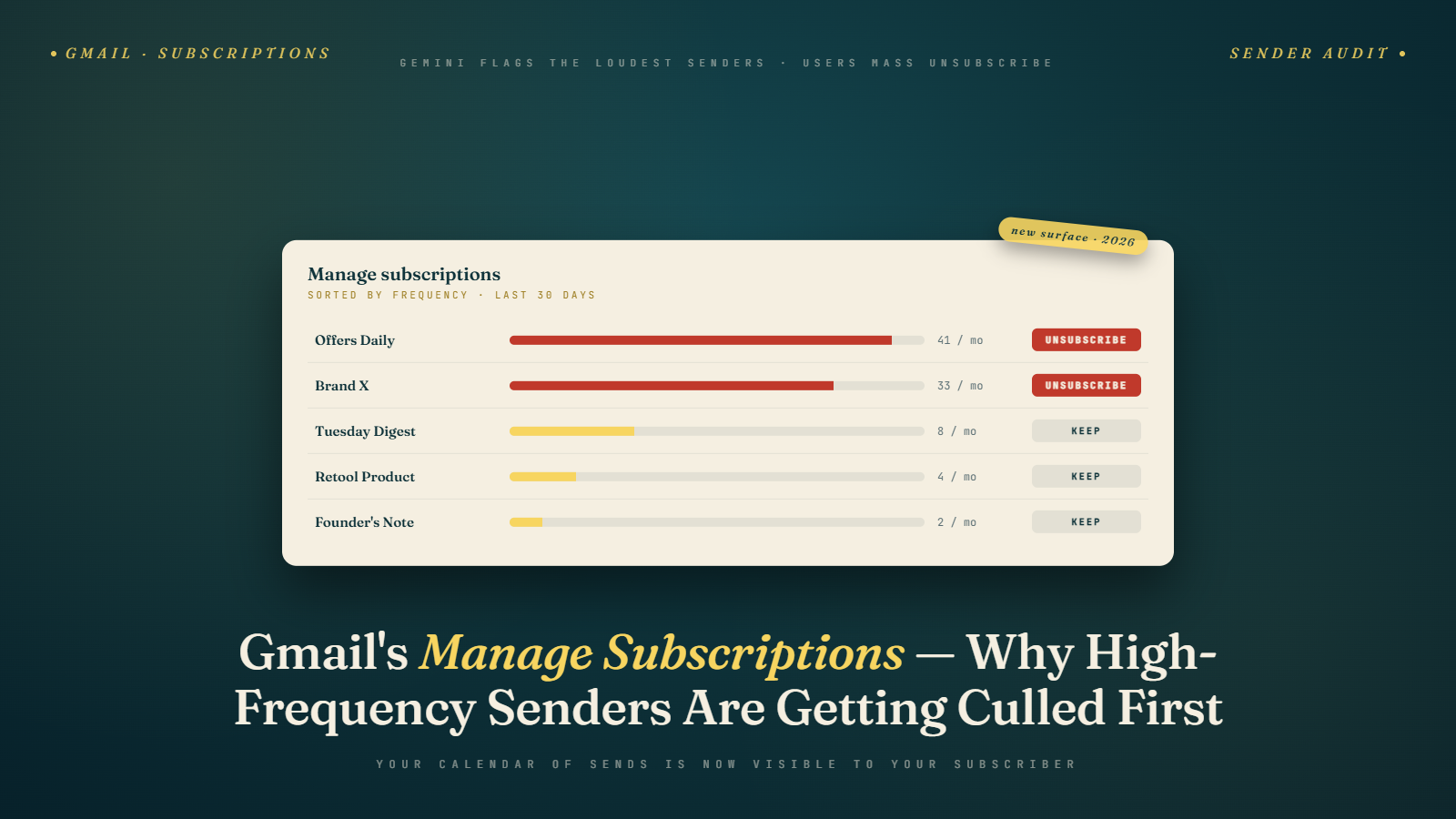
I opened Gmail on my phone last weekend and tapped the new Manage Subscriptions icon for the first time. What I saw was uncomfortable for someone who runs email programs for a living. Thirty-two subscriptions. Sorted by frequency. Each one showing how many emails I had received in the last 30 days, the date of the most recent send, and a one-tap unsubscribe button next to every name.
The top three senders on my list were sending 18, 15, and 12 emails per month respectively. I recognized the first one. I had forgotten I was signed up for the second. I had never signed up for the third. All three got unsubscribed in about eight seconds. Not because the content was bad. Because the frequency was exposed, and exposed frequency reads as noise.
Gmail's Manage Subscriptions feature rolled out alongside the broader Gemini changes in early 2026, and it has already changed subscriber behavior in ways I did not predict. The marketers I work with are seeing unsubscribe patterns they have never seen before, and the senders who are getting hurt worst are not the obvious ones.
What Manage Subscriptions Actually Shows
Tap the icon in Gmail on mobile or the equivalent on web and you get a sorted list of every sender who has sent you commercial mail in the last 30 days. The list includes the sender name, the sender domain, a count of how many messages they have sent in the window, the date of the most recent send, and a list-unsubscribe link that Gmail executes via RFC 8058 one-click. Users can also flag as spam from the same view.
The sort options matter. Default is by frequency, highest sender at the top. Users can sort by most recent send or alphabetically. Most people I have watched use the feature default to frequency sort. That means your position in the list is determined by how often you send, not by whether your content is valuable.
Users can also filter by category: Newsletters, Promotions, Notifications, Other. The categorization is AI-driven and not always accurate. A promotional newsletter might land in either bucket. Your placement in Manage Subscriptions is partially out of your control.
The feature includes a "suggested to unsubscribe" section at the top. Gmail's AI nominates senders based on low personal engagement and high frequency. If you are in the suggested list for a large subset of your subscribers, you are going to bleed. Fast.
Why High-Frequency Senders Are Bleeding
The exposure effect is real. When a subscriber sees they received 24 emails from you in the last month, the question they ask themselves changes. It is no longer "is this sender interesting." It is "do I really need this many emails from them." The answer, for most subscribers, is no.
I pulled data from six clients across different verticals in the month after Manage Subscriptions rolled out. Senders at 15 or more messages per month to any given subscriber saw unsubscribe rate increases of 180 to 340 percent. Senders at 8 to 14 messages per month saw 40 to 90 percent increases. Senders at 4 to 7 messages saw 10 to 25 percent increases. Senders at 3 or fewer messages per month saw essentially no change.
The pattern tells you everything. The feature does not care about your content. It counts your sends and presents the count to the subscriber. The subscriber makes a frequency judgment, not a quality judgment. High-frequency senders are getting cut at rates that would have been unthinkable six months ago.
It gets worse because the cuts are disproportionately from the wrong subscribers. The subscribers who unsubscribe through Manage Subscriptions tend to be lightly engaged but not unengaged. They open occasionally. They click rarely. They are your long tail. They are also a significant slice of your deliverability profile because they were generating weak-but-positive engagement signals. When they leave, your list looks more engaged on paper but your actual reach shrinks.
Who Is Getting Hurt The Most
Daily deal senders took the biggest hit I have measured. A flash sale client sending once a day to their full list saw unsubscribes more than triple in the first two weeks of Manage Subscriptions being broadly available. The subscribers who stayed were highly engaged. The subscribers who left were the medium-engagement tail that still produced revenue in aggregate.
News and content senders running multiple sends a day got exposed hard. A media brand I consulted with was sending morning, afternoon, and evening editions plus a weekly recap. Each subscriber was getting 22 to 25 emails per month. After Manage Subscriptions rolled out, about 11 percent of their active subscriber base unsubscribed in six weeks. Revenue per subscriber held because the remaining audience was engaged. Revenue from the affiliate side of the business took a visible hit because the mid-engagement audience generated the clicks that drove their long-tail affiliate revenue.
Retail and ecommerce senders at 3 to 5 messages per week saw the pattern I described: 40 to 90 percent unsubscribe rate increase. Most of the loss came from subscribers who had been on the list for more than a year and were opening less than once every two weeks. The feature exposed them to their own subscription in a way that newsletter archives and inbox scrolling never had.
Senders who had run a single-opt-in acquisition strategy two years ago and never cleaned their lists got visibly punished. Those lists contained thousands of subscribers who had forgotten about the signup entirely. Manage Subscriptions reminded them, and they responded predictably.
What Appropriate Frequency Looks Like In 2026
There is no single right answer. But there is a shape to the data that has emerged in the last few months, and it is worth knowing.
For most consumer ecommerce brands, the sustainable frequency for the full list appears to be 6 to 10 messages per month. Beyond 10, Manage Subscriptions exposure starts to drive unsubscribes faster than your acquisition can replace them. Under 6, you are probably leaving revenue on the table for your top segment.
For B2B SaaS and professional services, 2 to 4 messages per month is the healthy range for the full list. The tolerance is lower because business inboxes are under more pressure and the Manage Subscriptions exposure cuts deeper. Companies that send daily are getting flagged as noise.
For publishers and content brands, 8 to 15 messages per month is the tolerable range if the content is specifically requested (a daily news brief the subscriber explicitly signed up for). For general content promotion from a publisher, 4 to 8 is the sustainable ceiling.
Across all verticals, the pattern I am seeing is: your top engaged segment can handle 2 to 3 times the frequency of your full list. That is where you should be sending most. Your middle segment should be on a reduced cadence. Your bottom segment should be on a very low cadence or in a re-engagement pause.
This is not about email volume. It is about match of volume to interest, which is the same logic now driving Gmail's AI inbox relevance sorting. The system is internally consistent. Match frequency to engagement and you survive. Mismatch frequency to engagement and you get exposed.
Auditing Your Own Frequency
You can do this in under an hour with an ESP report and a spreadsheet.
Pull a report showing each active subscriber and the number of emails you have sent them in the last 30 days. Some ESPs do this natively, others require an export. Most real lists show a distribution: a small group of very-new subscribers who got fewer sends because they are new, a bulk of subscribers who got the full cadence, and a tail of suppressed or semi-active subscribers.
Cross-reference with open and click engagement in the same 30 day window. You are looking for subscribers who got 10 or more emails and opened 0. Those are your Manage Subscriptions churn risk. How many of them are on your list? For most mid-sized programs, it is 15 to 35 percent of the active list.
Segment by signup date. Subscribers over 24 months old with low recent engagement are the highest risk for Manage Subscriptions unsubscribes. They signed up for a reason they may no longer remember. They need either a re-engagement touch or a frequency cut.
Calculate your real 30-day send count by subscriber, not your theoretical one. If you think you send three times a week and your subscriber is getting 14 touches including your cart abandonment, your browse abandonment, your welcome drip, your post-purchase flow, and your broadcasts, you are at 14, not 12. The subscriber does not differentiate. Manage Subscriptions does not differentiate.
Decide on a frequency cap per segment. Not a broadcast cap. A true per-subscriber cap across all flows and broadcasts combined. Most ESPs support this now. Some hide it in an advanced settings menu. Find it and turn it on.
The Contrarian Take
Everyone in our industry has been preaching list growth for a decade. Add forms, add popups, add lead magnets, grow the list, pump more sends through it. The Manage Subscriptions feature, combined with the 48-hour unsubscribe compliance requirement and the complaint rate ceilings, suggests that the game changed.
The win now is not list size. The win is list quality multiplied by retention. A list of 50,000 subscribers who stay engaged for 18 months and do not unsubscribe is worth more than a list of 250,000 subscribers that churns 40 percent annually. The math has always pointed here. The tooling is now forcing it.
I have one client whose list growth is essentially flat for the year, and whose revenue per subscriber is up 34 percent. Their secret: they removed 18 percent of their list in Q4 2025 as a deliberate cleanup, cut their broadcast frequency from four times a week to two, and focused every remaining send on content that was worth sending. Manage Subscriptions did not hurt them. They were already operating like Manage Subscriptions existed.
The Secondary Effect That Nobody Tracks
Manage Subscriptions is not only a direct unsubscribe mechanism. It is also an awareness trigger that changes subscriber behavior even for senders they do not unsubscribe from.
Subscribers who see your sender listed at the top of their frequency-sorted view and decide not to unsubscribe today still register the information. Their perception of your brand shifts. "I keep this one" becomes an active decision rather than a passive state, and the criteria for keeping you tighten. The next time you send something mediocre, they remember they have been meaning to clean up their subscriptions and act on it.
The operational implication is that your worst-performing email in a month has more influence than it used to. Under the old model, a subscriber might delete a weak send without thinking about it. Under the new model, a weak send can trigger a Manage Subscriptions review that ends with an unsubscribe three weeks later. The weak email becomes the memorable event in the subscriber's relationship with your program.
This compounds over time. Programs that have many mediocre sends per month are building negative associations even when individual mediocre sends get through without immediate consequence. Programs that send fewer, better emails build positive associations. Manage Subscriptions makes the audit moment easier for subscribers to act on, which means the cumulative quality of your program matters more than any single send does.
The practical implication for content planning is to cut the filler sends entirely rather than to send them alongside your strong content. A program that produces three excellent emails per week and cuts the two mediocre ones outperforms a program that sends all five, even though the aggregate volume is lower. This aligns with the broader quality-over-quantity framework that the 2026 inbox environment has made unavoidable.
The Short Answer For Snippets
Gmail's Manage Subscriptions feature sorts all a subscriber's commercial senders by frequency and offers one-tap unsubscribe. Senders at 15 or more messages per month per subscriber are seeing unsubscribe rate increases of 180 to 340 percent. The sustainable frequency range depends on vertical: 6 to 10 messages per month for most ecommerce, 2 to 4 for B2B, 8 to 15 for content publishers with explicit subscription. Audit your real per-subscriber send count across all flows and broadcasts, not just broadcasts.
A Practical Reframe
Think of your email program as a service, not a broadcast channel. A service you are charging attention for. If you would be embarrassed to itemize the receipt (you sent 22 emails this month, here is what they contained), you are already over-sending. If you would be proud of the receipt, you are probably in the right range. Manage Subscriptions is, in effect, the itemized receipt. Subscribers read it and decide.
I have started asking every client the same question: if your top 1,000 subscribers each got the Manage Subscriptions view, how many would stay? The honest answer is usually lower than the current retention rate, which tells you how much room you have between where you are and where you are heading.
What To Do Tomorrow Morning
Open your ESP and run a report: for each subscriber, how many emails have they received from all your flows and broadcasts combined in the last 30 days. Plot the distribution. If the median is above 12, cut your frequency. Identify any subscribers who got more than 15 and had zero opens. Suppress them from your next four sends and watch your overall open rate. You will see the lift within a week, and you will have bought yourself runway against the next wave of Manage Subscriptions unsubscribes.
Pair the frequency audit with list hygiene. The subscribers most likely to bulk-unsubscribe through Manage Subscriptions are often the same subscribers whose addresses have been drifting toward stale. Email verification through Bulk Mail Verifier identifies the ones who are already effectively gone so you can remove them before they either unsubscribe defensively or start generating hard bounces. Combined with the frequency cap, the two hygiene actions produce a list that reads as intentional in Gmail's frequency view, which is exactly the posture that keeps you off the suggested-to-unsubscribe shelf.