
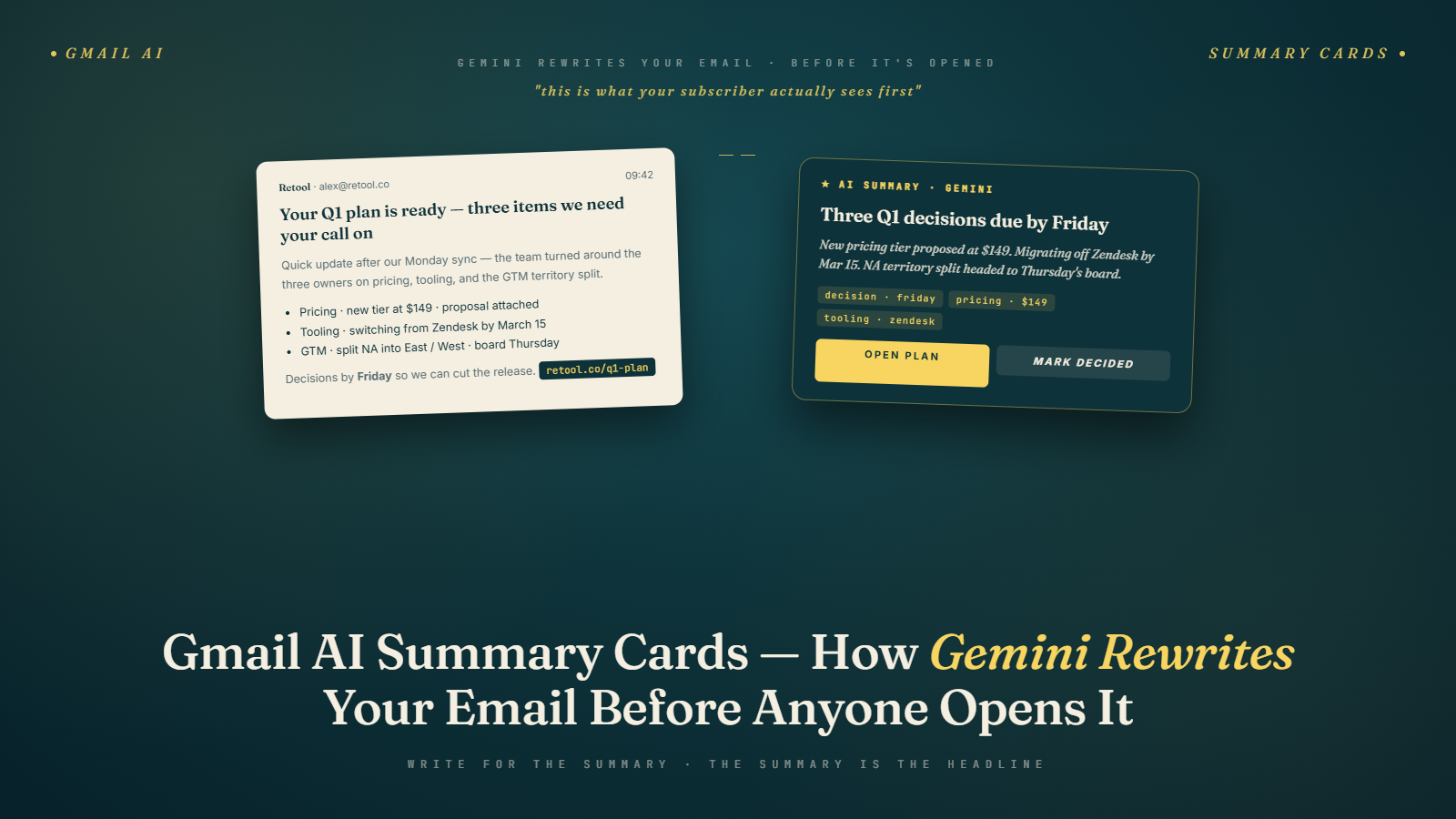
Your subscriber never reads your email. They read Gemini's version of it.
That's not a complaint. It's just the reality of how Gmail works in 2026. When a subscriber receives your message, Gemini's AI has already processed the full text and generated a short summary card that appears prominently in the inbox view, sometimes before the preview text you crafted. The subscriber can read the gist of what you sent, decide it's handled, and move on without ever opening the message.
For some senders, this is catastrophic. For others, it's invisible. The difference is almost entirely about how the email was written and structured.
What Gmail AI Summary Cards Actually Are
The summary card is a 2-3 sentence digest that Gemini generates from the full body of your email. It shows up in the inbox panel alongside the sender name and subject line, visible before any open event is registered. On mobile Gmail, it occupies a notable chunk of screen space. On desktop, it appears in the reading pane preview.
The key point: Gemini reads your actual email content, not the preview text you set in your ESP. It generates its own summary based on what it thinks is most informative to the recipient. You have no direct control over what goes into that summary. But you have enormous indirect control, because the AI is predictable about what it extracts.
This is different from Apple's Mail Privacy Protection, which only affected tracking pixels. Gmail's AI summaries change what information reaches the subscriber and in what form. The implications for email open rates and engagement metrics run deeper than most marketers have worked out yet.
The 55-Second Version
Gmail shows subscribers a Gemini-generated summary of your email before they open it. The summary is built from the concrete specifics in your body copy: numbers, dates, dollar amounts, and clear action statements. Vague openers produce vague summaries, which produce skipped opens. The fix is structural, not stylistic. Lead with specifics. Use real numbers. Keep a text version of your CTA. Everything else in your template can stay the same. Programs that make this one change see Gmail-specific engagement patterns shift within two to four weeks.
That is 80 words and captures the essential adjustment. The rest of this post explains what the AI actually prioritizes, what it cuts, and how to audit your existing templates for summary quality.
What Gemini Prioritizes When Generating a Summary
I've tested this extensively across dozens of email types over the past few months, and the pattern is consistent. Gemini prioritizes certain content above almost everything else.
Concrete nouns and specifics come first. "40% off all orders this weekend" will appear in a summary. "Amazing savings await you" will not. The AI strips abstraction and keeps the measurable.
Dates and deadlines are almost always surfaced. If your email mentions "expires Friday April 18" anywhere in the body, that will likely appear in the summary. Gemini treats time constraints as high-information content.
Dollar amounts and percentages get elevated. A specific number anchors the summary. "$15 off your next order" appears. "Great deals inside" does not.
The first 100-150 characters of the email body carry disproportionate weight. I've seen summaries that were almost verbatim from the opening sentence of a well-structured email. The AI uses the opening as a signal about intent, then scans for supporting specifics elsewhere in the body.
Clear action requests fare well. "Click here to claim your discount before Friday" or "Reply to schedule your consultation" both surface cleanly. Vague CTAs like "Discover more" disappear.
What Gets Cut or Distorted
Here's where senders run into trouble. Gemini is optimizing for information density, not persuasion. Your carefully crafted emotional hook, the story you told in the first three paragraphs, the brand voice you spent years building: none of that survives the summarization process intact.
What gets cut almost entirely: social proof statements that aren't specific ("Thousands of customers love us"), brand-story content, section headers that don't contain specific claims, disclaimers and legal language, repeated CTAs (the AI picks one).
What gets distorted: long conditional offers. If your email says "Get 30% off if you're a returning customer who hasn't purchased in 90 days and spends over $50," the summary might read "Get 30% off on orders over $50." The nuance disappears and the wrong subscribers get excited about an offer they can't use.
Promotional emails built around a single large image are the worst performers here. The AI has nothing to extract. The summary either pulls from the HTML alt text (which is usually empty or generic) or falls back to the preheader, which creates a generic, unhelpful preview. I've seen summaries for image-heavy emails that read "View this email in your browser" because that was the only text Gemini could find.
Good Summary vs. Bad Summary: Real Examples
Consider two promotional emails for the same sale. Both have the same offer: 25% off sitewide, ends Sunday.
The poorly structured email opens with: "We're so excited to share something special with our community this week. Spring is here, and we've been thinking about you." Three paragraphs in, it mentions the discount. The CTA is an image-button with no alt text.
Gemini's summary: "We have something special to share with our community this spring."
Not helpful. The subscriber learns nothing useful. They either open out of curiosity or skip it entirely.
The well-structured email opens with: "Spring sale: 25% off everything in our store, this weekend only. Use code SPRING25 at checkout. Ends Sunday at midnight." The rest of the email expands on the offer with product highlights.
Gemini's summary: "Spring sale: 25% off sitewide with code SPRING25, ending Sunday at midnight."
Perfect. The subscriber now knows exactly what the offer is. They can either click to browse (because they're interested) or skip (because they're not). Either outcome is fine. The worst outcome is a subscriber who is interested but gets a misleading or uninformative summary and skips.
Structuring Email Content So the AI Works for You
The adjustment is less dramatic than it might sound. Good email structure for AI summarization looks remarkably similar to good email structure for human readers who are skimming.
Lead with the most specific version of your offer or message. Not "We have an announcement," but the announcement itself. Not "Check out our new collection," but "Our summer collection just launched: 47 new styles from $28."
Put dates and deadlines as close to the top as possible. Gemini will find them anywhere in the body, but the opening 150 characters are weighted heavily. If your sale ends Sunday, say so in the first sentence.
Use real numbers. Percentages, dollar amounts, quantities. These are what the AI extracts and what subscribers remember. "Big savings" is invisible to both the AI and to humans who've been conditioned to ignore vague promotional language.
Keep your primary CTA in text, not just in a button image. Many email templates have beautifully designed CTA buttons that are pure images with no accessible text. Gemini can't read them. Add a text version somewhere in the email body even if it's less visually prominent.
Structure the email so the first paragraph, read alone, tells the complete story. This mirrors the journalistic "inverted pyramid" approach and it serves both skimming humans and AI summarization equally well.
The Irony That Makes This Easier to Accept
Here's the thing that struck me when I first started thinking carefully about AI summarization: everything that makes an email easier for Gemini to summarize also makes it better for humans.
Specific claims beat vague ones. Concrete numbers are more persuasive than abstractions. Front-loading the key point respects the reader's time. Clear CTAs with real text convert better than image buttons with no alt text.
The senders who are struggling with AI summaries are mostly senders who were already struggling. They were writing emails optimized for their own preferences (beautiful design, brand storytelling, elaborate copy) rather than for subscriber utility. Gemini is just making the cost of that choice more visible.
This doesn't mean brand voice doesn't matter. It means brand voice should live in the email body below a clear, specific opening. The first paragraph does the functional work. Everything after can do the emotional and brand work.
Subject line strategy for 2026 has gone through similar recalibration. The pattern is consistent: AI-mediated inboxes reward clarity and specificity at every layer.
What This Means for Different Email Types
The AI summary problem shows up differently depending on your email type.
Promotional emails suffer the most when poorly structured, and benefit the most when well-structured. A well-written promo email can get a summary that's basically a perfect elevator pitch for the offer.
Newsletter emails are tricky. Gemini tends to pull from the first story or section, which may not be the most important. If you lead with a less compelling story for editorial reasons, you might get a summary that undersells the issue. Consider reordering your newsletter content by importance rather than by theme, or ensure the opening section is strong enough to represent the whole.
Transactional emails (order confirmations, shipping updates) actually produce excellent summaries naturally because they're already written in the specific, concrete style the AI prefers. "Your order #48291 has shipped. Estimated delivery: April 17." That's a perfect summary already.
Cold outreach emails need particular care. A cold email that opens with relationship-building preamble gets summarized into nothing. One that opens with a specific, credible claim gets a useful summary. Given that cold email deliverability is already difficult in 2026, wasting the summary card on filler is a costly mistake.
The Common Mistakes I See in Client Audits
Across about forty client programs I have audited for Gemini summary quality in the past six months, a short list of mistakes shows up repeatedly. Most programs are making at least two of these simultaneously.
Opening the email body with a navigation bar. Many templates put "Shop | Sale | New | Account" as the first text block. Gemini reads it. The resulting summary reads "Shop sale new account." Useless. The fix is either moving the navigation below the hero content or wrapping it in HTML that Gemini does not prioritize (which in practice means putting substantive text before it).
Using all-image hero sections with no accompanying text block. The email looks stunning in the designer's preview. Gemini cannot read any of it and generates a summary from whatever boilerplate comes next, usually the unsubscribe footer. A text block under the hero with the specific offer fixes this without changing the visual design. The post on ending one-big-image email design covers the visual alternatives.
Burying offers three paragraphs deep behind relationship-building copy. This was correct advice in 2015 when subscribers opened emails and read them linearly. In 2026, Gemini reads linearly but subscribers read the summary card. If your offer does not appear until paragraph three, the summary card will not mention it, and many subscribers who would have converted never open to find it.
Writing CTAs as image-only buttons. A beautifully designed rounded button that says "Shop Now" visually but contains no text in the HTML is invisible to Gemini. The summary never mentions that there is an action available. A text version of the CTA, even a small one below the image button, gives Gemini something to surface and gives screen readers and accessibility tools something to work with.
Repeating the same CTA four times through the email in slightly different wording. Gemini picks one and discards the rest. The repeated CTAs that felt like reinforcement to the copywriter read to the AI as noise. One clear CTA, in text and button form, consistently produces cleaner summaries than five variations.
Testing Your Own Summaries Before Sending
The fastest way to check what Gemini will generate is to send yourself a test email to a Gmail account and look at what appears in the inbox panel before opening. Do this on both mobile and desktop because the summary display differs.
If the summary you see would make you open the email, great. If it's generic, misleading, or missing the key offer, revise the first 150 characters of the email body and test again. This should take 15 minutes.
What you're looking for: does the summary contain at least one specific number or date? Does it communicate what the subscriber gets or needs to do? Would a stranger understand the email's core value from the summary alone?
A quick audit of your last 10 sends using this framework will tell you a lot about your current performance gap. Most email teams find 3-4 of their recent sends had summaries that communicated almost nothing useful.
The structural changes required are small. Front-load specifics. Use real numbers. Keep CTAs in text. That's the whole adjustment. The rest of your email, the design, the storytelling, the brand voice, stays exactly as it is. You're just reordering the information hierarchy so the AI extracts what you actually want subscribers to see.
Pair this with a clean, verified list (running yours through Bulk Mail Verifier before major sends is worth the step) and the engagement signals you send Gmail improve across the board. Good summaries plus good deliverability create a compounding effect on inbox placement over time.
Run that test send today. Compare the summary to your subject line. If they're saying the same thing, you're in good shape. If they're contradicting each other or if the summary is empty, you have a fast fix available.
The compounding effect is worth naming. Programs that consistently produce good summary cards over three or four months develop a reputation signal that Gemini weights positively in future sends. Your well-structured emails get more prominent summary placement, your less-structured competitors get buried, and the gap widens over time. The reverse is also true: programs that consistently produce weak summaries find their placement degrading as Gemini learns the sender is not providing content worth surfacing. The structural work you do now has a long tail that keeps paying over subsequent quarters, which is why this is worth prioritizing over other inbox-era adjustments that feel more urgent but pay off less durably. Pair the structural work with the broader shift Gemini triggered across Gmail for full context on how summary cards fit into the larger inbox reorganization.