
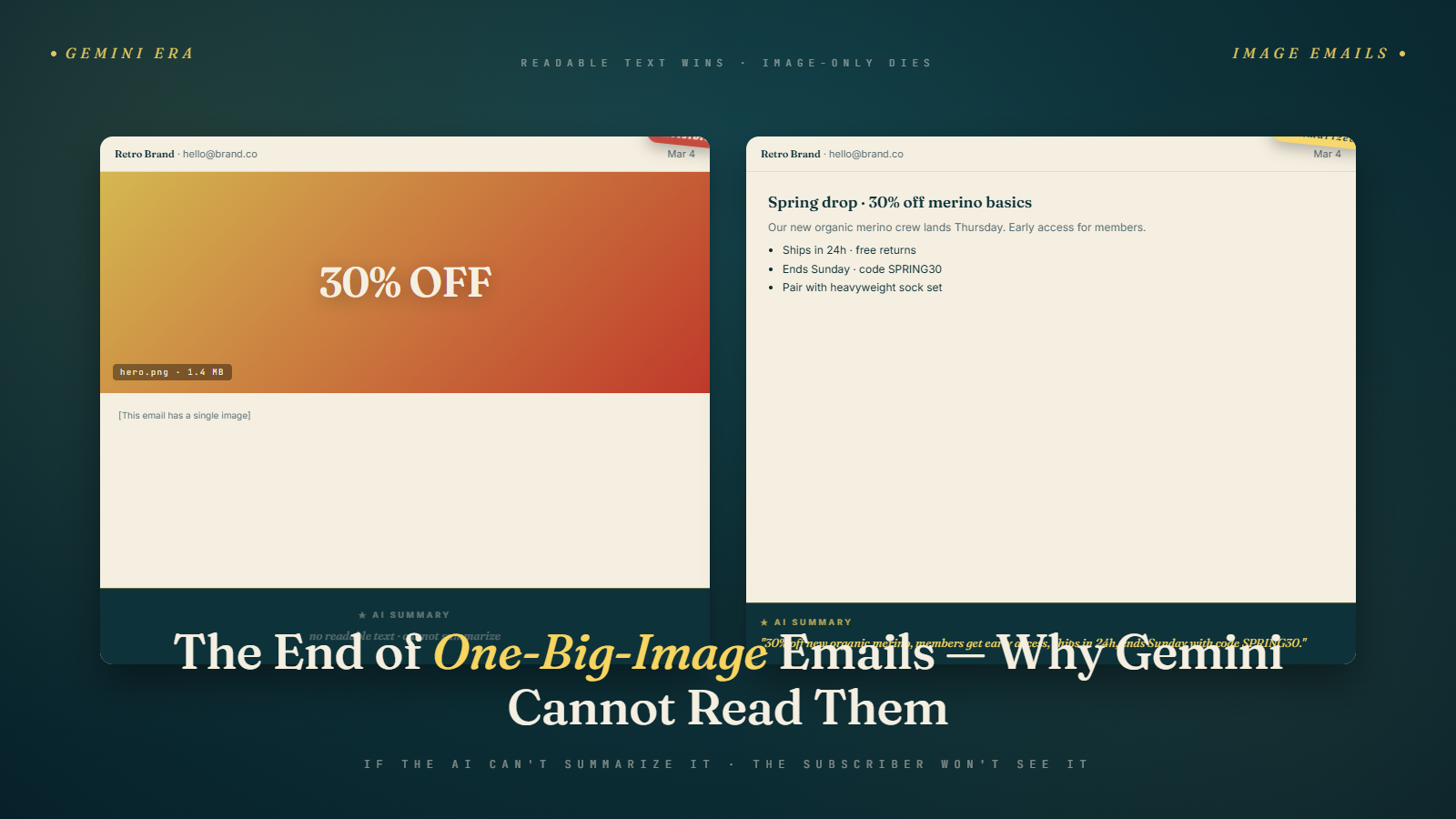
A lot of retail and e-commerce email programs were built around a simple premise: make the email look like a page from the catalog. One beautiful hero image, the sale details baked into the image as text, maybe a CTA button at the bottom. Clean. On-brand. Easy to produce.
Gmail's Gemini AI cannot read a single pixel of that.
When Gemini generates a summary card for an email, it reads the text content of the message. Not the images. Not the text that's been rendered into a JPG or PNG as part of a design. Actual HTML text. If your email is 90% image and 10% a footer with your address and an unsubscribe link, Gemini's summary of your email looks like this: "The sender's address is 123 Main Street, Chicago IL 60601."
That's the summary a subscriber sees before deciding whether to open your sale email. And that subscriber, if they're on a phone checking their inbox between meetings, is not opening it.
What Actually Happens When Gemini Encounters Image-Only Email
The behavior is consistent across Gmail clients and Workspace accounts. Gemini reads from the top of the email's text content. If there is no meaningful text before the footer, the summary is generated from whatever text exists, which is usually boilerplate.
In the absolute worst case, where the entire email is a single linked image with no alt text and no text footer, the summary either shows nothing or shows the subject line again with no additional context. The subscriber sees no signal beyond what the subject line already told them.
In the slightly-better case, where there's alt text on the image, Gemini may pull from the alt text. But alt text is typically written for screen readers and accessibility, not for AI summarization. Something like "Sale banner image" or "Spring 2026 collection hero" produces an equally useless summary. And many templates ship with empty alt attributes or generic placeholders because designers built them for visual clients, not text readers.
I've audited email programs where image-only templates accounted for over 60% of sends. For those senders, the Gemini summary problem is not marginal. It's structural.
The Old Arguments for Image-Heavy Email
The case for image-heavy email has always been brand control. In HTML email, you can't be certain that fonts, colors, and layouts will render correctly across clients. An image is pixel-perfect. It looks exactly like the designer intended on every client. The brand team knows the email will match the campaign creative without worrying about fallback fonts or CSS quirks.
There's also production velocity. A single-image email can be produced in minutes. A design team that's already creating a banner ad just drops it into an email template. No copywriting, no HTML coding, no testing text-heavy layout variations. For high-volume retail programs sending dozens of campaigns per month, this matters.
Those arguments haven't disappeared. But they've been losing ground for years, and the Gemini era accelerates the trend significantly. The brand-control argument is weaker now that email rendering across major clients has stabilized considerably compared to the mid-2010s. The production-velocity argument is real but is being outweighed by the cost of invisible email.
The Compounding Deliverability Problem
What Gemini exposed is something deliverability professionals have been saying for over a decade. Image-only emails are harder to deliver.
Spam filters have always been skeptical of emails with high image-to-text ratios. The logic is simple: spam content that's embedded in an image can't be scanned by content filters. A sender with all their content in images looks, from a spam filter's perspective, like someone trying to hide something. Not all spam filters apply this equally, and the major ESPs have tweaked their authentication checks in ways that reduce the penalty for reputable senders. But it has always been a signal.
The conventional advice has been to maintain a text-to-image ratio of at least 60/40, ideally 70/30. Most brands have ignored this advice because the visual results from all-image templates looked better to human eyes and engagement metrics didn't obviously suffer.
Now there are two compounding penalties: the deliverability penalty from high image ratios, and the Gemini summarization penalty from having no readable text. A sender with an image-only template is losing on both dimensions simultaneously. Their email is slightly harder to deliver and produces no useful AI summary when it does arrive.
See the post on causes of low email deliverability for the broader context on how content signals affect inbox placement. The image ratio issue has always been on that list. Now it has a second compounding mechanism.
The Right Balance in 2026
The answer is not "make ugly text emails." That's a strawman that brand teams use to avoid changing templates. The answer is "make beautiful emails that also contain readable text."
Specifically: a 60/40 text-to-image split, where the first visible content is text, not an image. This means your email opens with a headline in HTML text (styled in your brand font, properly sized, visually appealing), followed by a short line of body copy, followed by your hero image. The hero image carries the visual weight. The text above it carries the AI-readable weight.
That structure gives Gemini the first 100 characters of actual text it needs to generate a meaningful summary. It gives spam filters readable content to evaluate. It gives screen readers something to announce. And it gives subscribers who receive plain-text versions of your email something to read.
The visual impact of this structure is minimal if done well. A two-line text block above a full-width hero image is barely noticeable in a beautiful e-commerce template. The hero still dominates. The brand still shows. The difference is that now the email can be summarized.
For the full case on why the first few text characters matter so much, see the post on front-loading email content for Gemini, which covers exactly how to structure that opening text block.
How to Redesign Without Losing Visual Appeal
For teams running e-commerce programs, here's a practical migration path that doesn't require rebuilding everything from scratch.
Step one: identify your most-sent templates. Not all of them. The top five by send volume. Those are where the ROI of this change is highest.
Step two: add a text block above the hero image in each template. This block should contain: the email's headline (the campaign name or offer), one supporting sentence with the key details (discount amount, end date, free shipping threshold). Style this block in your brand colors and fonts. It should not look like a disclaimer. It should look like the start of the email.
Step three: add meaningful alt text to every image. Not "banner image." Something like "Spring sale 35% off sitewide through April 20." This serves Gemini, screen readers, and subscribers who have images disabled by default in their email client.
Step four: move your "view in browser" and "update preferences" links to the footer, where they belong. They have no business being in the top 100 characters of your email.
A retail brand that ran this migration across their top five templates in January 2026 reported a 15% increase in tap-to-open rate from Gmail subscribers within 30 days. They attributed it to meaningfully improved Gemini summary cards. Their visual templates looked virtually identical before and after. The change was structural, not cosmetic.
The Accessibility Parallel That Everyone Should Have Already Heeded
There's something worth acknowledging here. The accessibility case for text-in-email has been made for years. Screen readers can't read text in images. Users with low vision often have images disabled. Plain-text subscribers get blank emails if all your content is in images. Blind users who rely on screen readers receive essentially nothing from an image-only campaign.
The email marketing industry mostly ignored this. Accessibility was treated as a compliance checkbox rather than a design principle, and email accessibility in particular has been under-resourced at most companies I've seen.
Gemini's inability to read image-only emails is, in a way, the commercial consequence of ignoring the accessibility argument. The AI has the same limitation that screen readers have always had. It reads text. If you don't have text, it can't help you.
The organizations that did take accessibility seriously, that required alt text and text-first layouts in their design systems, are in a much better position today. They didn't have to change anything for Gemini. They'd already built it correctly.
What Good Template Structure Looks Like Now
The template structure that works in 2026 looks like this:
Preheader text (hidden, accessible to inbox preview and Gemini).
Visible header with logo (no text content required here, just brand identity).
A text block: one headline sentence and one supporting sentence in brand-styled HTML text. This is the first readable content. This feeds Gemini.
Hero image with meaningful alt text.
Body copy in HTML text (not as part of the image).
CTA button.
Product grid or secondary offer sections, each with HTML text captions.
Footer with address, unsubscribe, preferences.
That structure is not radical. It's roughly what every HTML email best-practices guide has recommended for years. The difference now is that the consequence of ignoring it is measurable in a very specific and painful way: your Gemini summary card is blank or useless, and subscribers see no reason to open.
The brands that are still running single-image email templates are carrying a structural disadvantage that compounds with every Gmail policy update. They're not just making their own job harder. They're actively handing an advantage to competitors who made this change a year ago.
If you're running Bulk Mail Verifier or a similar tool to maintain list hygiene, the list quality work is necessary but not sufficient. You can have a perfectly clean list and a 100% authenticated sending domain and still watch your Gmail open rates erode because your template produces no useful AI summary. The content has to work too.
A Client Case Study Worth Naming
A mid-sized apparel retailer I consulted with in February 2026 came in convinced that their Gmail open rate drop was a deliverability problem. They had been sending a weekly merchandising email to roughly 480,000 Gmail subscribers, and their tap-to-open rate had fallen from 18% to around 11% over three months. They had already done the usual checks: SPF, DKIM, DMARC alignment, sender reputation in Postmaster Tools, complaint rates. All clean. Their reputation scored high in Google Postmaster and their complaint rate sat at 0.04%, well inside the safe band.
What they had not looked at was the template. Their flagship Tuesday campaign was a 1200-pixel tall single image. The image was beautiful, shot on location, designed by a brand team that took real pride in it. But the only HTML text in the email was a 14-word footer with their mailing address and an unsubscribe link.
We ran the campaign through a Gmail test account and captured what the Gemini summary card actually showed subscribers. It read, almost verbatim: "The sender's business address is provided along with an unsubscribe option." That was the summary competing against every other email in the inbox. Not "30% off sweaters" or "new arrivals." Just the footer.
The fix took their designer about three hours. They added a text block above the hero image containing the headline and a supporting sentence. They rewrote the alt text on the hero. They moved the utility links to the footer. The next send produced a Gemini summary reading roughly: "30% off sweaters and outerwear through Sunday, free shipping on orders over $50." Tap-to-open rate on that campaign hit 16.2%. Two campaigns later it stabilized at 17%, roughly where they had been before the drop began.
The lesson I took from that engagement was not that Gemini changed email. It was that Gemini made the cost of lazy templates instantly visible. The same template had probably been suboptimal for years. It just was not being punished quite so directly. For related context on how this connects to the broader open-rate collapse, see the post on the death of open rate in the Gmail auto-open era.
What to Measure in the Next 60 Days
If you manage an email program and you are trying to figure out whether this shift is affecting you, there are three specific measurements worth pulling into a single dashboard over the next two months.
First, Gmail-segment tap-to-open rate compared to non-Gmail-segment tap-to-open rate, broken out weekly. If Gmail is diverging downward and Outlook or Yahoo are flat or growing, you have a Gemini-side problem, not a universal list or content issue. The divergence is the signal. Senders with healthy text-to-image ratios tend to show parity across mailbox providers. Senders with image-heavy templates tend to show Gmail-specific erosion.
Second, click-to-open rate on Gmail specifically. Even when opens decline, CTOR should hold or rise if the subscribers who do open are actually interested. If CTOR is also falling on Gmail, that suggests the emails that get opened are underwhelming the readers once they arrive, which is a copy and design problem layered on top of the summary problem. The post on click-through rate decline post-Gemini covers the compounding mechanics.
Third, a qualitative review of your own Gemini summary cards. Set up a seed list of five to ten personal Gmail accounts on different devices, receive every campaign you send, and screenshot the summary card for each. Compare to the subject line. Any gap between what the subject promises and what the summary confirms is a friction point that costs you opens.
Pull one of your image-heavy templates today. View the source. Find the first text string Gemini would encounter. If it's not the core offer of your email, that's the thing to fix this week.
The long-term position worth holding in mind is that this shift is not a one-quarter story. The inbox environments that Gemini pioneered are being adopted, in different forms, by Apple Mail and Outlook's Copilot integration through 2026. Templates that produce clean summary cards in Gmail will produce similarly clean previews in the other AI-enhanced inboxes as they roll out. Templates that fail Gemini today will fail every AI summary surface that follows. Teams that rebuild their top templates now are setting up a structural advantage that holds across the whole inbox landscape rather than solving for one mailbox provider in isolation. Pair the template rebuild with list hygiene through email verification so the improved summary cards are landing in inboxes that will actually see them, and the combination compounds through the rest of the year in a way that single-vector fixes never quite manage.