
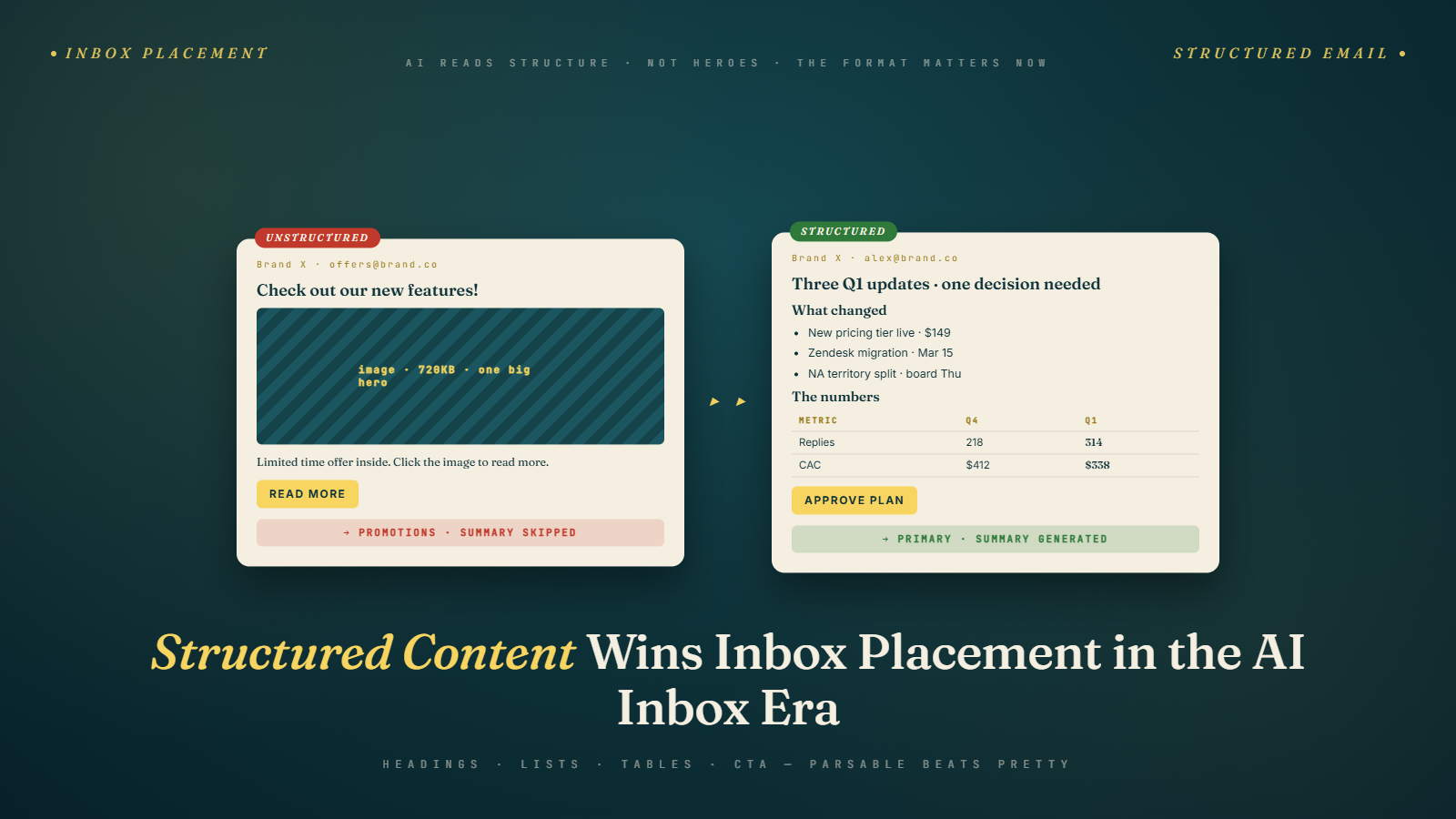
For most of the last decade, the accepted wisdom on promotional email design was: keep it clean, lean on a hero image, use short prose, and for the love of deliverability do not make it look like a document. Structure was for newsletters. Promotional emails were supposed to feel editorial, visual, effortless.
That wisdom is expiring. I would go further: the senders still following it are losing inbox placement and engagement to the ones who are adding headings, bullets, and small tables to emails where those elements used to feel out of place.
The reason is not mysterious. Gmail's inbox-level AI, Apple Intelligence, and the growing crowd of third-party assistants all read structured content more accurately and summarize it more usefully. Humans, it turns out, also process structured content faster on phones. What felt like a whitepaper on desktop in 2018 reads as "I can skim this in six seconds" on a phone in 2026.
Let me walk through why this happened, which structural elements do the most work, and how to add them without making your brand look like an HR announcement.
What changed in how inboxes parse structure
Three things shifted in the last two years. First, the major inbox AIs moved from simple keyword-based summaries to actual language-model summaries, which means they handle semantic structure like H2 headings or definition lists far better than they used to. Second, mobile reading hit close to 70 percent of total opens for most senders I work with, which means attention windows are shorter and skimmability matters more. Third, inbox placement itself started to weight engagement signals (scroll depth, time in view, click patterns) in ways that reward emails readers can process quickly.
Structured emails help with all three. The AI gets an outline to work with. The mobile reader gets scannable chunks. The placement algorithm gets stronger engagement signals because readers actually finish the email instead of giving up two paragraphs in.
This is the part I want to push back on: the old fear that structure kills conversion. For promotional emails, the evidence I have seen across client campaigns in the last nine months is that modest structure (two or three H2s, one bulleted list, one small comparison table when relevant) improves both AI summary quality and click-through rate. The losers are the walls of prose and the image-heavy sends with minimal text.
The three structural elements that do most of the work
Not every email needs every structural element. Three are worth making standard in your templates.
Headings. An H2 every 150 to 250 words breaks your email into sections a human can skim and a model can outline. The copy under each heading should start with a topic sentence that stands alone. If someone read only your headings plus the first sentence under each, they should understand your offer.
Short bulleted lists. One per email, no more. Use them for things that are genuinely list-like: features of a product, cities where an event is running, categories on sale. Do not use bullets for prose chopped into fragments. Bullets work for humans because they create visual rest. They work for AI because each bullet is a parseable entity.
Small tables for comparisons. Three columns maximum, five rows maximum. A pricing comparison, a size chart summary, a feature matrix. Tables used to be death for email rendering across clients. Modern email clients handle them fine, and AI summaries benefit enormously from the explicit row-and-column structure. If you have ever tried to write a pricing paragraph and had it come out as a jumble, a table is usually the answer.
That is it. Those three elements cover 90 percent of the structural needs in promotional and newsletter email. Anything more and you start looking like documentation.
Newsletters expected it. Promos benefit from it.
Newsletters have always been structured. Section headings, round-ups, short intros, clear article previews. The newsletter senders I work with already do this well, and their summaries render cleanly.
Promotional emails are where the bigger opportunity lives. Most promo emails still follow the 2018 template: hero image with text baked in, one headline, two paragraphs of prose, CTA button, product grid. Summaries of that structure are bad because the text load is too low and the facts live in image pixels.
I ran an audit for an apparel brand in January. Their last 20 campaigns were all in that 2018 template. I rewrote three of them with added structure: an H2 labeling the offer, a three-row bullet list of the categories on sale, and a small table showing discount tiers. The rewrites kept the brand voice and kept the hero image. They just added a second text block below the hero that put the facts in a parseable form.
Click rate across those three campaigns was 11 percent higher than the rolling average of the prior twenty. Summary accuracy (spot-checked by pasting into Gemini and Claude) improved dramatically. Nothing about the voice changed. The only difference was structural.
Why the old advice against structure existed
There was a real reason to avoid heavy structure a decade ago. Spam filters in 2014 treated emails that looked too much like documents as suspicious because a lot of phishing used document-style templates. Inbox placement could suffer. Early mobile clients rendered tables inconsistently. Bullets often displayed as weird characters in Outlook.
None of those problems are still problems. Modern spam filters care about sender reputation, authentication, engagement, and complaint rates, which we covered in our piece on mastering sender reputation. They do not penalize emails for having headings or bullets. Mobile clients render tables fine. Outlook still has quirks but none that break reasonable structure.
The advice to avoid structure persisted because design conventions update slowly. Designers trained on 2018 templates teach younger designers the same habits. Brands copy what other brands do. Nobody audits whether the old rules still apply. That inertia is what I am trying to break in this post.
A test you can run on your next send
Take one promotional email you are planning to send this month. Duplicate it. In the duplicate, add two H2 headings that break the message into clear sections. Replace any paragraph that is really a list with an actual bulleted list of three to five items. If you have a pricing or feature comparison anywhere in the email, replace the prose with a small table.
Send the original to half your list and the structured version to the other half, matched on usual segmentation. Let it run 48 hours.
In every test I have run or supervised with this exact setup, the structured version has matched or beaten the original on click rate, and it has always produced cleaner AI summaries. The worst case is parity. The usual case is a meaningful improvement. The best case (and I have seen this on several sends) is a 15 to 20 percent lift in click rate with no downside.
If your structured version loses, you probably overdid it. Scale back. Two H2s, one bulleted list, one table max. Anything more than that starts to feel bureaucratic and that does hurt engagement.
Structure is not the same as clutter
This is worth saying clearly because I have seen teams overcorrect after reading posts like this one. Structured does not mean cluttered. A well-structured email has fewer words, cleaner visual hierarchy, and more white space than its unstructured equivalent. It is easier to read, not harder.
If you add an H2 and it feels like it is competing with your hero copy, your hero copy is too long. If you add a bulleted list and it feels redundant with a paragraph above it, delete the paragraph. Structure replaces prose. It does not layer on top of it.
The emails I have rewritten with structure almost always end up shorter than the originals. The prose was carrying too much weight, and when I moved the facts into structural elements, the prose had less to do and could be cut.
How headings should be written
One detail that matters more than people expect: the wording of your headings. Generic headings like "Details" or "What's new" are useless to both humans and AI. Specific headings ("Spring sale runs through April 22," "Free shipping rules for orders over 50 dollars") carry information on their own.
Write your headings as if they were the only thing the reader (or AI) would see. If someone extracted only the three H2s from your email, would they know what the email is offering? If yes, your headings are pulling their weight. If no, rewrite them.
This discipline is close to what we covered in our piece on front-loading email content for Gemini, just applied to a different part of the message. Every structural element in your email should work as a standalone micro-summary of the section it introduces.
Bullets: do not cheat
A bad habit I see often: writers chop a paragraph into bullets because bullets look more structured. That is not what bullets are for. A bulleted list should be items that share a category and can be reordered without losing meaning. If your "bullets" are really narrative steps, use a numbered list or prose.
Misused bullets hurt you because AI summaries read them as discrete entities and the summary becomes a disjointed list of fragments. Real bullets summarize cleanly because each bullet is one entity the model can extract.
If you cannot describe what the category of the bulleted list is in one phrase, the list should not be bullets.
Tables: the underused tool
Tables are the most underused structural element in email. Most senders never touch them outside of invoices and order confirmations. That is a missed opportunity.
A pricing table in a B2B promotional email, a size chart summary in a DTC apparel launch, a feature comparison in a SaaS announcement. Each of these benefits enormously from table structure. The human reader skims a table in two seconds. The AI summary picks up the rows correctly almost every time.
The only rules: keep it small (three columns, five rows max), give every column a clear header, put totals or conclusions in the bottom row if relevant, and make sure the table is rendered as actual HTML, not as an image.
I have had clients rewrite pricing paragraphs into three-row tables and see summary accuracy jump from near-zero to consistent. That is not a small change. That is the difference between the AI representing your offer correctly and the AI making up something adjacent.
One last word on aesthetics
Some designers reading this will worry that adding structure will make their emails feel like Jira tickets. That fear is real but overblown. You can keep your aesthetic. Style your H2s with custom typography. Use branded colors on your bulleted list markers. Style your tables with padding, alternating row colors, and your brand's type system. Structure does not have to look clinical. It has to be parseable in the underlying HTML.
The emails I admire most right now are the ones that look visually distinctive and still summarize cleanly. That combination is achievable. It just requires treating structure as a design element, not a compromise.
The metrics that actually tell you structure is working
A question I get from every client after we rebuild a few templates: how do we know the structure is doing the work versus the copy or the offer? The honest answer is that you need more than one send to isolate it, but the signals show up quickly if you know where to look.
Scroll depth is the first metric I check. When a plain-prose email runs 180 words and a structured version runs 140 words, the structured version almost always shows higher average scroll completion because readers reach the end instead of abandoning mid-paragraph. If your ESP exposes scroll tracking, watch the 50 percent and 100 percent completion rates over a four-campaign window. A 5 to 10 point lift in full-scroll rate is a typical result when we move from walls of prose to headings plus a small table.
Second, watch click distribution across your CTAs. Structured emails tend to spread clicks across more elements because sections give readers clear handles to act on. If your prior version had 85 percent of clicks going to a single hero button, expect that to drop to 60 to 70 percent with added H2 sections and a table, because secondary links under each heading pick up real traffic. Total clicks usually go up. The pattern is what tells you structure is pulling weight.
Third, compare AI summary outputs manually. Paste your rendered HTML (or the text content) into Gemini and Claude and ask for a three-sentence summary. If the output correctly names your offer, the date window, and any pricing detail, your structure is doing its job. If the summary waffles ("this email appears to be about a sale of some kind"), the facts are not parseable and you need more explicit structural containers. This manual check takes two minutes per campaign and it is the single highest-leverage quality gate I know. The same principle we covered in new email engagement metrics for the AI inbox applies here: the things worth measuring are changing, and structure-quality checks belong in your QA flow.
Finally, track complaint and unsubscribe rates alongside engagement. Well-structured emails tend to lower complaint rates because readers who are not interested can identify that quickly and move on without feeling tricked. The quiet benefit of structure is that it respects the reader's attention, which pays back in the form of lower negative signals, a point worth paying attention to as inboxes weigh more signals in placement decisions.
What to do when your brand templates push back
The hardest part of this work is rarely the email itself. It is the brand system. Most brands have template libraries built by design teams who optimized for hero-image aesthetics and now resist structural additions because "that is not on brand." If you are a marketing lead reading this, that pushback is the real barrier, not any technical limitation.
Two approaches work. The first is to introduce structure gradually inside existing templates. Keep the hero. Keep the big headline. Add one H2 below the hero, styled in the brand's display typography, and one structured element (a bulleted list with branded markers, or a three-row table using brand colors). This preserves aesthetic while adding parseability. Most design teams accept this when you show them the summary quality difference before and after.
The second approach is to build a parallel template specifically for information-dense sends: pricing announcements, event schedules, product comparisons, policy updates. This template lives alongside the hero-driven promotional template and gets used when the content is fact-heavy. I helped a retail client build this two-template system in November and they now route about 30 percent of their sends through the structured template, mostly for sale mechanics, loyalty updates, and shipping policy changes. Engagement on those sends is measurably higher than when the same content ran through the hero template.
The stakeholder conversation that usually unlocks this is framed around AI summarization, not structure for its own sake. Show your head of design a side-by-side: their current template rendered as a Gemini summary versus a structured version's summary. The difference is undeniable and it shifts the conversation from "do we want to look like a document" to "do we want the AI to describe our offer correctly or not." That is a conversation design teams understand, and it connects to the broader shift we covered in moving from deliverability to desirability in the Gemini era.
Pick your next campaign and add two H2s, one bulleted list where a paragraph used to be, and a small table if there is a comparison anywhere in the email. Send it. Check the summary Gmail generates. Read it on your phone. You will see the difference before the engagement numbers come in, and you will see the numbers move the week after. The senders winning inbox placement in 2026 are the ones who figured this out already.