
A client texted me on January 14, 2026, two weeks after Gemini finished its broad rollout to Gmail. Her message: "My open rates went up 8%. My clicks are down 12%. What is happening?" I told her she was seeing the Gemini effect in real time. AI-prefetched opens were inflating her open counts, and AI summaries were giving her subscribers enough information that clicks became optional. Both things were true at once. Neither was a list problem or a content problem. It was the inbox itself changing under her.
If you have been running email campaigns through the first quarter of 2026 and felt like the ground shifted without explanation, this is why. Gmail's Gemini integration is not a feature update. It is a reorganization of how the inbox works.
What Gemini Actually Changed in Gmail
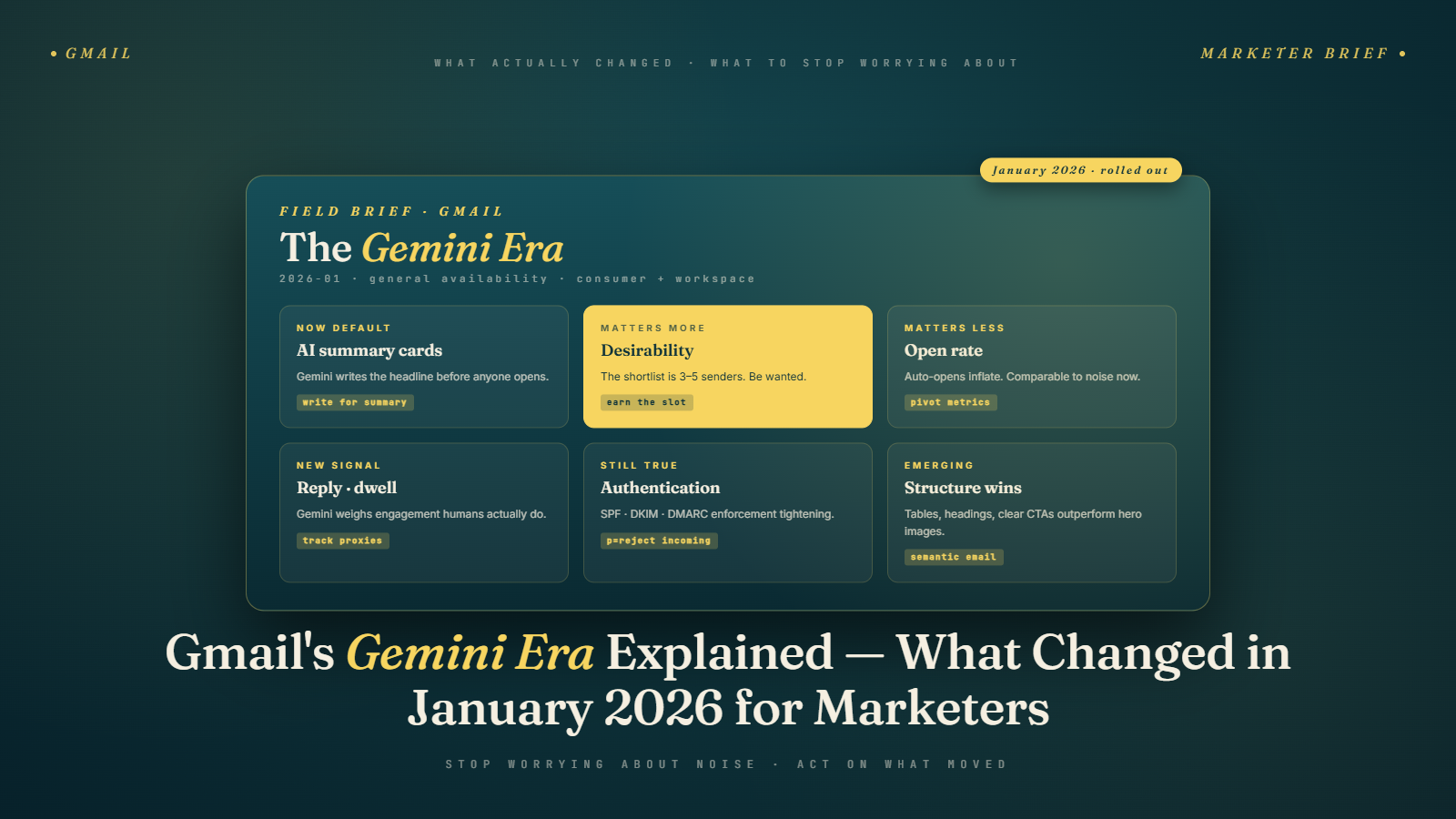
Gemini is now embedded throughout Gmail rather than sitting as a separate assistant. For most users, the visible changes are AI-generated summaries at the top of promotional emails, a Manage Subscriptions view that surfaces all your active email senders with frequency data, AI-prioritized inbox sorting that groups messages by relevance instead of pure recency, and summary cards that pull key details like offers, dates, and prices out of marketing emails before the subscriber opens them.
Underneath those visible features, the shift is bigger. Gmail's spam and reputation scoring now runs on models that evaluate sender quality in near real time, and the signals that matter have expanded. Engagement is no longer just opens and clicks. It includes reply rates, scroll depth, how long a subscriber hovers on the summary card, and whether they engage with the unsubscribe controls in Manage Subscriptions.
Senders who were doing reasonable things before the rollout mostly did not notice a disaster. Senders who were already marginal on list quality, frequency, or content relevance got hit faster than they would have under the old rules.
The 40-Second Version for Someone Who Just Wants the Answer
Gemini changed how Gmail surfaces and summarizes email. Most marketers should not panic, but three specific things now matter more: the first 100 characters of your email (Gemini reads them first), your reply rate (a stronger engagement signal than clicks), and your send frequency (visible to subscribers in Manage Subscriptions). Fix those three and you are mostly fine.
That is 55 words and it is the honest summary. The rest of this post covers why each of those three things matters and how to adjust without overreacting.
The Open Rate Is Now Half Noise
If your open rates jumped 5 to 15% between December 2025 and February 2026 and nothing else in your program changed, Gemini is the reason. Gmail's AI prefetches and preloads email content for promotional messages, including tracking pixels. That registers as an open in your ESP's analytics even though no human has seen the message.
This is the same kind of problem that Apple's Mail Privacy Protection created in 2021 when Apple started proxy-loading images, but Gemini's version is broader because Gmail is a larger share of many marketers' list. The practical consequence is that your open rate is no longer a clean signal of human engagement. It mixes real human opens with AI-triggered opens, and the ratio varies by sender, list composition, and even campaign type.
The death of the open rate, explained in detail, is a deeper post on this if you want to understand the mechanics. The short version: stop triggering automation sequences based on open events alone. A subscriber "opening" your email might actually be Gemini prefetching it. If your next-email-sends-when-they-open logic is running on inflated data, you are effectively sending more email to subscribers who have not actually engaged, which hurts downstream reputation.
The metrics to trust now: replies, confirmed clicks (not just link scans), conversions, and Gemini's own relevance feedback if you watch Postmaster Tools closely.
Click-Through Rate Is Down and That Is Not Your Fault
Industry benchmark data from multiple reporting services showed a broad drop in promotional email CTR from roughly 4.35% to around 3.93% in the first quarter of 2026. That is not a coincidence. It is what happens when Gemini produces good summary cards.
Here is the logic. A subscriber gets your promotional email. Gemini shows them a summary that says "New arrivals, 25% off through Sunday, use code SPRING." They have enough information to decide. They either act (open and click, or go directly to your site through a different channel) or skip. Either way, the click-through event on your email link is less likely to fire.
This is measurably bad for senders who still evaluate program performance on CTR alone. It is less bad for senders who look at attributed revenue or cross-channel conversion, because those metrics often show subscribers converting through direct site visits or search traffic that your email drove even though the email itself did not get a click.
The practical response is not to try to outsmart the summary card by writing deliberately confusing emails. That works for one campaign and kills your reputation over a few. Instead, design offers where the click is required to complete the action. Personalized URLs. Account-specific discount codes that require a click to apply. Content that cannot be summarized because it is interactive or gated by preference. Those formats recover CTR because the summary card cannot substitute for them.
The Manage Subscriptions Feature Is Your New Frequency Audit
Gmail's Manage Subscriptions panel shows subscribers every sender they receive mail from, sorted by frequency with an unsubscribe button right there. For the first time, subscribers have a single surface where they can see which senders are actually high-volume and act on it with one click.
Senders who send daily or multiple times per week are now visibly prominent in this view. A subscriber who opens Manage Subscriptions sees "You have received 47 emails from this sender in the past 30 days" right next to the unsubscribe button. That framing changes subscriber behavior. Senders who had been tolerated through inertia are now getting bulk-unsubscribed.
I watched this happen with a client in mid-February 2026. A subscription-box company with a 180,000-subscriber list was sending five to seven emails per week. Their unsubscribe rate jumped from 0.18% per send to 0.42% per send in three weeks. Nothing about their content changed. What changed was that Gmail started showing subscribers "You have received 28 emails from this sender in the past 30 days" and subscribers acted on it.
The fix was not clever. They cut to three sends per week, improved targeting on those sends, and watched both unsubscribe rate and complaint rate drop back to healthy levels within a month. The lost volume did not cost them revenue because the sends that remained had higher engagement.
If you are sending more than four times a week to the same segment, audit your frequency against your Manage Subscriptions exposure. This deeper post on Manage Subscriptions and high-frequency senders covers how to do that audit in practice.
Why Subject Lines Matter Differently Now
In the pre-Gemini era, the subject line was the gateway. Your entire chance of getting the message read depended on the subject line convincing the subscriber to click the email open. That framing was the basis for a generation of email copywriting advice about curiosity hooks, emoji usage, and teaser lines.
In the Gemini era, a meaningful share of subscribers read the summary instead of opening the email. The summary pulls from your email body text, not your subject line. This changes the job of the subject line. It still matters for getting into a good inbox position and for influencing which emails the AI surfaces prominently. But it is no longer the only gate, and curiosity-gap subject lines that deliberately hide the offer hurt you because the summary reveals the offer anyway and the curiosity trick loses its power.
What works now is specificity. Subject lines that accurately preview the contents. Numbers and dates in the subject. Clear value propositions. Not because Gemini "prefers" these, but because they align with what the summary will show, which makes the combined subject-plus-summary experience coherent to the subscriber.
The full subject line strategy for 2026 goes into the data I am drawing on. The short version here is: stop being clever, start being clear.
The First 100 Characters of Your Email Are Now Critical
Gemini generates its summary from the first substantive text it encounters in your email body. If your email opens with a preheader like "View this email in your browser | Update your preferences | Visit our site" before the real content starts, the summary can include that preheader text and lose the thread of your actual message.
The fix is structural. Lead with your point. The first sentence of your email body should contain the core value. The specific offer. The concrete update. The reason the subscriber should care. Not a friendly "Hi there, hope your week is going well" opener. Not a brand mission statement. Not a disclaimer. The actual content.
This cuts against a lot of copywriting advice that emphasizes warmth, rapport, and brand voice in openers. That advice was not wrong, it just did not anticipate an AI reading the first 100 characters and rendering them as a preview. If your preview reads well, your open and engagement metrics improve because subscribers who see the summary get a clean version of your message.
Front-loading email content has the specific rewrite patterns for common email types.
What to Stop Worrying About in the Gemini Era
Three things I hear senders worry about that mostly do not matter.
The idea that Gemini is going to "kill email marketing." No. Email open, click, and revenue metrics are all still positive overall. The channel is not dying, it is adjusting. Senders who adjust will do fine.
The idea that you need to rewrite every email from scratch. Not unless your emails were already poorly written. Senders whose emails have a clear subject, a strong opening line, and real value are fine. The marginal senders are the ones whose copy was already weak and relied on tricks.
The idea that you should game the AI by trying to produce deceptive summaries or content that exploits the AI's parsing quirks. Gmail's spam team is aware of this behavior. It gets detected quickly. The senders trying to outsmart the AI are the senders you see getting hard 550 rejections in the November 2025 enforcement data.
What to Actually Start Doing This Quarter
Three changes that have the highest impact for the least effort. None of them require new tools, new budget, or new team structure.
Rewrite your first 100 characters across your most important lifecycle and broadcast emails so the summary reads well. This is usually a 30-minute exercise per email and it pays for itself the first time Gemini generates a clean summary.
Audit your send frequency per segment against subscriber engagement. If you are sending more than four times a week to a segment whose average opens-per-month is below four, you are overexposing yourself in Manage Subscriptions and you are going to watch unsubscribes climb.
Stop triggering automation off open events alone. Use confirmed clicks or conversions as your engagement signal. If your platform does not make this easy, add a secondary trigger condition that requires either a click or a longer dwell time to classify as engaged.
You can do all three in a week with existing tools. You do not need a platform migration or a new CDP to adapt.
The Honest Take On What This Means for Most Programs
Here is the contrarian position I keep coming back to when clients ask about Gemini. For senders doing the right things (clean lists, relevant content, reasonable frequency, proper authentication), Gemini is good news. It makes the inbox cleaner. It gives their better campaigns more prominent placement. It elevates their reply rates as a visible signal.
For senders coasting on volume and inertia, Gemini is a correction. The kinds of mediocre programs that got away with 7% engagement rates and 0.15% complaint rates are now getting their engagement normalized down and their complaint exposure up. This is the Gemini effect that people call "punishing." It is not punishment. It is just measurement that finally reflects what subscribers were already thinking.
The practical advice I give every client in Q1 2026 is the same: your program does not need to change strategy. It needs to do the strategy better. The sloppy edges that were tolerable in 2023 are the ones failing now, and the fix is tightening the sloppy edges, not reinventing the approach.
Pair this with list hygiene. If you are sending to any segment where your bounce rate has crept above 2% on Gmail specifically, run that segment through verification before your next send. Bulk Mail Verifier handles the hygiene side in an afternoon. The rest of this is thinking and editing, which only you can do for your own program.
Pull up your last three Gmail campaign reports tomorrow morning. Compare the open rate to the click rate and the reply rate. If your opens are up and your clicks and replies are flat or down, you are seeing Gemini in your data. Pick one change from this post and test it on your next send. Start there. The full adjustment takes a quarter, not a weekend.
The compounding piece is worth naming separately. Every well-executed Gemini-era adjustment (front-loaded content, clean frequency audits, reply-rate growth, authenticated sends, list verification) feeds reputation signals that Gmail weights positively in future placement decisions. Programs that make three or four of these adjustments over a quarter often see disproportionate placement improvement in the following quarter because the signals reinforce each other. Programs that make none of them continue to slide as the inbox environment keeps evolving around them. The sooner you start, the more the compounding works for you rather than against you.