
Most people trying to start cold email waste weeks comparing tools instead of sending emails. They read G2 reviews, watch YouTube comparisons, sign up for five free trials, then get paralyzed by the options and never actually launch a campaign.
This post cuts through all of that. What follows is an opinionated, practical breakdown of every tool category you need to run cold email outreach — with specific recommendations for beginners and for people scaling up. Not the "best" tools in some abstract sense. The right tools for the job at different stages.
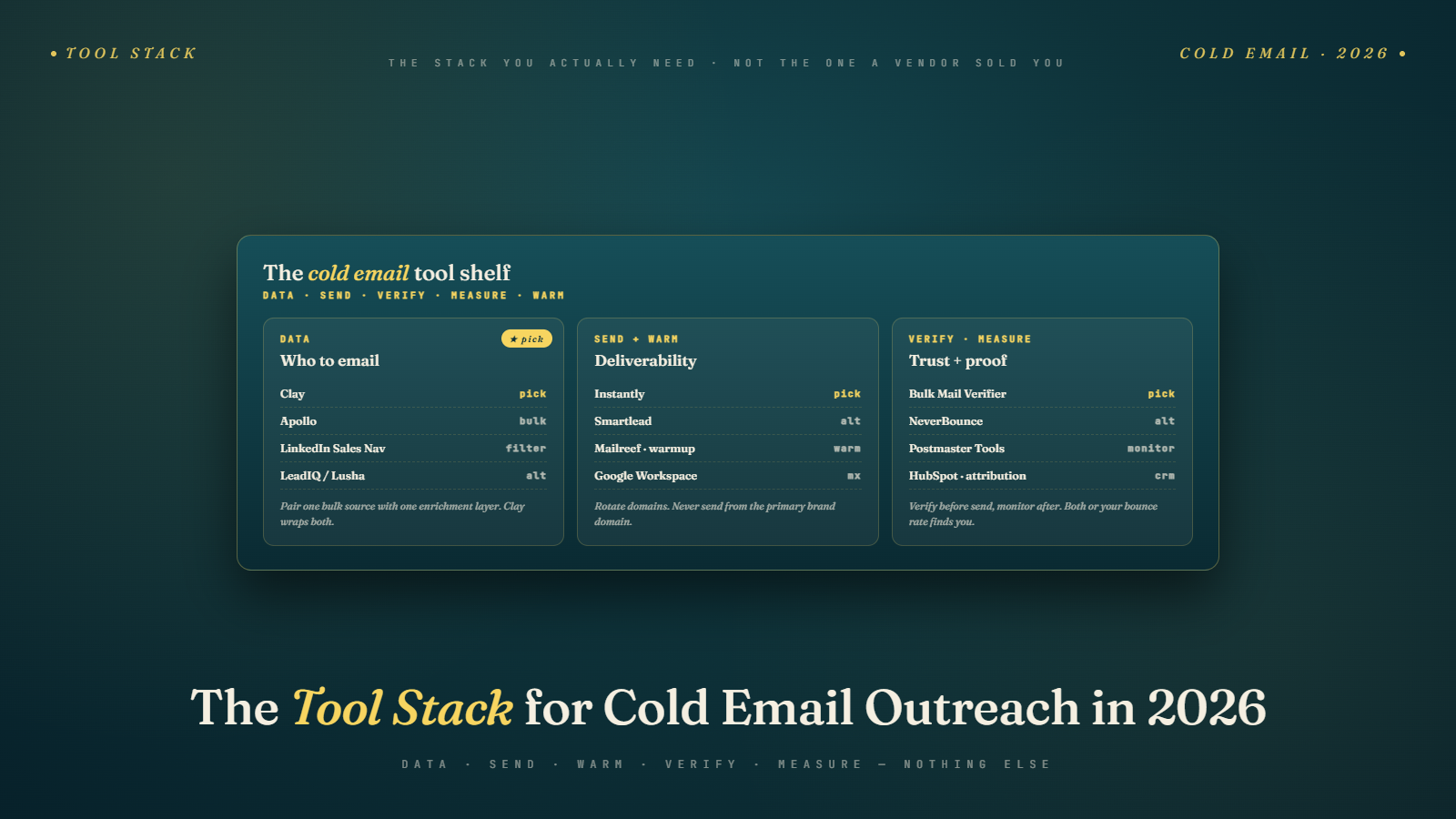
There are seven tool categories you need to cover. Skip any one of them and something breaks — your list is bad, your emails land in spam, your replies fall through the cracks, or you burn a domain you spent three months building up. Let's go through each one.
The 7 Categories of Tools You Need
Before diving into specifics, here's the full map:
- Prospecting — finding and building lists of qualified contacts
- Email verification — cleaning those lists before you send anything
- Sending — the platform that actually sends sequences at scale
- Warm-up — building sender reputation on new domains and inboxes
- CRM — tracking replies, pipeline, and follow-up
- Personalization — making emails feel one-to-one even at scale
- Deliverability monitoring — knowing whether your emails are hitting the inbox
You might be tempted to skip one or two of these because you're just starting out or you're trying to keep costs down. Don't. Each category solves a specific failure mode. Prospecting without verification means you're sending to dead addresses and wrecking your sender score. Sending without warm-up means your first batch of emails goes straight to spam. Managing replies in your regular Gmail inbox means deals die in thread clutter. Every gap is a leak somewhere in the funnel.
Category 1 — Prospecting Tools (Finding the Right People)
Prospecting tools do one thing: help you build lists of qualified prospects with accurate contact information. The quality of your list determines the ceiling of your campaign. There's no sequence copy clever enough to save a bad list.
Apollo.io is the best all-in-one option for most people starting out. You get a large B2B database, a Chrome extension for LinkedIn prospecting, email finding, basic sequencing, and CRM functionality — all in one tool. The free plan is surprisingly functional. The paid tiers are reasonable. If you're starting cold email and don't want to stitch together multiple tools, start here.
LinkedIn Sales Navigator is the best tool specifically for B2B list building when your targeting depends on company size, department, seniority, or role-based filters. The search filters are more powerful than anything else in the market for finding the right people. The downside: it doesn't give you email addresses directly. You still need an email finding tool on top of it.
Hunter.io is excellent for domain-based lookup — when you know the company and just need to find the right person's email. It's particularly good for verifying email format patterns at a domain and finding contacts by role. It's not a database play; it's a precision tool.
Clay sits in a different category than the others — it's more of a data enrichment and automation platform than a traditional prospecting tool. You can pull data from dozens of sources (LinkedIn, Apollo, Clearbit, Crunchbase) and combine them into a single enriched row per prospect. It's overkill for beginners, but if you're building personalized sequences at scale, there's nothing better.
For beginners: start with Apollo's free tier and get your first 500 contacts before spending anything. For teams sending at volume: combine Sales Navigator for targeting with Apollo or Clay for enrichment.
What to look for when evaluating any prospecting tool: data freshness matters more than database size. A tool claiming 300 million contacts is useless if 40% of the emails bounce. Check bounce rates on small test batches before committing.
Category 2 — Email Verification Tools (Non-Negotiable)
This category exists because every data source — no matter how good — has dirty data. Emails go stale. People change jobs. Companies shut down. Domains expire. If you skip verification and send to a list with more than 3–5% invalid addresses, you'll start accumulating hard bounces, and hard bounces hurt your sender reputation fast. Enough of them and you'll find your entire domain blacklisted.
Email verification isn't glamorous, but it's the single highest-leverage technical step in the entire cold email workflow.
Here's what a proper email verification tool actually checks:
- Syntax validation — Is the email address formatted correctly?
- MX record check — Does the domain have a mail server configured to receive mail?
- SMTP check — Does the specific mailbox exist on that server?
- Catch-all detection — Is this a domain that accepts all emails regardless of whether the mailbox exists?
- Disposable email detection — Is this a throwaway address from a service like Mailinator?
For bulk verification — which is what you need when you're working with exported lists — BulkMailVerifier.com is the tool to use. Upload your list, run it through verification, download the cleaned results with validity status on every address. It handles large lists without the per-credit restrictions that make other tools painful to use at scale. The accuracy is high, the process is straightforward, and there are no arbitrary volume caps that force you to upgrade just because your list got bigger.
Check out the guide on unlimited email verification if you're dealing with volume concerns, and bulk email verification services compared for a broader breakdown of what's available.
When to verify: before every campaign, without exception. Any time you import from a data source you didn't build yourself — whether that's a purchased list, an exported Apollo search, a trade show CSV, or an enriched Clay export — verify it before it goes near your sending tool.
Category 3 — Cold Email Sending Tools
You can't run cold email campaigns at scale out of Gmail or Outlook. Both platforms rate-limit personal sending, flag bulk activity, and weren't designed for sequence automation. And you definitely can't use an ESP like Mailchimp or Klaviyo — those tools require opt-in consent by design and will terminate your account for cold outreach.
You need a purpose-built cold email sending platform. Here's what to look for:
- Multi-inbox support — Ability to rotate sending across multiple email accounts to protect deliverability and increase volume
- Sequence automation — Multi-step drip sequences with conditional branching and reply detection
- A/B testing — Test subject lines, body copy, and send times
- Deliverability features — Built-in warm-up, sending throttles, randomized send delays
Instantly is the best option for teams focused on volume and cost efficiency. The pricing is flat-rate rather than per-contact, which makes scaling economics much better. Multi-inbox management is clean, the UI is fast, and the warm-up network is large. For anyone focused on outbound at volume, Instantly is the starting point.
Lemlist is better if personalization is central to your strategy. It supports image personalization natively, has more flexible sequence logic, and the interface is built for crafting thoughtful campaigns rather than blasting volume.
Smartlead is the strongest option for agencies managing outbound for multiple clients. The multi-client workspace management is well-designed, inbox rotation is sophisticated, and the reporting works well at scale.
Apollo — if you're already using it for prospecting, the built-in sequencing is good enough to avoid adding another tool early on. It's not as powerful as a dedicated sending platform for deliverability management, but for getting your first campaigns running, it removes one integration step.
For beginners: Instantly with their basic plan is the right call. For agencies: Smartlead. For highly personalized, account-based outreach: Lemlist.
Category 4 — Domain Warm-Up Tools
If you register a new domain today and start sending 200 cold emails tomorrow, most of them will end up in spam. Gmail, Outlook, and other providers track sender reputation by domain and IP. A brand new domain has no reputation history — it's treated as suspicious by default.
Warm-up tools solve this by gradually building reputation. They work by automatically sending emails between real inboxes in a peer network, marking those emails as important and moving them out of spam. This simulates legitimate sender behavior, which is what it takes to earn inbox placement.
The good news: most modern cold email sending platforms have warm-up built in. Instantly, Lemlist, and Smartlead all include it as a core feature. If you're using any of those, just enable warm-up for every new inbox and let it run for three to four weeks before scaling volume.
Dedicated tools like Warmup Inbox are worth considering if you want more granular control over warm-up curves, or if you're not using a platform that includes it natively.
For the full setup process, read how to warm up your email domain.
Category 5 — CRM (Managing Replies and Pipeline)
Cold email tools are good at sending. They're not designed to manage what happens after someone replies. You need a place to track warm leads, log follow-up activity, move deals through stages, and make sure interested prospects don't fall through the cracks.
For solo founders or small teams just getting started: HubSpot Free is the answer. It integrates with Gmail and Outlook for automatic email logging, the deal pipeline is functional, and it costs nothing. A well-structured Notion database works too if you're disciplined about it.
For teams with more volume: Pipedrive is the cleaner, faster option for sales-focused teams — the deal pipeline UI is more intuitive than HubSpot's and it's designed specifically for managing outbound deals. Close.io is excellent if your team does a lot of phone/call follow-up alongside email.
The minimum viable setup for a solo founder: HubSpot Free, two pipeline stages (Interested, Demo Scheduled), and a strict rule to log every positive reply within 24 hours.
Category 6 — Personalization at Scale Tools
Here's the uncomfortable truth: doing personalization properly is time-consuming, but generic emails don't work. The solution isn't to choose between personalization and scale — it's to automate research and variable generation so each email feels custom without requiring manual research per prospect.
Clay is the best tool in this category by a wide margin. It pulls data from dozens of sources simultaneously — LinkedIn, company websites, recent news, job postings, funding data — and combines them into enriched rows with custom variables you can drop into sequences. You can build logic like "if the company posted a VP of Sales job in the last 30 days, use this opening" and have it execute across thousands of contacts automatically. The learning curve is real, but the output is a genuine competitive advantage.
Lyne.ai is simpler and more accessible — feed it LinkedIn URLs, it scrapes relevant context and writes a unique opening line for each contact. The quality isn't always perfect, but it's a significant step above no personalization, and the time savings are dramatic.
Hyperise handles image personalization — dynamically inserting a prospect's name, company logo, or LinkedIn photo into email images. It's a nice-to-have for account-based campaigns targeting high-value prospects.
When to invest in personalization tooling vs. doing it manually: if you're sending fewer than 50 emails per week and each deal is worth more than $5K ACV, do it manually. Above that threshold, Clay or Lyne.ai start paying for themselves quickly.
Category 7 — Deliverability Monitoring
Sending emails and having those emails land in the inbox are different things. Your sending platform shows you that emails were sent. It doesn't show you they ended up in the spam folder of every Gmail user on your list. That's a distinction that can silently kill a campaign for weeks before you figure out what's wrong.
GlockApps is the most comprehensive inbox placement testing tool available. Send a test email to their seed address network and it reports exactly where each one landed — inbox, spam, promotions tab, or missing. Run this before any new campaign launch and whenever open rates drop unexpectedly.
MxToolbox checks the technical foundation of your email authentication — SPF, DKIM, DMARC records, blacklist status. Free for basic checks and should be in your regular monitoring routine.
Google Postmaster Tools is free from Google and shows domain reputation and spam rates specifically for Gmail recipients. Connect it to every sending domain you operate.
Mail-Tester.com is a free quick-check tool — send an email to their address, get a score with specific issues to fix. Not a substitute for GlockApps but useful as a 30-second sanity check when setting up a new domain.
For a deep dive on sender reputation, read how to improve and check your sending IP reputation.
The Minimum Viable Cold Email Stack (Starting Out)
If you're a solo founder or small team running your first campaigns, here's exactly what you need:
| Category | Tool | Approx. Cost |
|---|---|---|
| Prospecting | Apollo.io (free tier) | $0 |
| Email Verification | BulkMailVerifier.com | Pay per use |
| Sending + Warm-up | Instantly (Growth) | ~$37/mo |
| CRM | HubSpot Free | $0 |
| Personalization | Manual (first 200 contacts) | $0 |
| Deliverability | MxToolbox + Google Postmaster | $0 |
Total starting cost: roughly $37–60/month depending on verification volume. Get your first 100 positive replies before you start adding tools.
The Advanced Cold Email Stack (Scaling Up)
Once you're sending consistently and have proven campaigns generate pipeline:
Multi-domain setup: register several sending domains, configure authentication on all of them, and rotate across multiple inboxes per domain. Most serious outbound operations run 3–10 sending domains simultaneously.
Clay for advanced personalization: at volume, manual personalization isn't possible. Clay becomes essential once you're targeting hundreds of accounts per month.
Inbox rotation at scale: Smartlead or Instantly handle this natively. Configure limits per inbox (50–80 emails/day max per inbox) and let the platform distribute sends.
GlockApps on a regular testing cadence: not just ad-hoc. Build it into weekly operations as a standard deliverability check.
Common Tool Mistakes
Using an ESP for cold email. Mailchimp, Klaviyo, ActiveCampaign are built for permission-based marketing. Send cold email through them and your account gets terminated. This isn't a gray area. See cold email vs email marketing for the full breakdown.
Skipping email verification. The most expensive mistake in cold email and entirely avoidable. One campaign to an unverified list can burn a domain you've spent months warming up. The cost of verification is trivial compared to the cost of domain replacement and reputation repair.
Over-investing in tools before validating the campaign. Don't spend $500/month on Clay, Lemlist, Smartlead, and a dedicated warm-up tool before you've sent your first 500 emails. Validate with the minimum stack. Add tooling when you have a specific bottleneck it solves.
Too many tools creating integration complexity. Every tool you add is another potential point of failure. Keep the stack as simple as possible for as long as possible.
Practical Takeaways
- Cover all seven categories before you launch. Each one addresses a real failure mode.
- Start with Apollo free + BulkMailVerifier + Instantly. That's a complete enough stack for real campaigns.
- Verify every list before it touches your sending platform, no exceptions.
- Don't add tools to solve problems you don't have yet.
- Warm-up isn't optional for new domains. Give new inboxes 3–4 weeks before scaling sends.
- Monitor deliverability proactively — don't wait for open rates to drop.
- Your CRM doesn't need to be fancy. It needs to exist, and you need to use it consistently.
This is Blog 10 — the final post in Batch 1 of the Cold Email Mastery Series. If you're just arriving here, the right place to start is What Is Cold Email Outreach, which lays the foundation for everything in this series.
Before this post, we covered how to read and act on your cold email metrics and how the cold email funnel actually works. Those two posts give you the performance framework that makes this tool stack meaningful — because tools without a system for measuring and improving results are just overhead.
The best place to start with any of this in practice is with a clean, verified list. Head to BulkMailVerifier.com, upload your contacts, and know exactly what you're working with before your first email goes out.