
Picture this: a marketer posts in a Slack community, excited. "Our latest cold email campaign hit 63% open rates!" Everyone congratulates them. Two weeks later, a quiet admission: zero meetings booked. The campaign generated no pipeline, no demos, no revenue. Just a lot of impressions of a subject line.
This is the vanity metrics trap, and it is embarrassingly common in cold email.
The problem wasn't the channel. Cold email works. The problem was that this marketer optimized — and celebrated — the wrong number. They improved the metric that feels good while ignoring the metric that actually drives business outcomes. And because they measured the wrong thing, they had no idea what to fix.
Here's the core principle behind measurement-driven cold email: you can't improve what you don't measure, but measuring the wrong things is actively worse than measuring nothing at all. It gives you false confidence, misdiagnoses problems, and leads you to optimize in directions that make your results worse, not better.
This post covers the eight metrics that actually matter in cold email, what good looks like for each, what they tell you when they're off, and how to build a simple dashboard that gives you full visibility into your campaign performance.
Why Metrics Matter More in Cold Email Than Almost Any Channel
Cold email is a channel without a safety net. There's no algorithm to amplify your best content. There's no network effect to help good messages spread. There's no platform that surfaces your outreach to people who might be interested. When you send a cold email, it succeeds or fails entirely on the strength of your list, your copy, your timing, and your process.
That's what makes it both powerful and demanding: you have full control, which means you have full responsibility.
The upside of that dynamic is that cold email is extraordinarily responsive to data-driven improvement. Change your subject line and see a measurable difference in open rates within 48 hours. Tighten your ICP and watch reply rates jump in your next campaign. Add a follow-up email and observe exactly how many additional replies it generates. These cause-and-effect relationships are clean and fast in a way that most marketing channels can't match.
But that responsiveness only benefits you if you're measuring. Teams that run cold email without rigorous metric tracking are running experiments with no readout. They might get lucky. They can't learn.
The teams generating consistent, predictable pipeline from cold email are the ones who know their numbers at every stage of the funnel and respond systematically when any one of them moves out of range.
Metric 1 — Open Rate (And Why It's the Most Overrated Metric)
Let's start with the metric everyone tracks and many people over-index on.
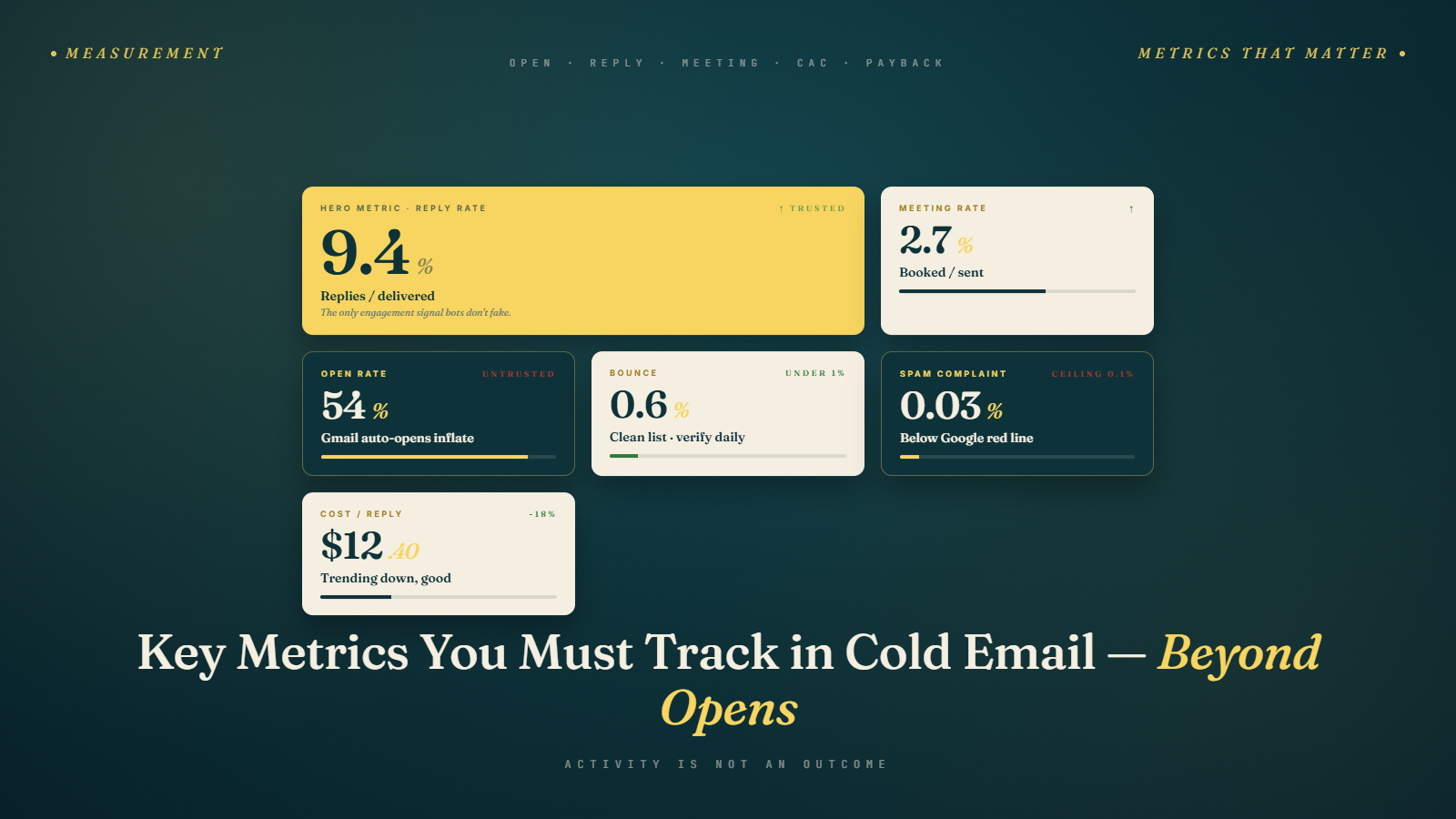
Open rate measures the percentage of delivered emails that were opened, tracked via a 1x1 pixel image embedded in the email. When the image loads, an "open" is recorded. It's expressed as:
Open Rate = Emails Opened / Emails Delivered × 100
Here is the problem: open rate tracking is broken, and it's been broken since September 2021 when Apple introduced Mail Privacy Protection (MPP) as part of iOS 15. MPP pre-loads email content — including tracking pixels — regardless of whether the recipient actually opened the email. This means that any Apple Mail user (which accounts for roughly 50—60% of mobile email opens) can appear as an "open" in your campaign data even if they never looked at the email.
The practical consequence: your open rates are almost certainly inflated, and the inflation isn't consistent across segments. The marketer celebrating 63% open rates may have 40% of their list using Apple Mail, which means their "real" open rate might be 35—40%. It's impossible to know precisely.
Does this mean you should ignore open rate? Not entirely. It still has directional value for subject line testing — if version A shows 45% opens and version B shows 28%, version A's subject line is probably genuinely better, even if both numbers are inflated. The relative difference is more meaningful than the absolute number.
But you should never use open rate as a primary KPI, and you should never celebrate a high open rate that isn't accompanied by a healthy reply rate. Open rate tells you whether your subject line got attention. It tells you nothing about whether your email earned a response.
Benchmark context: pre-MPP, good cold email open rates ran 30—50%. Post-MPP, reported open rates of 40—65% are common for well-optimized campaigns — but significant portions of those "opens" are MPP ghosts.
Metric 2 — Reply Rate (The One That Actually Matters)
If you had to pick a single north star metric for cold email, reply rate is it.
Reply rate measures the percentage of people who sent your email a response — any response. It is expressed as:
Reply Rate = Total Replies / Emails Delivered × 100
Why is this the metric that matters most? Because a reply is a signal of genuine engagement. Unlike an open (which might be an MPP ghost, a bot scan, or a reflexive inbox check), a reply requires a human to read your email, process it, and take deliberate action. That is qualitatively different from anything a pixel can measure.
Replies also include all types of responses. An unsubscribe request, a "not interested," an out-of-office, a "who are you?", and a "let's talk" all count as replies. This matters because negative replies tell you something important about your targeting or messaging, neutral replies might be warm leads on a timeline, and positive replies are where your pipeline comes from.
Here's the full benchmark breakdown with context:
| Reply Rate | Assessment | Likely Cause |
|---|---|---|
| Below 2% | Poor | Broad targeting, generic copy, deliverability issues |
| 2—5% | Decent | Room to improve targeting or personalization |
| 5—10% | Good | Well-targeted, reasonably personalized campaign |
| Above 10% | Excellent | Tight ICP, strong personalization, compelling offer |
The factors that drive reply rate, roughly in order of impact:
List quality and targeting. The most important variable. Highly specific ICPs see dramatically higher reply rates.
Personalization. Emails that demonstrate specific knowledge of the recipient outperform templates. Even one genuine personalized sentence moves the needle.
The CTA. A single, low-friction question outperforms a multi-ask or a Calendly link as a first-touch CTA.
Subject line. Gets you the open; contributes marginally to reply rate.
Timing. Tuesday through Thursday, morning to early afternoon in the recipient's timezone, consistently outperforms other windows.
When reply rate is low, diagnose systematically. A low reply rate despite decent open rates points to a copy or CTA problem. A low reply rate alongside low open rates suggests deliverability or subject line issues.
Metric 3 — Positive Reply Rate
Total reply rate is important. Positive reply rate is where the money actually lives.
Positive reply rate isolates the subset of replies where the prospect expressed genuine interest — a request for more information, agreement to a meeting, a referral to the right person, or any response that moves the conversation forward.
Positive Reply Rate = Positive Replies / Total Replies × 100
For a healthy campaign, you should expect roughly 30—60% of all replies to be positive. If your total reply rate is 8% but only 15% of those replies are positive, you have a message resonance problem: people are engaging with your email (which means your targeting is probably fine) but they're not connecting with your offer or framing.
This distinction matters for diagnosis:
Low total reply rate + Low positive reply rate â†' Targeting problem. The people you're emailing aren't the right people.
Decent total reply rate + Low positive reply rate â†' Message problem. The right people are reading your email but aren't convinced. Fix the copy, the value proposition, or the timing.
Decent total reply rate + High positive reply rate â†' You're doing well. Scale.
One practical note: always categorize your replies manually, at least for the first few campaigns. Automated sentiment analysis tools miss context constantly. A reply that says "this is interesting, but terrible timing" is technically neutral but is actually a warm lead. A reply that says "please don't email me again" is definitively negative but also contains useful signal about your messaging.
Metric 4 — Bounce Rate (The Silent Killer)
Bounce rate doesn't make it into most cold email blog posts about metrics. That's a mistake. Bounce rate is the metric that can quietly destroy your entire program — and your sending domain — before you realize anything is wrong.
A bounce occurs when your email cannot be delivered to the recipient's mail server. Hard bounces happen when an address is permanently invalid (the address doesn't exist, the domain doesn't accept email, etc.). Soft bounces are temporary failures — a full inbox, a temporarily unavailable server — but repeated soft bounces eventually become permanent blocks.
Bounce Rate = (Hard Bounces + Soft Bounces) / Emails Sent × 100
Here is why this metric is critical: email service providers and receiving mail servers track your bounce rate. When you consistently send emails that bounce, you signal to the internet's mail infrastructure that you're either a spammer or careless about your list quality. Both conclusions result in reduced deliverability — your future emails go to spam, or aren't delivered at all.
The damage thresholds:
Below 3%: Normal. Monitor but no action required.
3—5%: Elevated. Clean your list before the next send.
5—8%: High. Pause sending, investigate list sources, verify aggressively.
Above 8%: Emergency. Stop sending immediately. Your sender reputation is actively degrading.
The prevention is straightforward: verify your email list before every campaign. Not once, not when you first build the list — before every send. Email addresses go stale at a rate of roughly 22—30% per year. A list you verified six months ago may have a bounce rate several percentage points higher than when you last checked.
For bulk list verification before campaigns, see our guides on unlimited email verification and bulk email verification services. Verification before sending is not an optional step — it is the minimum viable hygiene for sustainable cold email.
Metric 5 — Meeting Booked Rate
For most B2B cold email programs, booking meetings is the primary goal. That makes meeting booked rate the most directly business-relevant metric in the funnel.
Meeting Booked Rate = Meetings Booked / Emails Sent × 100
This metric is distinct from reply rate in an important way: reply rate measures engagement with your email. Meeting booked rate measures the commercial outcome of that engagement. It's possible to have a high reply rate but a low meeting booked rate if your replies are predominantly negative or neutral, if your qualification process is weak, or if there's excessive friction between reply and booking.
Benchmark ranges:
| Meeting Booked Rate | Context |
|---|---|
| Below 0.5% | Needs significant work across targeting, copy, or follow-up |
| 0.5—1% | Typical for broad campaigns with average personalization |
| 1—3% | Good performance; well-targeted, well-personalized |
| Above 3% | Excellent; usually indicates very tight ICP and strong offer |
Note that meeting booked rate varies significantly by industry and deal size. High-ticket enterprise sales to a narrow ICP will often have lower meeting rates (0.5—1.5%) but higher deal values that make the math work. SMB outreach with a broad ICP might need 2—3% meeting rates to justify the program.
The factors that drive meeting booked rate are slightly different from reply rate. Reply rate is driven primarily by copy quality and targeting. Meeting booked rate is also driven by:
How quickly you respond to positive replies
How much friction exists in the booking process (one calendar link vs. a three-email back-and-forth)
How well your qualification process works (booking fewer, better-fit meetings improves close rates)
Whether your follow-up sequence has a clear, singular call to action at each step
Metric 6 — Spam Complaint Rate
Spam complaint rate is the metric that can end your cold email program overnight. Not "hurt" it — end it.
A spam complaint is recorded when a recipient clicks "Report Spam" or "Mark as Junk" in their email client. Gmail, Yahoo, and other major providers have internal dashboards (Google Postmaster Tools, Yahoo Sender Hub) that report spam complaint rates back to senders.
The thresholds that matter:
Below 0.08%: Healthy. Continue as normal.
0.08—0.1%: Yellow zone. Investigate immediately.
Above 0.1%: Google and Yahoo begin throttling or blocking your email.
Above 0.3%: Serious enforcement action. Your domain may be blocked entirely.
These numbers sound tiny. They are tiny. But consider: if you send 10,000 emails and 30 people hit "Spam," you're at 0.3% — which is territory where Google will actively block your emails. You don't need a widespread problem to trigger consequences. You need a handful of people who received your email, found it irrelevant or annoying, and clicked a button.
The primary causes of high spam complaint rates in cold email:
Irrelevant targeting. The fastest path to spam clicks is emailing people who have no conceivable reason to care about your offer.
No clear opt-out. Recipients who can't find a way to unsubscribe will mark as spam instead. Always include a simple unsubscribe link.
Misleading subject lines. Subject lines that trick people into opening an email they didn't want generate disproportionate spam complaints from the resulting frustration.
High frequency. Too many emails in too short a period from the same domain correlates with complaint spikes.
For a full list of the words, phrases, and patterns that trigger both spam filters and spam complaints from recipients, see our guide on spam-triggering words to avoid.
Metric 7 — Conversion Rate (Prospect to Customer)
Conversion rate is the full-funnel metric that determines whether your cold email program is actually generating revenue — not just activity.
Conversion Rate = Customers Acquired / Total Prospects × 100
For most cold email programs targeting B2B buyers, this number will be somewhere between 0.5% and 2.5%. That range sounds narrow but represents a massive difference in outcomes. At 0.5% conversion, you need 200 prospects to acquire one customer. At 2.5%, you need 40. At your average deal size, the difference between those two numbers might be several hundred thousand dollars in annual pipeline per campaign.
Tracking conversion rate properly requires connecting your cold email activity to your CRM. This sounds obvious but is frequently not done. When someone books a meeting from a cold email sequence, that opportunity needs to be tagged in your CRM with its cold email source so you can follow it through to close — or to loss — and attribute the outcome correctly.
Attribution is genuinely hard in cold email. Some prospects will receive your cold email, ignore it, see a retargeting ad for your product two weeks later, receive a cold call from your AE, and then close after a demo. Was that a cold email win? Partially. The practical approach is to use first-touch attribution for cold email (if cold email was the first interaction, it gets credit) while tracking all touchpoints so you can see patterns over time.
Metric 8 — Cost Per Meeting / Cost Per Acquisition
At some point, every cold email program faces a budget conversation. The ROI metric that makes or breaks that conversation is cost per meeting (CPM) and cost per acquisition (CPA).
CPM = Total Campaign Cost / Meetings Booked
CPA = Total Campaign Cost / Customers Acquired
Total campaign cost includes: tooling (sequencer, data provider, verification), time (prospecting, writing, campaign management), and any overhead. For a lean in-house cold email program, this might be $2,000—$5,000 per month. For an outsourced agency arrangement, it might be $8,000—$15,000 per month.
Let's work through a concrete example:
Monthly program cost: $4,000 (tooling + 20 hours of SDR time)
Emails sent per month: 2,000
Meeting booked rate: 2% = 40 meetings
CPM: $100 per meeting booked
Now compare that to alternative channels for B2B meetings:
LinkedIn InMail campaigns: $150—$300 per meeting
Google Ads (B2B SaaS): $200—$600 per meeting
Industry events: $400—$1,200 per meeting
Paid social (LinkedIn): $200—$500 per meeting
Well-executed cold email consistently produces CPMs in the $75—$200 range — at the lower end of the spectrum compared to most other B2B outbound channels. That's the ROI case for cold email in a single number.
If your CPM is running above $250—$300, it's time to diagnose. Usually the culprit is either high tooling costs relative to volume, or a meeting booked rate that needs improvement. Fix the rate, not the budget.
How to Build a Simple Cold Email Dashboard
You don't need a sophisticated BI tool to track cold email metrics effectively. A simple weekly dashboard — either in a spreadsheet or in your cold email platform's reporting view — covering five core metrics is enough to keep your program on track.
The five metrics to review after every campaign:
Bounce rate — Is it below 3%? If not, stop and verify the list before the next send.
Reply rate — Is it in the 5—10% range? If below 3%, diagnose copy and targeting.
Positive reply rate — Are at least 30% of replies positive? If not, investigate message-market fit.
Meeting booked rate — Is it above 1%? If below 0.5%, look at your response process and CTA.
Spam complaint rate — Is it below 0.08%? If approaching 0.1%, pause immediately and investigate.
The response protocol when metrics go out of range:
| Metric | Below Threshold | Action |
|---|---|---|
| Bounce rate | Above 5% | Pause sends; reverify list |
| Reply rate | Below 3% | A/B test copy; tighten targeting |
| Positive reply % | Below 25% | Review value proposition and ICP fit |
| Meeting rate | Below 0.5% | Audit reply handling speed and CTA clarity |
| Spam rate | Above 0.08% | Review targeting relevance; add clearer opt-out |
Track at two levels: campaign-level (what happened in this specific send?) and rolling trend (are my numbers improving or declining month over month?). Campaign-level data tells you what to fix now. Trend data tells you whether your program is getting better overall.
Common Measurement Mistakes
Measuring open rate as a primary KPI. Covered in depth above, but worth repeating: Apple MPP has made open rate an unreliable primary metric. Use it for directional testing only.
Not tagging cold email leads in your CRM. If you can't connect cold email activity to pipeline and revenue, you can't calculate ROI, and you can't justify (or improve) the program. Tag every cold email opportunity at the source.
Looking at aggregate numbers instead of segment breakdowns. A 5% reply rate across your entire campaign might hide a 12% reply rate in one segment and a 1% rate in another. The segments that perform well tell you where to focus; the ones that underperform tell you where to cut.
Treating all replies the same. An OOO, a "not interested," and a "let's talk" are three completely different signals. Count them separately. Track positive reply rate independently from total reply rate.
Optimizing for volume over quality. More emails is not always better. Sending 500 highly targeted, personalized emails will typically generate better absolute results than sending 5,000 generic ones — and will do it without the deliverability costs that come with high bounce rates and spam complaints from irrelevant outreach.
Never testing. Cold email is one of the most testable channels in marketing. Subject lines, opening sentences, CTAs, send times, follow-up cadences — all of these can be A/B tested with measurable results in days. Teams that don't test are leaving systematic improvement on the table.
Practical Takeaways
Eight metrics sounds like a lot to manage. Here's how to think about it:
The two metrics that determine if your program is healthy: Reply rate and bounce rate. If reply rate is above 5% and bounce rate is below 3%, your fundamentals are sound.
The two metrics that determine if your program is safe: Spam complaint rate and bounce rate. If either of these runs hot, pause everything and investigate before sending another email.
The two metrics that determine if your program is profitable: Meeting booked rate and cost per acquisition. These are the numbers that justify the budget conversation.
The two metrics that tell you what to fix: Positive reply rate tells you if your messaging resonates with the right people. Conversion rate tells you if the people you're booking meetings with are actually buying.
When you track all eight consistently, you have a complete diagnostic picture of your cold email program. When something breaks — and something will always break, at some point — you'll know exactly which stage failed and exactly what to do about it.
Metrics without a funnel to put them in context are just numbers. If you haven't already read our previous post on how the cold email funnel works end to end, that's the framework that makes these metrics actionable — you'll know not just what each number means, but where in the funnel it lives and how it connects to the numbers above and below it.
In our next post in this series, we cover the specific tools that make cold email programs run — from sequencing platforms to data providers to verification tools: tools for cold email outreach.
And if you're questioning whether cold email is still worth the effort in a world of LinkedIn DMs, intent data platforms, and AI-generated content — read our piece on why cold email still works in 2026.