
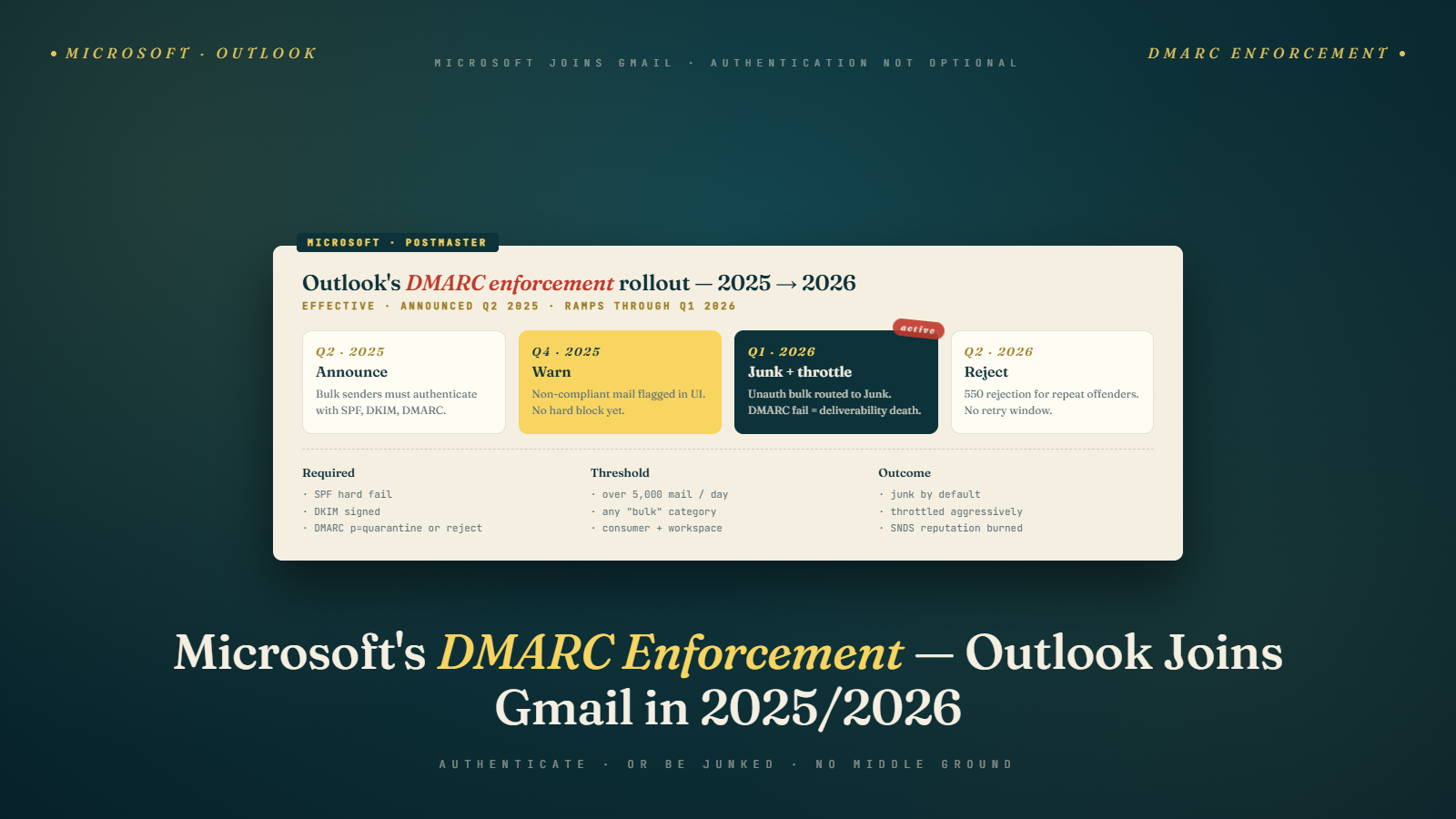
When Google announced bulk sender requirements in February 2024, every deliverability conversation shifted to Gmail. That was understandable. Gmail's market share is large, the requirements were specific, and Google gave dates. What happened in parallel was easy to miss: Microsoft was rolling out its own DMARC enforcement for Outlook.com, Hotmail, and Live addresses, and doing it quietly.
A year out from when those changes became broadly observable, the picture is clearer. Microsoft's enforcement is real, it behaves differently from Gmail's, and the tools available to senders for diagnosing problems are quite different from what Google offers. If you have been focused entirely on Gmail deliverability, your Outlook.com placement may be silently underperforming.
What Microsoft Changed and When
Microsoft had technical DMARC support long before enforcement. The change that matters for senders is that Microsoft shifted from treating DMARC as a signal among many to actually rejecting or quarantining mail that fails DMARC checks against the sending domain.
The rollout through 2024 and into 2025 was gradual and not announced with the same specificity as Google's February 2024 blog post. Senders started noticing increased rejection rates to @outlook.com, @hotmail.com, and @live.com addresses in mid-2024. The pattern was consistent: senders with p=none DMARC policies (or no DMARC at all) were not getting rejected, but senders whose authentication was actively failing were seeing higher rates of messages landing in junk or getting rejected outright.
By late 2024, senders with no DMARC record were seeing stricter filtering. Senders with p=quarantine or p=reject and authentication failures were seeing those policies honored more consistently.
The practical distinction: Google enforces based on aggregate sender behavior and reputation signals. Microsoft applies DMARC policy more directly to individual message authentication results. A single message that fails SPF and DKIM alignment can land in junk or get rejected based on the sending domain's DMARC policy, even from a sender with generally good reputation. This is closer to a literal DMARC implementation than Google's blended approach.
How Microsoft's Enforcement Differs From Gmail's
Gmail's bulk sender requirements focus on three things: authenticated mail (SPF, DKIM, DMARC), easy one-click unsubscribe, and spam complaint rate under 0.10%. Gmail's filtering is heavily reputation-based, meaning even authenticated mail can land in spam if the sender's reputation is poor, and unauthenticated mail from a high-reputation sender may still get through in some cases.
Staying under the spam complaint ceiling matters enormously for Gmail inbox placement. For Microsoft, complaint rate is one of several signals, but it is not the primary lever in the same way.
Microsoft weighs authentication more heavily relative to reputation. This has a counterintuitive implication: a sender with excellent Gmail reputation but broken DKIM signing can have better Gmail placement than Outlook placement, simply because Microsoft is stricter about per-message authentication results.
Another difference is how each provider handles mail from third-party sending services. When you send through a marketing platform, that platform signs outbound mail with its own DKIM key unless you have set up DKIM signing for your own domain. Gmail will often accept that mail as long as the platform's reputation is good. Microsoft is more likely to check whether the DKIM signature aligns with your From domain, not just whether a valid DKIM signature exists.
SPF and DKIM dual alignment matters here: if only the platform's DKIM is signing (without your domain's key), alignment will fail for your domain, and Microsoft will treat it as a DMARC misalignment even if DMARC policy is p=none.
Smart Network Data Services and What It Tells You
Google Postmaster Tools is the primary diagnostic tool for Gmail. Microsoft's equivalent is Smart Network Data Services (SNDS), available at sendersupport.olc.protection.outlook.com.
SNDS shows data by IP address, not by domain. You will need to register your sending IP addresses to get data. For senders on shared ESP infrastructure, this can be more complicated because you may share IPs with many other senders. You see the reputation of the IP, not just your own contribution to it.
Once registered, SNDS shows a traffic light-style status for each IP: green (good reputation), yellow (caution), or red (blocked or heavily filtered). It also shows complaint rate data, trap hit rates, and message volume.
The trap hit rate is particularly useful. Microsoft maintains a network of spam trap addresses, similar to industry honeypot providers. If your list includes these addresses, you will see trap hits in SNDS. A nonzero trap hit rate is a strong indicator that your list contains stale addresses that you should be suppressing or verifying. What catchall email addresses mean for your list is related here: catchall domains can accept mail for any address, including old or invalid ones, which raises trap hit risk.
One thing SNDS does not show well: per-campaign data. It is an aggregate view by IP and time window. You cannot easily correlate a spike in your SNDS red status back to a specific campaign the way you can correlate complaint spikes in Postmaster Tools to specific send dates.
Junk Mail Reporting Program and Feedback Loop Data
The Junk Mail Reporting Program (JMRP) is Microsoft's FBL (Feedback Loop) equivalent. You register your IP addresses, and Microsoft sends you copies of messages that Outlook users marked as junk.
Unlike Google, which does not operate a traditional FBL and exposes complaint data only through Postmaster Tools, JMRP actually sends you complaint data. Your ESP may already be registered with JMRP, and the data flows into your complaint suppression list automatically. If you are on a dedicated IP and managing your own sending infrastructure, you will want to register directly at sendersupport.olc.protection.outlook.com.
JMRP data is useful for identifying complaint-generating campaigns, but it has a limitation: it reflects Outlook users who clicked "Report as junk," not the broader signal of spam folder placement without user action. Some users do not click report; they simply do not open mail. SNDS shows you the fuller picture of how Microsoft's filters are treating your IP.
One thing I have noticed with clients who monitor JMRP closely: the complaint patterns for Outlook users tend to differ from Gmail complaint patterns. Outlook users are slightly more likely to complain about transactional mail, particularly if the From address or sender name does not match what they expect. Gmail users tend to complain about promotional frequency. Both signals are useful, and they can point to different problems.
A Client Case That Showed the Divergence
A B2B SaaS company I worked with in Q3 2025 had what looked like a healthy sending program by every Gmail metric. Google Postmaster Tools showed Good domain reputation. Their complaint rate was under 0.06%. Authentication was passing across their main sending domain. They ran a monthly campaign to about 120,000 subscribers, roughly split between Gmail, Outlook hosted, and various corporate domains.
In October 2025, their sales team started flagging that cold follow-up replies from Outlook-hosted accounts had dropped off noticeably. The marketing team pulled open rate data and found that Gmail opens were steady at around 28%, while Outlook-specific opens had slid from 24% to 14% over three months. Nothing in their Gmail metrics had signaled the problem. Nothing in their ESP dashboard flagged it either, because the ESP aggregated delivery numbers without separating Microsoft-hosted recipients.
The diagnosis took about ninety minutes once they registered for SNDS. Their sending IP was sitting in yellow status in Microsoft's view, because the ESP they used had recently added new clients who were sending aggressively from the same IP range. Their own sending behavior had not changed. The shared IP reputation had deteriorated around them. The fix was a conversation with the ESP about moving to a cleaner IP pool, combined with tighter DKIM alignment on their domain so Microsoft could recognize their messages as theirs rather than as generic traffic from the ESP's infrastructure.
This is the pattern I see repeatedly. Microsoft's enforcement exposes problems that Gmail's reputation-weighted filtering smooths over. A sender with generally solid practices can look fine at Gmail while their Outlook placement silently degrades because of infrastructure issues Microsoft evaluates differently. The only way to catch it is watching SNDS alongside Postmaster Tools, not instead of it.
What Bulk Senders Should Check Right Now
The practical checklist for Outlook, Hotmail, and Live deliverability comes down to authentication state, policy, and monitoring.
First, verify that your DKIM setup is functioning for every domain you use in the From address. Go to mxtoolbox.com or a similar tool and check DKIM record existence and validity. Then send a test message and look at the headers to confirm the DKIM signature is valid and that the d= value in the signature matches your From domain. If you are sending through a third-party ESP, your marketing platform, or a transactional service, confirm that each one is signing with a key for your domain, not just their infrastructure domain.
Second, check your DMARC record at the same tool. Confirm the policy is not p=none if you are ready to move to enforcement, and confirm the rua tag (aggregate report address) is sending reports somewhere you actually monitor. The path from p=none to p=quarantine and p=reject is something many senders have been deferring, and Microsoft's enforcement is one more reason to stop deferring.
Third, register for SNDS. Even if your Outlook delivery seems fine, baseline data is valuable. A degradation in SNDS status is an early warning before it shows up in open rate drops.
Fourth, confirm your unsubscribe handling. Microsoft has adopted one-click unsubscribe requirements for high-volume senders that parallel Google's requirements. The List-Unsubscribe header with a POST endpoint (not just a mailto link) is expected. Senders without this header may see increased junk placement independent of DMARC compliance.
Fifth, check your bounce handling for Microsoft-hosted addresses. Hard bounces affect your sender reputation regardless of the mailbox provider. If you are seeing elevated bounce rates for @outlook.com addresses specifically, that often indicates list age issues or addresses that changed status without a clear bounce notification.
What Still Does Not Work the Same Way as Gmail
Several things about Microsoft's filtering remain less transparent than Gmail's after a year of enforcement.
Google Postmaster Tools shows you domain reputation on a clear scale and spam rate as a percentage. Microsoft's SNDS shows IP reputation without the same per-domain granularity. If you are on shared IPs, diagnosing whether a problem is your sending behavior or another sender on your IP is much harder.
Microsoft does not publish threshold numbers the way Google did in February 2024. Google said "under 0.10% complaint rate." Microsoft's documentation uses language like "avoid sending unsolicited mail" without specific percentages. This makes it harder to know exactly where you stand relative to an enforcement line.
Microsoft's mitigation process for blocked IPs is manual. If your IP ends up on Microsoft's blocklist, you submit a delisting request through the SNDS portal. The process can take several days, and Microsoft does not always explain the specific reason for the block. Google's domain reputation degradation from high complaint rates is self-healing once the complaint rate drops, within a few weeks. Microsoft's IP blocks sometimes require human review.
Inbox placement testing for Outlook is more expensive relative to Gmail because Microsoft limits how many test accounts you can use with automated tools. Services like GlockApps or Litmus have Outlook seed accounts, but coverage is narrower than Gmail. You are often working with less data than you would have for Gmail deliverability analysis.
The Authentication Foundation Everything Depends On
Both Google and Microsoft enforcement come down to the same underlying requirement: your DMARC, SPF, and DKIM setup needs to be functional and correctly configured before enforcement matters.
Setting up authentication correctly for your sending domains is not optional anymore. Both Google and Microsoft enforce it, PCI DSS v4.0 requires it for payment-handling businesses, and the direction of the industry is clearly toward stricter enforcement, not less.
If you are on a shared ESP and sending from your own domain, confirm your ESP has documented how to set up DKIM signing for your domain specifically. Most major ESPs (Mailchimp, Klaviyo, HubSpot, Postmark, SendGrid) have this as a configuration step in domain settings. Many senders skip it and rely on the ESP's default signing, which means authentication does not align with the From domain.
Bulk Mail Verifier can help ensure your list itself is clean before you send, which reduces bounce rates and keeps your sending IP status healthy in SNDS. Clean lists are a prerequisite for good IP reputation, and SNDS data makes that relationship visible in a way that ESP dashboards often do not.
Outlook.com addresses represent a meaningful share of most business B2C lists and essentially all B2B lists, since Microsoft 365 is the dominant corporate email platform. Treating Outlook deliverability as secondary to Gmail is an error that shows up over time in open rate declines among the segment of your list with @outlook.com, @hotmail.com, and any corporate domain hosted on Exchange Online.
The Reporting Structure for Multi-Provider Programs
For programs large enough to warrant formal reporting on deliverability, the structure that holds up best under Microsoft's distinct enforcement model treats Gmail and Outlook as separate reporting streams, not as a single "deliverability" metric aggregated across all providers.
The dashboard I recommend for client programs has three views. First, a Gmail-specific view showing domain reputation, spam rate, and delivery errors from Postmaster Tools, refreshed weekly. Second, an Outlook-specific view showing SNDS traffic light status, JMRP complaint volume, and bounce rate segmented to Microsoft-hosted domains. Third, a cross-provider view showing engagement metrics (clicks, replies, conversions) by recipient domain, so the team can spot provider-specific engagement shifts that precede reputation changes.
The reason for splitting the views is that a single aggregated number hides what is happening per provider. A program with 60% Gmail and 40% Outlook exposure that shows a stable overall open rate can be masking a Gmail improvement that exactly offsets an Outlook decline. That scenario is common enough that it happens to at least one client I audit every quarter. The only way to see it is provider-specific reporting. The same logic applies to list segmentation by engagement, where provider-specific engagement patterns should inform segment definitions rather than being collapsed into a single "engaged" flag.
Tomorrow, go to postmaster.google.com and sendersupport.olc.protection.outlook.com and check your data on both. The difference between them will tell you whether your authentication problem is provider-specific or systematic. Pair that diagnostic with list hygiene using email verification on your Outlook-concentrated segments, because Microsoft's trap network is sensitive to stale addresses in a way that a general Gmail-focused hygiene routine does not always catch.