
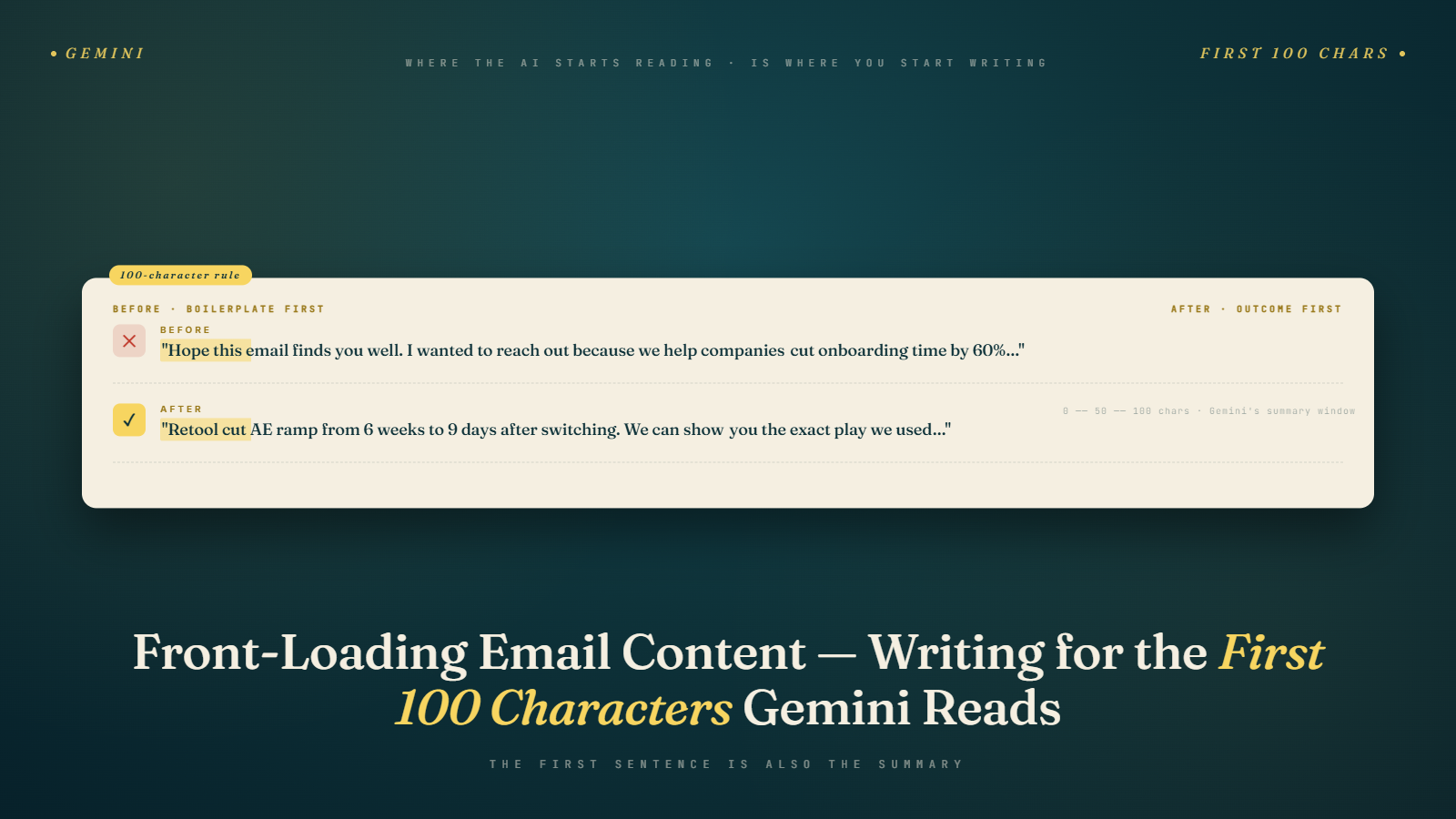
Your subscriber opens Gmail. Before they read your subject line, before they tap the preview, before they even decide whether to open the email, Gemini has already generated a summary card. That card was built from the first substantive text Gemini encountered in your message. If that text was "View this email in your browser | Unsubscribe | Update preferences," your summary card is now either blank or filled with navigation copy nobody asked for.
This is not hypothetical. Gmail's Gemini summarization feature has been active across consumer and Workspace accounts since late 2025, and the behavior is consistent: the AI reads top-down and builds its understanding of your email from what it encounters first. The first 100 characters of body text carry disproportionate weight. And most email templates in the wild waste every single one of them.
What Front-Loading Actually Means
Front-loading is the practice of placing your most important information at the start of a message, before any supporting context or qualification. Journalists have done this for a century. It's called the inverted pyramid. The news gets delivered in the first sentence. The background and nuance come later.
Applied to email, front-loading means your first visible sentence answers the reader's implicit question: "Why should I care about this right now?" The discount amount, the event date, the product name, the specific benefit. Not a vague tease. Not a brand welcome. Not a legal disclaimer. The thing.
For Gemini summarization, front-loading has an additional mechanical dimension. The model generates its summary from the earliest readable text in the HTML structure. This means the very first text node in your email body, before images, before layout tables, before decorative copy, sets the tone of the summary.
The Preheader Problem and What It Was Actually For
Most email senders use a "preheader" trick: invisible or very-small text placed at the top of the HTML that appears in the Gmail inbox preview snippet. The idea is that you can control what the inbox preview shows by putting it there, then hiding it with CSS so it doesn't clutter the visual design.
That trick still works for the inbox preview text. But here's the problem: a surprising number of templates place visible boilerplate text above the main content, either before or alongside the hidden preheader. Lines like:
"Having trouble viewing this email? Click here to view in your browser."
"You are receiving this because you subscribed at bulkmailverifier.com."
"[Company Name] | [Address] | [Unsubscribe]"
When Gemini reads your email, it starts at the top and works down. If those lines appear before your actual content in the HTML, they feed the summary. The AI has no way to know they're boilerplate rather than substance.
The preheader field in your ESP is meant to give you control over the inbox snippet preview without requiring you to clutter the email body. Use it. Write a 90-to-120-character sentence that bridges your subject line and your email's core offer. Then make sure your email body itself opens immediately with the substance.
Old-School Copywriting Hooks and Why They Work Against You Now
There's a well-known email copywriting school of thought built around the "hook and reveal." You open with a provocative question or a mysterious statement, you build tension, and you delay the payoff. The idea is to generate curiosity that pulls the reader deeper into the email.
I've written hooks like this. They work for opens and clicks in the right context, usually longer-form newsletters where the reader already trusts you and enjoys the ride.
But in 2026, that structure creates a specific problem. Gemini's summary reads the hook, finds no concrete information, and generates a summary that says something like: "The sender asks whether your email strategy is costing you customers." That summary tells the inbox user nothing actionable. It competes poorly against an email whose summary reads: "35% off all plans through April 18. Use code APRIL35 at checkout."
The second summary earns the tap. The first probably doesn't.
This doesn't mean you should abandon engaging writing. It means the structure shifts. Lead with the concrete value, then build the narrative context. You can still be interesting. You just have to earn interest after you've delivered the offer, not before.
Before and After: How the Same Email Reads to Gemini
Here's a common e-commerce email opener I've seen clients use:
"The wait is over. Something big is coming, and we think you're going to love it. We've been working behind the scenes for months..."
Gemini summary: "The sender teases an unspecified upcoming announcement."
The subscriber sees that summary and has zero reason to open. There is no date, no product, no action, no urgency. Now the front-loaded version:
"Our summer collection drops Thursday, April 17. Free shipping on all orders over $75 through the weekend."
Gemini summary: "Summer collection launches Thursday April 17, free shipping on orders over $75 through the weekend."
Same campaign, radically different summary. The second one gives the subscriber everything they need to decide whether to open. If they're interested in the summer collection, they open. If not, they skip it, and that's fine, because a non-interested subscriber who opens and immediately closes is a worse signal than a non-interested subscriber who never opens.
A SaaS company running a webinar campaign had a similar issue. Their opener was: "Join us for a conversation about the future of email marketing." The front-loaded revision: "Live webinar Wednesday April 16, 2pm ET: How to maintain inbox placement after Gmail's 2025 authentication changes. Free, 45 minutes." The registration rate from Gmail users specifically went up 28% after the template change. The email itself didn't change. The structure did.
The 50-Second Version If You Are Skimming
Your email's first 100 characters of body text are what Gemini summarizes. Most templates waste those characters on "view in browser" links, navigation bars, or brand welcomes. Move your core offer (what, when, and what to do) into the first visible text block, right after the hidden preheader. That single change fixes most AI summary problems without rebuilding your template. The writing craft still matters. The structure shifts so the concrete information comes first and the narrative comes after.
That is 76 words and it is the whole adjustment. The rest of this post is about why the change works and how to implement it without breaking your design system.
The Metric Pattern That Shows the Change Is Working
When a program fixes its first-100-character problem, the engagement metric pattern follows a recognizable sequence.
In the first two weeks, open rates often do not change much. The subscribers who would have opened still open, because they were already interested in the subject line. What changes is the composition of opens: more of them are now coming from subscribers who read the summary card and decided the offer was relevant. Fewer are coming from subscribers who opened out of curiosity because the summary told them nothing.
In weeks three through six, click-through rates on Gmail opens tend to rise by a few percentage points. The reason is that the subscribers opening are now better-matched to the email's actual content. A summary card that honestly previews the email produces opens that are predisposed to act. A summary card that is vague or boilerplate produces opens that are mostly curiosity and disengage quickly.
By month two, reply rates on Gmail opens often tick up as well. Subscribers who see a coherent summary, open to a coherent email, and find the content relevant are more likely to engage conversationally. This compounds in the Gemini-era reputation model where reply rates are increasingly weighted as a positive engagement signal.
Unsubscribe rates on poorly-performing segments sometimes rise slightly. Subscribers who were tolerating vague promotional content because they could not tell what the offer was now see the offer clearly and self-select out if it is not for them. This is usually a good outcome. The subscribers leaving were not going to convert anyway, and their presence on the list was dragging down your engagement signal.
Look for the full pattern across 60 days before drawing conclusions. Early data can be misleading because the first week of a template change sometimes shows worse metrics as Gmail's systems reclassify the sender's content style.
How to Structure Your Email HTML for Gemini
The HTML structure matters here, not just the copy. A few specific patterns:
Place your preheader text first in the HTML, as a visually hidden element. Your ESP's preheader field handles this automatically in most cases. If you're building custom templates, use a span with a tiny font size or display-none, placed at the very top of the body.
Immediately after the preheader, your first visible content should be your core message. If you're using a hero image, put the most important text below it or overlaid as alt text, but also include a visible text block right after the image with the key details. Gemini may not read image alt text with the same weight as body text, but a text block reading "35% off, ends Sunday" placed immediately after the hero is exactly what Gemini needs.
Avoid putting navigation, legal, or utility text at the top of your visible email. Header navigation bars ("Shop | Sale | New Arrivals") that appear above the hero are read by Gemini before anything substantive. They produce summaries like "Shop sale and new arrivals." Technically accurate. Useless as a decision-making signal.
What the First 100 Characters Should Do
A useful rule: your first 100 characters of body text should answer at least two of these three questions. What is the offer or topic? When does it apply? What should I do?
"Summer sale, 30% off sitewide, ends Sunday April 19. Free shipping on orders over $50." (89 characters, answers all three)
"Webinar Thursday 2pm ET: Gmail's 2026 inbox changes and what to do about them. Register free." (93 characters, answers all three)
"Your trial ends in 3 days. Upgrade now to keep your data and avoid losing your integrations." (91 characters, answers all three)
Each of these produces a usable Gemini summary. Each gives the inbox reader enough to make a decision before they open. And each of them, if your offer is relevant, earns the open.
Practical Template Audit Steps
Go into your ESP right now and look at your last five campaign templates. Specifically: what is the very first text that appears in the HTML source after your preheader? Not what it looks like visually. What does the raw text say?
If you're using a major ESP like Klaviyo, Mailchimp, Campaign Monitor, or Brevo, you can view the source of a test send. Look for the first text string that isn't your preheader. Is it your core message? Or is it a header navigation bar, a "view online" link, or a brand tagline?
For templates where the first visible text is navigation or boilerplate: add a text block immediately after the preheader and before the hero image. Put your core offer or the email's main point there. You can style it to be part of your design. It doesn't have to be ugly. A single sentence in your brand font, below your logo, above your hero image, reading "Spring sale: 25% off, this week only" does not break your visual template and does fix your Gemini summary.
This is a one-afternoon audit. The teams I've seen do it haven't needed to rebuild their entire template system. They've added or repositioned one text block. The downstream effect on AI summary quality is immediate and measurable.
For context on how Gemini's inbox behavior has shifted overall, see the post on Gmail's Gemini era changes for marketers. And if you're thinking about how your subject lines interact with this new summary layer, the subject line strategy post for 2026 covers exactly that angle.
The Copywriter's Adjustment
If you're a copywriter or you work with one, the adjustment here is not as dramatic as it might sound. You're not abandoning craft. You're reordering it.
The discipline of front-loading actually makes email copy more honest. It forces you to answer: what is actually good about this email? If you can't state it in 100 characters, the email might not have a clear enough offer to begin with. I've found that the emails that fail the front-loading test are often the ones that were vague in strategy before they were vague in copy.
Think of Gemini's summary as a forcing function. It makes you articulate your value proposition before you get to write the interesting parts. The interesting parts can still be interesting. The narrative can still pull people through the email. But the summary has to earn the open first.
The reader who taps your Gemini summary card and then encounters a beautifully written email that delivers on the promise in the summary: that's the ideal sequence. Front-load the decision-making information, then reward the decision with the writing. That's it.
Where This Tactic Does Not Help
Front-loading is not a universal fix. A few situations where the rule needs qualification.
Highly personalized 1:1 sales emails do not benefit from front-loading in the same way. A cold outreach message that opens with "Saw your LinkedIn post about the procurement review process at your company" is doing relationship work that compresses into a worse summary than a less personal version would. For genuine one-to-one email, the writing craft still follows older rules. Gemini treats these emails differently in summary behavior because they often do not trigger promotional summarization at all.
Transactional emails have their own structural conventions. An order confirmation does not need a rewritten opener because Gmail already categorizes transactional email with different summary treatment than promotional. Pushing transactional templates through the same front-loading audit adds friction without payoff. The boundary between transactional and promotional is covered in more depth in the post on separating AI-generated promotional from transactional email.
Narrative newsletters with a clear editorial voice, like founder essays or weekly columns, can violate the front-loading rule if the audience is already engaged enough to open on trust. A long-running weekly newsletter with a 40% open rate is earning opens through relationship, not through summary-card quality. Forcing these emails into front-loaded structures can flatten the voice. If your newsletter is the kind of email subscribers read because they want to hear what you have to say, the front-loading principle applies less strictly.
The tactic earns its highest payoff on standard promotional email, which is also the category where most sending volume lives, which is why it is worth doing even if it does not apply universally.
Start tomorrow by pulling your most-sent template, checking the first 100 characters in the HTML source, and asking: if Gemini summarized only this, would my subscriber have a reason to open? If the answer is no, fix that one line. Pair that fix with list hygiene by running your list through email verification so the improved summary card reaches inboxes that actually deliver. The rest of your copywriting strategy can stay intact.