
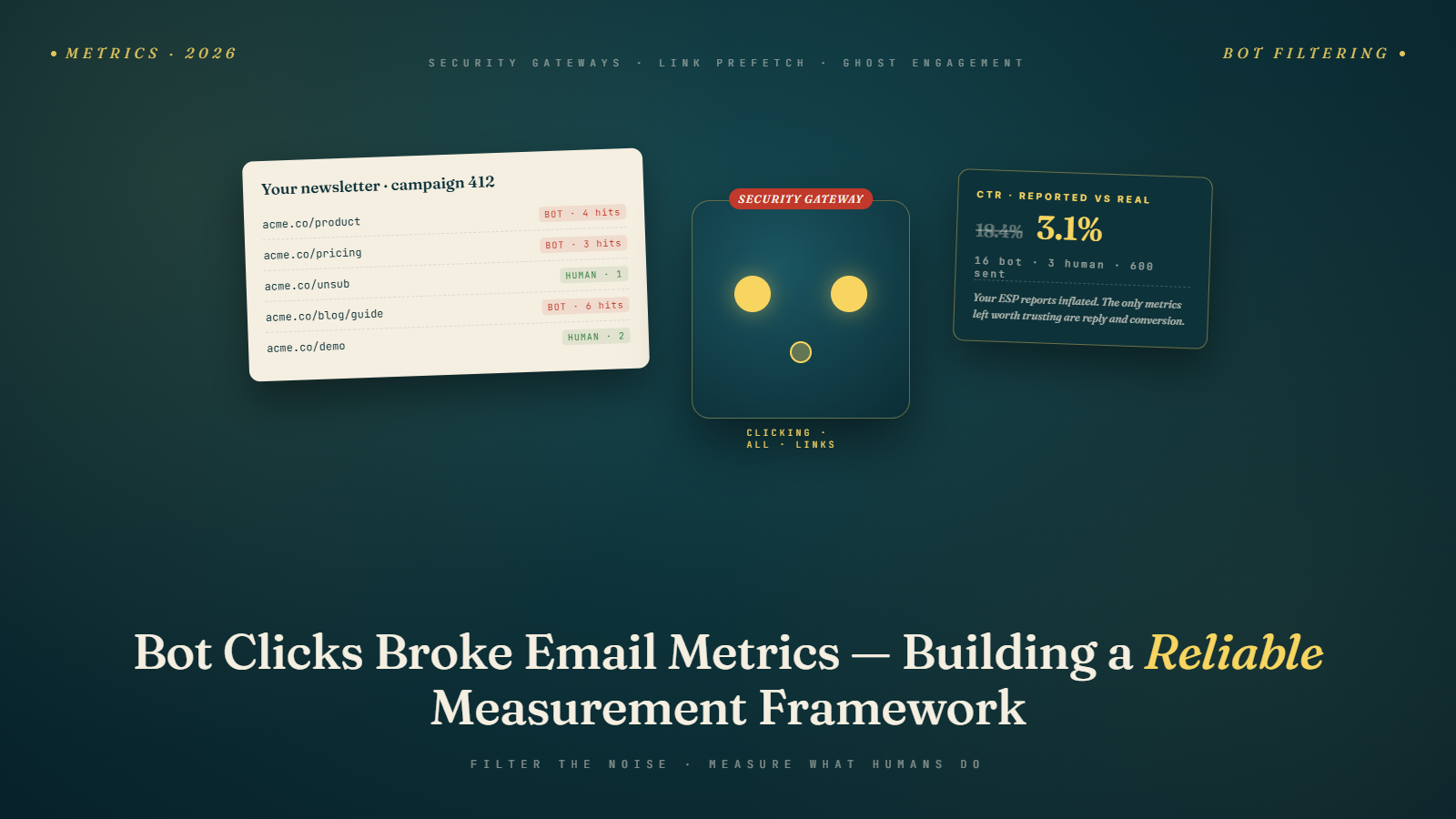
A client called me in a panic last spring. Their cold outreach campaign had a 34 percent click-through rate, which sounded incredible until we looked at the conversion data. Zero replies. Zero meetings booked. Zero forms filled. Every click was happening within three seconds of delivery, and most were hitting the unsubscribe link, the pricing page, and a "book a call" button all in the same session.
The clicks were real in the sense that an HTTP request hit their server. They were fake in the sense that no human was on the other end. Security gateways were scanning every link in every email, and their ESP was counting those scans as engagement. The automation they had built around "clicked pricing page" was firing for people who had never seen the email at all.
This is the measurement problem nobody wanted to talk about for five years, and it has gotten dramatically worse since enterprise security tools became standard. If you run email programs in 2026 and you still treat raw click-through rate as a primary metric, you are making decisions on a number that is roughly 30 to 60 percent noise.
Why the noise got louder
Security email gateways have existed for over a decade. Proofpoint, Mimecast, Barracuda, and Cisco IronPort have been scanning inbound links since the late 2000s. What changed is reach and aggressiveness.
Microsoft Defender for Office 365, now deployed on roughly 85 percent of enterprise Microsoft 365 tenants, runs something called Safe Links. Safe Links rewrites every URL in every email to route through a Microsoft scanner. When the user clicks, Microsoft checks the destination in real time. But Microsoft also does something else: it scans many links proactively at delivery, not just at click time, to warm its threat database.
Google Workspace added similar behavior in 2024 with enhanced URL scanning, though Google tends to scan more selectively than Microsoft. Proofpoint's Targeted Attack Protection rewrites all links and fetches them with varying cadence. Mimecast Attachment Protect plus URL Protect does the same for many B2B senders.
The cumulative effect is that a cold email sent to 1,000 enterprise recipients can generate 300 to 700 automated link fetches before a single human reads the message. If your ESP is not filtering those out, your click data is compromised before the campaign has even reached working inboxes.
What a bot click actually looks like
Bot clicks have patterns. Once you know what to look for, they stand out in event logs.
The first pattern is time-since-delivery. Human clicks cluster in the first 30 minutes in waves, with a long tail over hours and days. Security scanner clicks cluster in the first 60 seconds, often in the first 5 seconds. If you see a click logged 1.2 seconds after delivery, that is not a human opening their laptop, reading, and clicking. That is a gateway.
The second pattern is link coverage. A human clicks one or two links in an email. A scanner clicks all of them. If a single session in your logs shows clicks on the main CTA, the footer unsubscribe link, the preference center link, and a privacy policy link, within the same minute, that is one bot.
The third pattern is IP origin. Microsoft Safe Links clicks originate from Microsoft data center IP ranges, which are public. Proofpoint scanners come from Proofpoint-owned ranges. A click coming from AS8075 (Microsoft), AS22843 (Proofpoint), or AS26513 (Barracuda) is almost certainly automated.
The fourth pattern is user agent. Many scanners identify themselves in the user-agent string, though some spoof browsers. A user agent of "Mozilla/5.0 (compatible; ProofPoint URLDefense)" is obviously a bot. A user agent that perfectly matches Chrome on Windows but comes from a Microsoft IP at 2am local time is the same bot pretending not to be one.
The fifth pattern is repeat fetches. Some scanners fetch the same URL every few hours for 24 to 72 hours after delivery to check if the destination changed. If your logs show the same IP hitting the same link from the same email five times over two days, that is a polling scanner, not a curious reader.
Which ESPs actually filter bot clicks, and how well
I have spent more time than I would like testing ESP bot filtering. Here is what I have found in 2026.
HubSpot filters known security gateway IPs by default and labels them in the engagement log. Their filter catches roughly 80 percent of enterprise scanner traffic based on my tests across three client accounts. It misses newer or regional scanners. You can view filtered events in the contact timeline, which is useful for debugging.
Klaviyo added bot-click detection in late 2024 and it has improved steadily. Their detection is now based on a combination of IP range matching, click velocity, and behavioral patterns. In my testing on ecommerce sends, Klaviyo excludes about 70 percent of bot clicks from reported metrics. Raw event data is still available via their API if you want to audit.
Mailchimp has bot detection but it is less aggressive. They lean toward counting ambiguous clicks rather than filtering them out, which means their reported CTR is usually inflated compared to HubSpot for the same list.
Iterable is strong here. Their machine learning based filter, which they rolled out in 2025, catches closer to 90 percent of scanner traffic in my tests. They also let you exclude bot clicks from journey triggers, which solves the automation-firing problem directly.
Customer.io gives you raw event data and lets you write your own filter logic. This is the right approach for technical teams but useless for marketers who just want a dashboard.
SendGrid and Postmark, both more transactional-focused, have weaker filtering. SendGrid's marketing campaigns product does some filtering but it is not as sharp as the dedicated marketing platforms.
Outreach, Salesloft, and Apollo (sales engagement platforms) all have bot filtering for cold outreach specifically. Because cold email hits corporate inboxes heavily, these platforms have had to build strong detection. Outreach's "Smart Clicks" feature filters about 85 percent of gateway traffic from reported clicks.
The takeaway is uneven. Your reported CTR depends heavily on which platform you use, and two platforms looking at the same campaign can report CTRs that differ by 20 points.
Why automations are the bigger disaster
Inflated metrics are annoying. Broken automations are expensive.
When your ESP fires an automation based on "clicked pricing page," and a security gateway clicks that link at 1.4 seconds post-delivery, the automation fires. The lead moves into your "high intent" sequence. A sales rep gets an alert. They reach out. The prospect has no idea what they are talking about because they never opened the email.
This happens more than most teams realize. I audited a B2B SaaS pipeline last fall and found that 28 percent of "qualified leads" from their email program had triggered entirely from bot clicks. Their sales team had been chasing ghosts for months, and their conversion data on those leads was predictably abysmal. The fix was not subtle. We rewrote every click-based automation to require either a reply or a form fill as the actual trigger, and the "click" became a soft supporting signal at most.
Braze, Klaviyo, Iterable, and HubSpot all let you set journey triggers that exclude bot clicks. Most teams have not flipped that switch because it is buried in settings, and the default is usually "include all clicks." Check your journey configuration this week.
Reply rates are the signal that still works
Here is a measurement claim that will upset some people: reply rate is the single most reliable engagement metric in email in 2026. Not click-through rate. Not open rate, which we discussed in the death of the open rate era. Reply rate.
The reason is boring. Security gateways do not reply to emails. Auto-responders reply to emails, but they are identifiable by pattern and easy to filter. A genuine human reply is almost impossible to fake at scale, and when you get one, you know a person read your message.
Reply rates are also what Google and Microsoft increasingly use as a reputation signal, because they face the same bot-click problem you do. A domain that generates replies is, by definition, sending messages people engage with. A domain that generates only clicks might just be hitting a lot of security gateways.
For cold email specifically, our guide on cold email metrics to track walks through the reply-focused measurement stack. The same principle applies to warm email: if you are running a re-engagement campaign and measuring success by click rate alone, you are measuring security gateways.
Building a reliable measurement framework
Here is the framework I use with clients, ordered from most reliable to least.
Conversions first. Whatever the actual goal is (purchase, signup, demo booked, content downloaded), measure that. Attribution is messy, but a real conversion is a real conversion, and no security gateway is buying your product.
Reply rate second. Track genuine replies, not auto-responders, and track the reply rate against sends not against opens. Target 1 to 3 percent for cold email, 0.3 to 1 percent for warm marketing, 0.5 to 2 percent for transactional.
Unique clicks with bot filtering third. Report unique clicks per recipient rather than total clicks, and make sure your ESP is filtering known bots. Pair this with the next metric.
Clicks followed by another action fourth. Someone who clicks and then fills a form, visits three pages, or starts a session is a human. Someone who clicks and never appears again is probably a bot. Most analytics tools can segment this.
Time-to-click distribution fifth. Pull the histogram of click delay after delivery. If most of your clicks happen in the first 10 seconds, you are measuring bots. A healthy human click distribution peaks somewhere between 5 minutes and 4 hours post-delivery.
Opens last. Opens have been unreliable for years due to image prefetching by MPP (Apple Mail Privacy Protection) and now Gmail's auto-opens. Treat opens as a directional signal at list scale, not as an individual engagement metric. Our guide on troubleshooting low open rates still applies for comparing list-level trends, but individual open events are noise.
UTM parameters done right
UTM parameters do not stop bots. A gateway will happily follow a URL with UTMs attached. But UTMs let you separate gateway traffic from human traffic downstream in your analytics.
Here is the pattern that works. Append a unique identifier per recipient (not per email) to every link. When a click comes in, match it against your sending log. If the same identifier shows up clicking from two different IP ranges within two minutes, and one is a known data center range, you know the data center one is the bot.
Most ESPs support merge-field UTM content. Use utm_content with the recipient's hashed email or a send-specific ID. Do not put the raw email address in the URL, because that creates a privacy problem and leaks into referrer headers.
In your analytics platform, create a segment that excludes traffic from known gateway IP ranges. Keep this segment updated. Microsoft publishes their Safe Links IP ranges, Proofpoint publishes theirs, and there are community-maintained lists on GitHub for the rest. A 20-minute setup saves you months of confusion.
The contrarian read
The part of this that annoys me most is how much the industry still optimizes creative around inflated metrics. A/B testing subject lines based on click-through rate, when half your click-through rate is bots, is worse than not testing at all. You are finding the subject line that happens to go to inboxes with more aggressive security scanning, not the subject line that earns more human attention.
The same goes for "click heatmaps" on email, which some vendors sell as an engagement tool. If your click data is noisy, the heatmap is telling you where the security gateway clicked, which is usually the first and last link. That is not insight.
My position: rebuild your testing framework around replies, conversions, and unsubscribes. Subject line tests should measure reply rate for cold email and conversion rate for marketing. Content tests should measure time-on-page or multi-step conversion. Creative tests should measure whatever downstream action you actually want.
This is slower because the sample sizes needed are larger and the signals are noisier at small scale. It is also correct. The teams I know who made this shift in 2024 and 2025 are the ones consistently growing pipeline from email today.
The open-rate interaction nobody expected
Bot clicks and auto-opens feed each other in a way most analysts miss. When a security gateway fetches a URL, it often also fetches the tracking pixel along the way, because the gateway loads the whole email content during inspection. That means a single scan can trigger both a click event and an open event, making the recipient look doubly engaged.
For a cold email send of 2,000 messages to corporate inboxes, I have logged cases where 600 opens and 200 clicks appeared within 90 seconds of delivery. The ESP showed a 30 percent open rate and 10 percent CTR within the first two minutes. By hour two, the curves barely moved. The first 90 seconds were almost entirely gateways, and the next few hours were almost entirely humans. The cumulative number looked excellent. The actual human engagement was closer to 8 percent open and 1.5 percent click, which is normal for cold outreach.
This double-counting effect also breaks day-over-day comparisons. If your Monday campaign went mostly to small business inboxes without gateway scanning, and your Tuesday campaign went mostly to enterprise inboxes with gateway scanning, Tuesday will look dramatically better in raw metrics even if Tuesday actually drove fewer real conversations. The difference is gateway density, not creative.
What clean data costs you politically
Here is the uncomfortable part. When you clean your click and open metrics of bot traffic, your numbers go down. A campaign that reported 18 percent CTR now reports 6 percent. A benchmark that looked industry-beating now looks mid-pack. For teams whose compensation or reporting cadence is tied to those inflated numbers, this feels like losing ground.
The senior marketers I know who have made the switch handle this by reframing the reporting. They present both the old and new numbers for one or two quarters with a clear explanation of what changed. They anchor executive conversations on conversions and reply rates, which were never inflated. They stop running A/B tests that use CTR as the primary outcome.
The political work is harder than the technical work. Most of my implementation projects spend three weeks on dashboards and nine weeks on stakeholder conversations about why the dashboards dropped.
What to do this week
Pull your click event log from the last 30 days. Sort by time-since-delivery. Count clicks under 10 seconds. That number, divided by your total click count, is roughly your bot click contamination rate. If it is over 20 percent, your current metrics are misleading you.
Then pull your automation triggers. For any journey triggered by a click, add a secondary filter: either "click from non-data-center IP" or "click followed by a page view or form submission within 10 minutes." One or the other is usually enough.
Finally, set a reply-rate baseline for every campaign type you run. If you do not know what a healthy reply rate looks like for your list, you cannot tell when you have a problem. Most teams are surprised to find their cold email reply rates are fine and their click rates were lying about their creative being better than it is.