
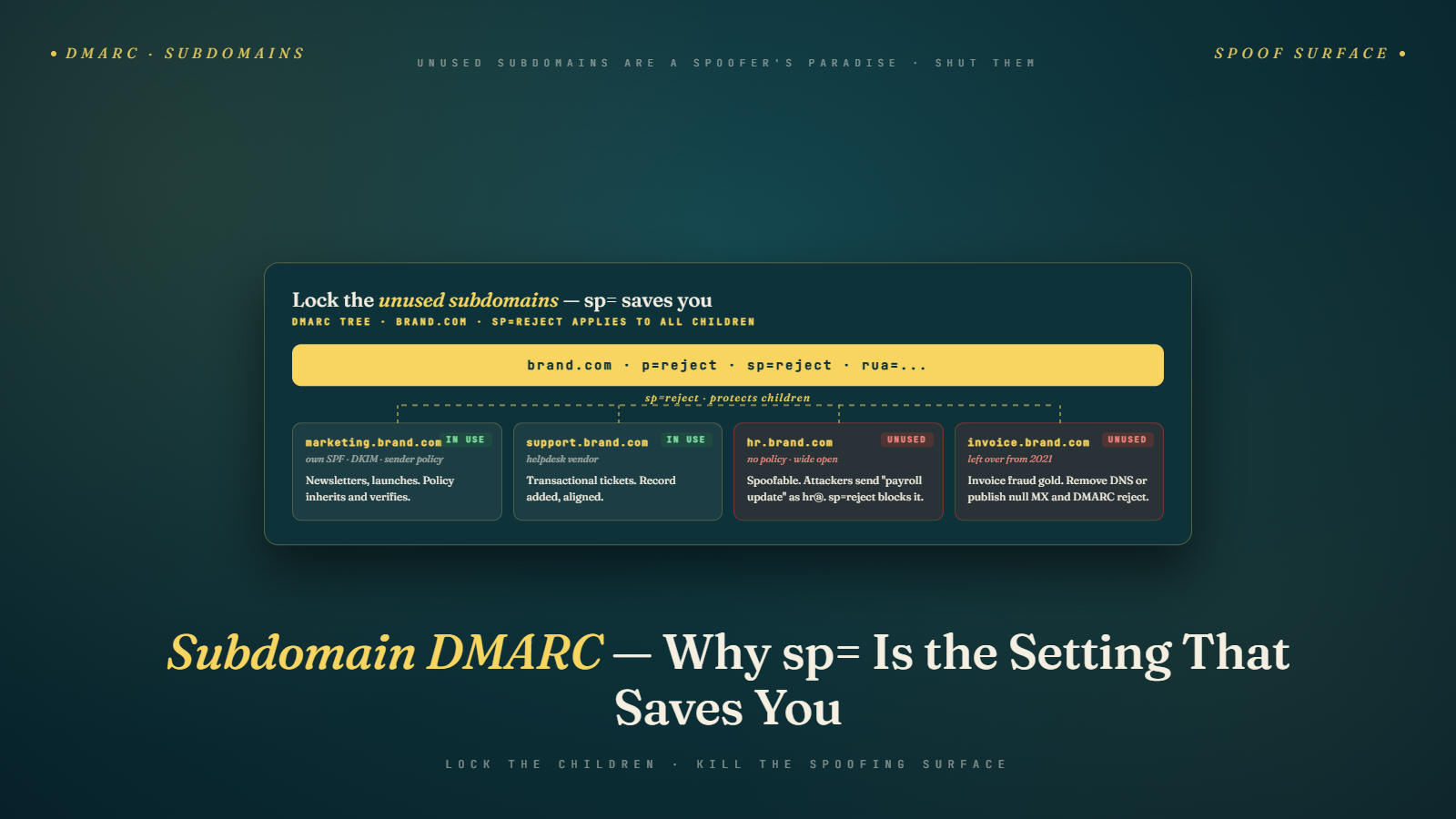
A founder I know runs a B2B analytics company with about 90 employees. In November 2025, his sales team started getting bounce-back emails from people asking why they received phishing attempts from "billing@invoice.hiscompany.com". The subdomain did not exist in any of his DNS records. It had never been used for email. And yet spammers were sending thousands of phishing messages from it, and receiving mail servers were accepting them as authentic.
His root domain had a DMARC policy at p=reject. He assumed that protected everything. It did not. Attackers had found an unused subdomain, spun up their own DNS and SPF record for it using a compromised hosting account, and were sending phishing mail that technically passed authentication because no DMARC policy told receivers to reject messages from that subdomain.
This is the subdomain DMARC gap, and it affects almost every company I audit.
Why a DMARC Record on Your Root Domain Does Not Auto-Protect Subdomains
DMARC policies have two separate tags that govern how receiving mail servers treat messages: the p= tag covers the organizational domain (yourcompany.com), and the sp= tag covers subdomains (anything.yourcompany.com). If you only set p= and omit sp=, DMARC falls back to applying your p= policy to subdomains. Sounds like it solves the problem, right?
Not quite.
The real issue is that attackers do not need your DMARC record to cover them. They just need a subdomain that resolves in DNS and has either no DMARC record of its own or a permissive record they can work around. If someone sets up a DNS entry for billing.yourcompany.com that you never configured, and that subdomain has no DMARC record attached to it, receiving servers fall back to your organizational DMARC policy, which is good. But if the attacker controls the subdomain's DNS (through a compromised registrar account, a cloud service that lets anyone register subdomains, or a stale provider that still serves DNS for the subdomain), they can publish their own SPF, DKIM, and even DMARC records that pass authentication.
Your p=reject on the root domain protects the root domain. It does not prevent an attacker from using your brand on a subdomain whose authentication they control.
What Subdomain DMARC Actually Does (Short Version)
The sp= tag in your DMARC record specifies the policy that receivers should apply to messages sent from any subdomain of your organizational domain. If you publish v=DMARC1; p=reject; sp=reject; rua=mailto:reports@yourcompany.com, you are telling receivers to reject messages from both yourcompany.com and any subdomain unless those messages pass DMARC alignment. Without sp=, receivers default to applying your p= policy to subdomains, which sounds equivalent but is not quite how all receivers behave in practice.
That answer is 78 words and more or less covers the mechanism. The harder question is what an attacker can still do even with sp=reject in place, and what you have to do beyond publishing the record.
The Subdomains Most Senders Forget They Own
Pull up your DNS management console and look at every A, CNAME, MX, and TXT record you have. Most companies I audit have more subdomains than they think. The common forgotten ones:
Marketing subdomains from old ESP configurations. Senders set up email.yourcompany.com or marketing.yourcompany.com when they moved to a new ESP in 2019 and never removed it when they switched providers in 2022. The DNS entries are still there. SPF and DKIM may still point to an ESP that no longer sends for you.
Transactional subdomains for third-party services. mail.yourcompany.com pointing to Mandrill, or notifications.yourcompany.com pointing to Postmark. If you stopped using those services and did not clean up DNS, the subdomains are still live.
Development and staging subdomains. dev.yourcompany.com, staging.yourcompany.com, test.yourcompany.com. These are common targets because they often have lax authentication or none at all.
Regional subdomains. uk.yourcompany.com, eu.yourcompany.com. International expansion often creates these and they persist long after the regional team that requested them moves on.
Vendor-provisioned subdomains. Your CRM vendor created track.yourcompany.com for click tracking five years ago, your event management tool created events.yourcompany.com, your referral program provider created refer.yourcompany.com. Each of these is a potential vector if the vendor relationship changed and you never reclaimed the subdomain.
Every one of these is an email sending surface that attackers can probe. If any of them lacks a proper DMARC policy, receivers may still accept mail from that subdomain, and your organizational reputation can suffer when complaint rates from the spoofed subdomain get attributed back to your organization.
Understanding SPF, DKIM, and DMARC fundamentals is the baseline, but subdomain-level auditing is the part most guides skip.
A Real Attack Pattern: The Invoice Fraud Variant
Let me give you a concrete sequence because this is how I explain it to clients who think subdomain DMARC is a theoretical concern.
A small finance firm I worked with in Q4 2025 had a standard DMARC record on their organizational domain. p=quarantine, no sp= tag, a reporting address that nobody checked. Their DNS was with a major registrar. They had about 30 employees, most on a shared IT setup managed part-time.
An attacker identified the firm as a target through LinkedIn research. They found that the firm used a subdomain called portal.firmname.com for client logins. They discovered that the firm had also at some point configured invoices.firmname.com to route mail through an old billing system they stopped using in 2023. The DNS entries for invoices.firmname.com still existed, but the MX record pointed to a third-party hosting provider whose service had been cancelled.
The attacker signed up for a new account with the same hosting provider, claimed the defunct subdomain through their provisioning flow, and set up their own mail server on it. They published their own SPF record for the subdomain, authorizing their own sending IPs. DKIM was configured the same way. Because the firm had no sp= policy and no DMARC record specifically on invoices.firmname.com, and because the attacker's setup produced SPF-aligned and DKIM-aligned messages from that subdomain, the phishing messages passed DMARC evaluation at most major receivers.
The firm's clients received "updated invoice" emails with wire transfer details routed to attacker-controlled accounts. Three clients paid before anyone noticed the pattern. Recovery took seven weeks and involved direct legal coordination with the original billing provider. The remediation: they audited every subdomain in their DNS, removed stale records, and published specific DMARC records on every active subdomain along with sp=reject on the root.
Auditing Your Own Subdomain Attack Surface
You can do a reasonable audit in about an hour if you have DNS access. Export your full DNS zone file. Every domain has one. Some registrars make this easy (Cloudflare, AWS Route 53), some less so (GoDaddy is often a mess), but you can always get it.
Search for every A, AAAA, CNAME, and MX record. Each of those represents a subdomain that resolves. Then query each one for TXT records. You are looking specifically for SPF records (v=spf1) and DMARC records (_dmarc.subdomain.yourcompany.com). Any subdomain that has an MX record or A/CNAME but lacks an explicit DMARC TXT record is relying on your organizational DMARC policy, which is fine if your DMARC has sp=reject set, but risky if it does not.
Tools that speed this up: MXToolbox, dmarcian's domain checker, EasyDMARC, and commercial platforms like Valimail. For small programs, a bash script with dig calls over each subdomain works. What you want is a table of every subdomain, its current SPF record if any, its current DKIM selectors if you can find them, and its DMARC policy (direct or inherited).
Expect surprises. In an audit I did for a retail client in January 2026, they had 47 distinct subdomains in DNS. Thirty-one of them had no email-related records at all and posed minimal risk. Eight had SPF records pointing to vendors they no longer used. Three had DMARC records at p=none from an old deployment. Five had active email configurations they did not remember setting up, including one that was still sending transactional password resets from a prototype system a former developer had configured.
The Right DMARC Configuration for Your Subdomain Surface
The short answer: treat each active sending subdomain as its own domain for authentication purposes, and publish a restrictive sp= policy on the root to catch everything else.
On your organizational domain, publish v=DMARC1; p=reject; sp=reject; pct=100; rua=mailto:aggregate@yourcompany.com; ruf=mailto:forensic@yourcompany.com. That rejects both organizational-domain and subdomain mail that fails DMARC.
On each subdomain you actually use for sending, publish a specific DMARC record at _dmarc.subdomain.yourcompany.com. The reason to do this rather than relying on sp= is threefold. First, specific records override inherited ones, so if a subdomain has different auth requirements (for example, your transactional subdomain uses one ESP while your marketing subdomain uses another), you can align policies correctly at each level. Second, specific records give you per-subdomain reporting, which is much more useful for troubleshooting than a single aggregate stream for all subdomains. Third, some receivers handle sp= inheritance inconsistently, and explicit records eliminate that variance.
On subdomains you do not use but cannot remove (because they are attached to systems you still need for non-email purposes), the safest approach is publishing a restrictive SPF record (v=spf1 -all) and a DMARC record with p=reject. That tells receivers: no one is authorized to send mail from this subdomain, ever. Attackers trying to abuse it will find their messages fail authentication and get rejected.
A Numbered Subdomain Audit You Can Run Tomorrow
- Export your DNS zone file or use your registrar's console to list every subdomain.
- For each subdomain with an MX record or A/CNAME pointing to a mail-capable service, note the subdomain name and its current authentication records (SPF, DKIM, DMARC).
- Identify subdomains you no longer use. Remove their DNS records entirely if you can, or lock them down with SPF -all and DMARC p=reject if you cannot remove them.
- For every active sending subdomain, publish or update a specific DMARC record at _dmarc.subdomain.yourcompany.com with p=reject and a reporting address you actively monitor.
- On your root domain DMARC, ensure sp=reject is present alongside p=reject.
- Wait two weeks, then check your DMARC aggregate reports. Any subdomain showing sending activity you do not recognize is either a shadow IT discovery or an active abuse attempt, both of which need action.
The cost of this audit is maybe two hours of work per mid-size domain. The cost of not doing it is reputation damage that you may not be able to attribute directly when it happens, which is the worst kind of damage because you cannot even diagnose why your organizational deliverability suddenly dropped.
Why This Matters More in 2026 Than It Did Two Years Ago
Three things changed that make subdomain DMARC a sharper issue now.
First, Google and Microsoft both tightened their DMARC enforcement for bulk senders starting in February 2024 and continuing through 2025. Complaint rates and authentication failures now feed directly into sender reputation scoring at a level of granularity that did not exist before. An attacker sending phishing mail from your subdomain, even if a small portion, can pollute your reputation profile because receivers see the activity tied to your organizational domain.
Second, phishing toolkits have commoditized subdomain takeover. What used to require custom infrastructure and technical skill now happens through point-and-click services sold on criminal marketplaces. The attack pattern I described above is not bespoke. It is a template.
Third, the signals that AI-driven filtering like Gemini uses to evaluate senders are increasingly cross-referenced. Gmail's November 2025 enforcement shift moved toward hard rejections of senders showing multiple negative signals, and subdomain abuse is one of those signals. A sender whose organizational reputation is clean but whose subdomains are being spoofed can find their entire program under-placed because the AI has detected pattern-level concerns.
What a Good Subdomain DMARC Posture Looks Like in Practice
The companies I see doing this well have four habits. They audit DNS quarterly. They centralize subdomain provisioning through a single team or workflow, so nobody can spin up marketing.yourcompany.com without triggering an authentication review. They use a DMARC reporting platform (EasyDMARC, dmarcian, Valimail, or even a homegrown parser) to actually read the aggregate reports coming back. And they treat subdomain cleanup as part of vendor offboarding when they stop using a third-party service.
The ones who do this badly discover subdomain issues the way my finance-firm client did, through customer complaints about phishing messages they did not send.
If you also send large volumes of email and want to pair subdomain hygiene with list hygiene, running your active subscriber list through email verification closes the other half of the deliverability loop. Bulk Mail Verifier handles the list-side work while your DMARC work closes the authentication-side gap. Both matter, and neither substitutes for the other.
The Thing to Do Before You Close This Tab
Open your DNS management console. Count the subdomains. If the number surprises you, that is your signal. Pick one subdomain you do not recognize and look up its current authentication records. If it has none, or if the records point to a service you no longer use, you have found your first target. Fix that one before lunch. Then schedule time on your calendar next week to do the full audit.
The companies whose subdomains get weaponized almost always knew they had cleanup work to do. They just kept putting it off until someone else used the gap first.
Pair the subdomain audit with list hygiene on your active sending domains too. A subdomain program that is authentication-clean but sends to a list full of stale addresses still produces bounce and complaint patterns that hurt your reputation, which makes it harder to tell whether a subsequent reputation dip is an authentication issue or a list quality issue. Running your active subscriber list through verification catches the list-side problems so the authentication-side diagnostics stay clean. The two pieces of work are complementary: authentication locks the doors, verification cleans the rooms. Both are part of a deliverability posture that holds up under the tightening enforcement environment that Gmail, Microsoft, and Yahoo have all signaled is the direction through 2026 and beyond.